White Edges On Shorelines

By Pooka, Aug 19, 2012 in Help!!

Posted August 19, 2012

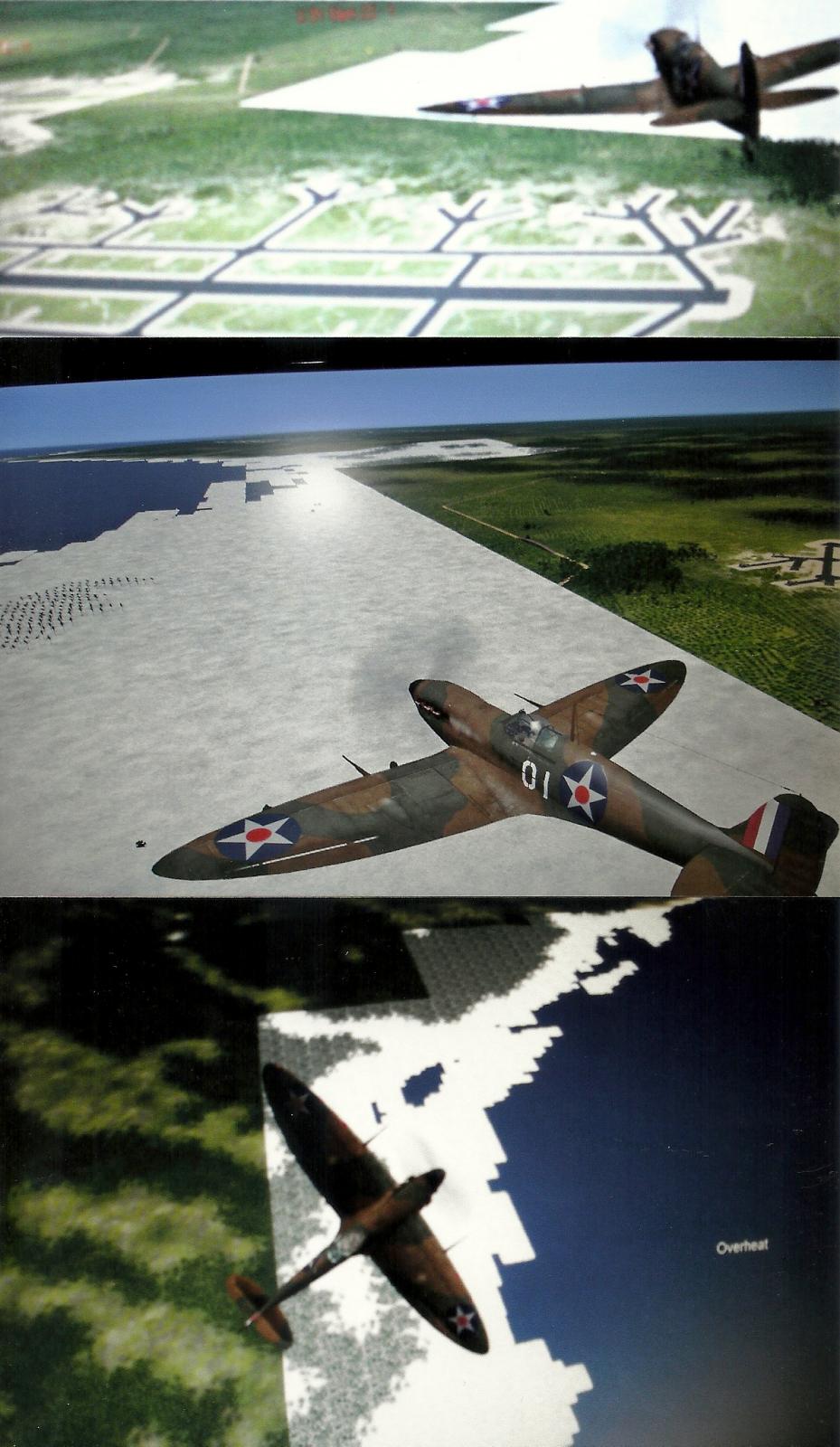
A friend who just downloaded HSFX-6 has a problem with video in his game. From an altitude the shorelines have white block like edges. I've seen pictures of this and know there is a cure, but I can't remember what it is.

We've tried some changes in Conf, games settings and the Catalysrt Control Center, for a while I thought it may be fixed by shutting down the Catalyst AI.

Some old mate must recall the fix, Thanks..

pheart-1-1.gifCAR-1-1.gifpuc-1-1.gifnmu-1-1.gifusmcgc-1-1.gifnatdef-1-1.gifafem-1-1.gifvser-1-1.gifusmcrec-1-1.gifgcuc-v-1-1.gifvcm-1-1.gif
gallery_440_79_23940.png

Posted August 22, 2012

Big thread but have a look here Pooka, might be something in there for you.http://www.sas1946.com/main/index.php/topic,16872.msg0.html#new

image.png

siggy.jpg

Posted August 22, 2012

There is a lot of stuff to look at for problems like this. Has he tried just running stock IL2? It may not be HSFX related.

Posted August 27, 2012

The party with the problem sent me some photos, I'll try and DL and take this along with his Dxdiag over to Ubi Forums.

He's running an ATI GPU (Radeon HD6950)post-291-0-39247500-1346096604_thumb.jpg

pheart-1-1.gifCAR-1-1.gifpuc-1-1.gifnmu-1-1.gifusmcgc-1-1.gifnatdef-1-1.gifafem-1-1.gifvser-1-1.gifusmcrec-1-1.gifgcuc-v-1-1.gifvcm-1-1.gif
gallery_440_79_23940.png

Posted August 27, 2012

Change catalyst AI setting?

DD-Signature.jpg

Posted August 27, 2012

That is what I recalled to fix the problem, but when I went where you make the change, there isn't a box to uncheck.

Only a bar to slide from Preformance to Quality. Tried oppisite from what it was set to, no improvement.

pheart-1-1.gifCAR-1-1.gifpuc-1-1.gifnmu-1-1.gifusmcgc-1-1.gifnatdef-1-1.gifafem-1-1.gifvser-1-1.gifusmcrec-1-1.gifgcuc-v-1-1.gifvcm-1-1.gif
gallery_440_79_23940.png

Posted August 27, 2012

What is the version of his ATI drivers? Are they current? That is weird that he doesn't have that Cat AI checkbox.

Posted September 17, 2012

this thread over at SAS might help you Pooka,

http://www.sas1946.com/main/index.php/topic,28538.0/topicseen.html

large.DD-Signature.jpg.345348946893195d2fb36046bbc90daa.jpg.0269149e41488d6f21ef7162130cde40.jpg

B-52 Electronic Warfare Officer (EWO) veteran Jack Donovan’s natural response, when he was introduced to the tactics and mission details. His exact reply was: “you want me to fly in the back of a little tiny fighter aircraft with a crazy fighter pilot who thinks he’s invincible, home in on a SAM site in North Vietnam, and shoot it before it shoots me, you gotta be shitting me!

Posted September 25, 2012

Thanks guys, we'll try drivers, it has to be the problem.

pheart-1-1.gifCAR-1-1.gifpuc-1-1.gifnmu-1-1.gifusmcgc-1-1.gifnatdef-1-1.gifafem-1-1.gifvser-1-1.gifusmcrec-1-1.gifgcuc-v-1-1.gifvcm-1-1.gif
gallery_440_79_23940.png

Posted September 26, 2012

~S~ Pooka M8,

It's almost certainly because he has those "Yankie" markings on the Spit !! LOL

Hope that helps :D

~S~ P.

P10002571.jpg JORibbonspeciality.gif

DDzsigMarch2012-1-1.jpg

DSC01396-1.jpggallery_440_79_39944.png

Posted October 11, 2012

Yep that was it, took off those stars and all is wonderful.

Ended up going back to scratch, started from the 1946 disc (407) added all the updates and everything looked fine on each Quick Mission Bldr we ran between updates. When we put in the HSFX Updater the white shorelines reappeared, but this time they were black. I'd dl a file from some forum, atigo.dll or something like that. Added it for the heck of it, Presto, no black shoreline, all is functioning as should be. I think its a file that is needed with his 6950 GPU.

The screen doesn't fill to the edges when the game starts up. Mine has the black border edges during set up, but when the game starts there gone and the sim is at full screen. His won't stretch to the sides, any ideas here....?

pheart-1-1.gifCAR-1-1.gifpuc-1-1.gifnmu-1-1.gifusmcgc-1-1.gifnatdef-1-1.gifafem-1-1.gifvser-1-1.gifusmcrec-1-1.gifgcuc-v-1-1.gifvcm-1-1.gif
gallery_440_79_23940.png

Posted October 11, 2012
His won't stretch to the sides, any ideas here....?
Sure, no worries, that's normal on a wide screen monitor....

DD-Signature.jpg

Sign in to reply.