
Barn, I would suggest just trying it the 'normal' way. It's fairly straight forward.. Install the game. Patch up to 4.11.1. Install mods. Run the built-in mod auto-updater.
Putting On The Goggles Again
By Barnaby, Oct 4, 2012 in IL-2 Sturmovik: 1946
One for FT I think. Chkmods is his pidgeon. Sit tight Barnaby, he'll be along..

Here are some instructions I wrote up for Skypup to do it the 'classic' way, as FT puts it.. You'll need (free) BitTorrent to download one big file instead of 8 smaller ones. And it will verify the files automatically.
Patch your game up to stock 4.11.1
Test game runs.
Download the HSFX 6 torrent here: http://dangerdogz.co...e__hl__ torrent
Install that into your game folder.
Download the patch here: http://dangerdogz.co...6-0-patch-1exe/
Install patch into your game folder.
Run the HSFX_Client_Updater.exe in the game folder.
That's it, now your ready to play.
Copy a shortcut for the il2fb.exe and jsgme.exe to your desktop.
run jsgme and enable the HSFX History mod. (move it to the right side). Also we usually enable at least the Expert mode mod. If the host is using this mod, then everone needs it. You will get a connection error saying 'different version' if they are using Expert mode, and you are not.
Run IL2!
More info is here: http://dangerdogz.co...e__hl__ torrent
Cheers Skypup!
Hm, autoupdate failed by the looks of it...
Delete Chkmods.exe, and rename Chkmodsnew to Chkmods.exe, then run that one.

Should that error happen again, could you grab a screenshot, and add it to a reply in here?
I'm very curious why it happens... it should not, ya know...


Hello and thanks all.
Fooltrottel, Trying your suggestion of Delete Chkmods.exe, and rename Chkmodsnew to Chkmods.exe, then run that one. still didn't work.
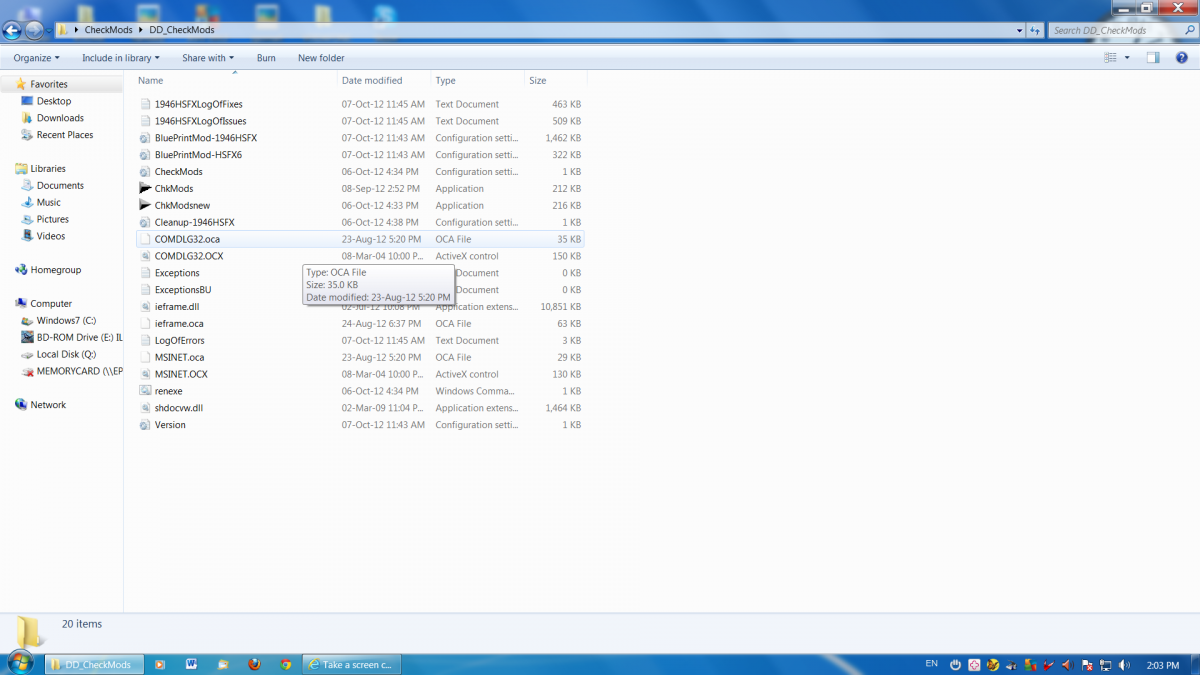
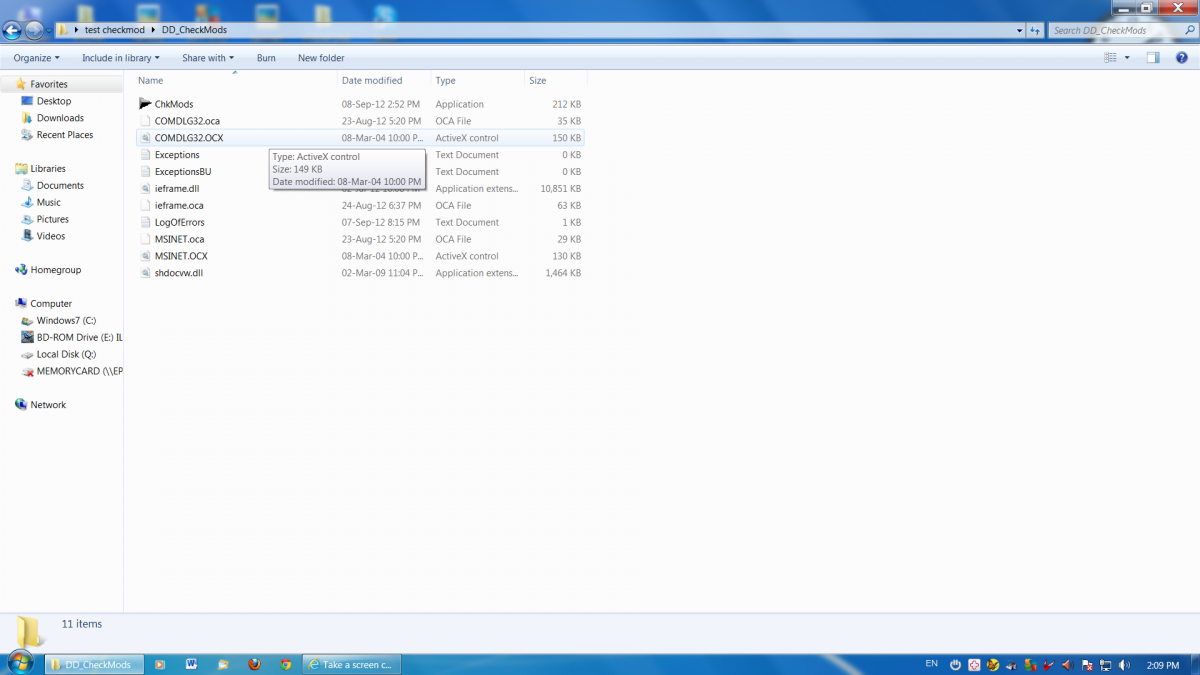
In my original unzip there was no .exe file to run I just ran the chekmods one, maybe the extensions are hidden but if you compare the 2 attached screeen shots showing "first unzip" and "after new mod" you can see the contents are quite different. Please note that I have tried to run the "chkmods" before the 2nd picture was taken incase that adds any files here. I also notice that there is an .exe in the new mod file named renexe, mmmmmnnnn just noticed that there is no dot in it.
Any comments?
KEEP THE RUBBER SIDE DOWN
on ts now if you want some help..,.

B-52 Electronic Warfare Officer (EWO) veteran Jack Donovan’s natural response, when he was introduced to the tactics and mission details. His exact reply was: “you want me to fly in the back of a little tiny fighter aircraft with a crazy fighter pilot who thinks he’s invincible, home in on a SAM site in North Vietnam, and shoot it before it shoots me, you gotta be shitting me!
You can run the 'renexe', it is a command procedure, will delete the old chkmods.exe, and rename chkmodsnew.exe to chkmods.exe, and then start chkmods.
What I'm really interested in, is a screenshot of the situation when the error occurs...
Here you go Fooltrottel
What I'm really interested in, is a screenshot of the situation when the error occurs...r
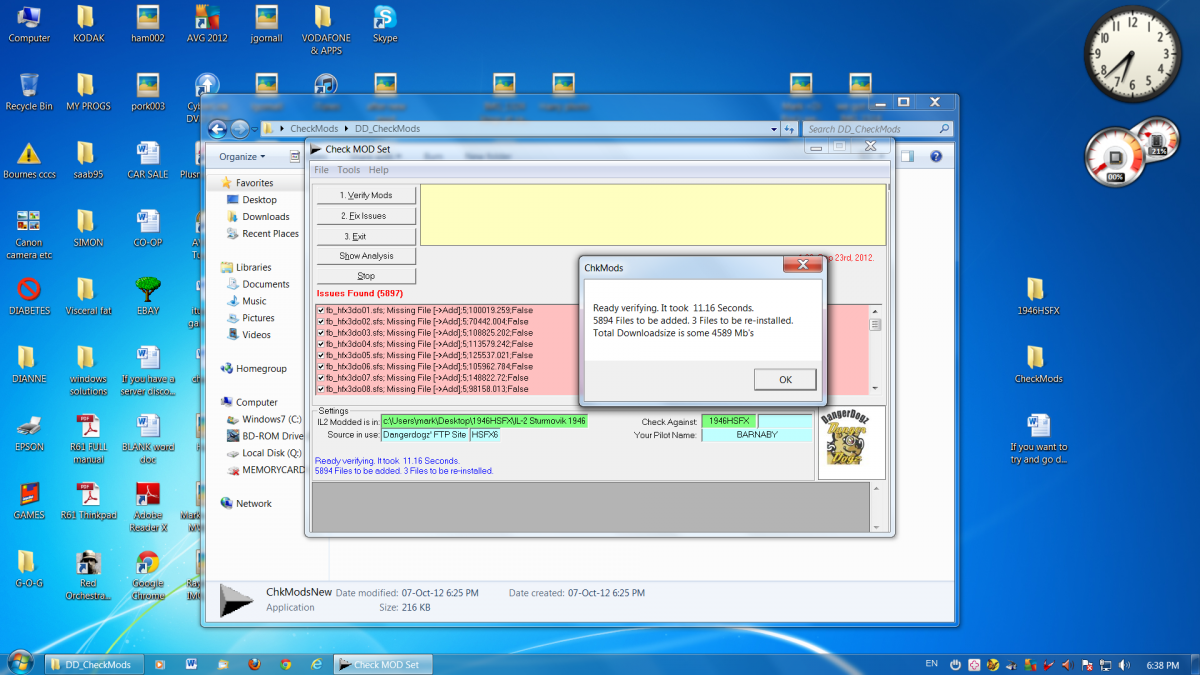
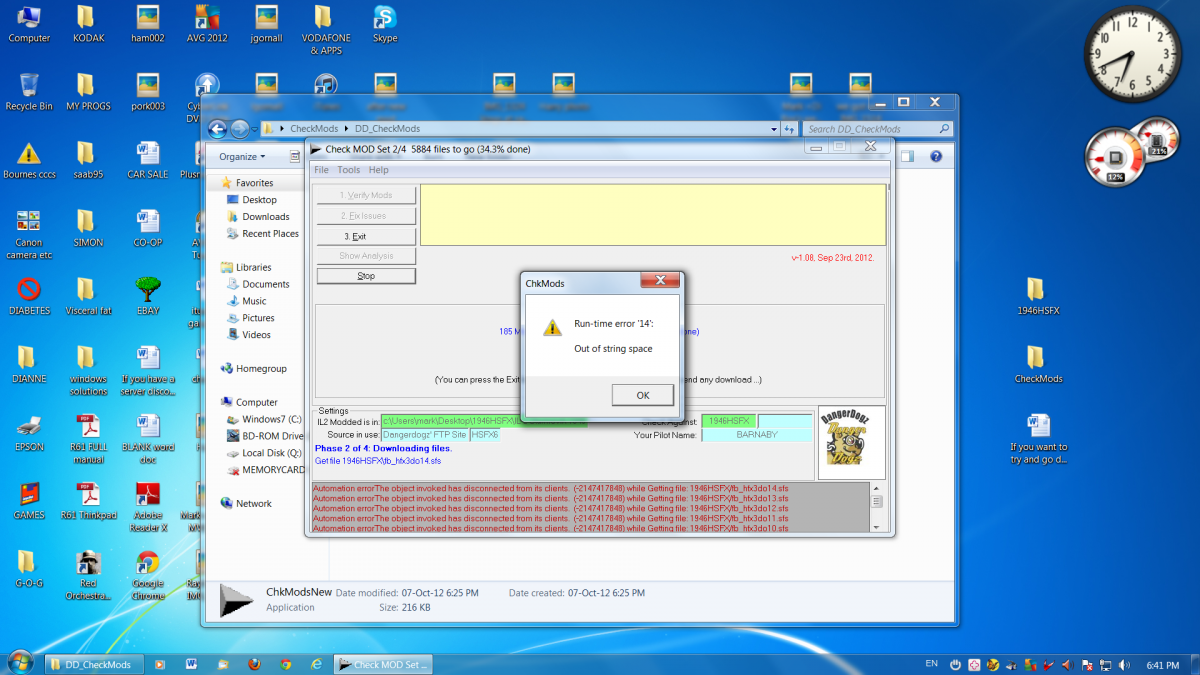
I deleted all and redid it but it still fails with a runtime error see attached files.
Does that give anyone any ideas or should I give up on this and do the classic but long winded install??
Thanks
KEEP THE RUBBER SIDE DOWN
Hi Barnaby, FT will be on comms shortly, so you can ask him over comms, will be much easier to sort out, or if you decide to go through the manual install, i can walk you through that, know HSFX installing very well, have helped many Dogz already.....
B-52 Electronic Warfare Officer (EWO) veteran Jack Donovan’s natural response, when he was introduced to the tactics and mission details. His exact reply was: “you want me to fly in the back of a little tiny fighter aircraft with a crazy fighter pilot who thinks he’s invincible, home in on a SAM site in North Vietnam, and shoot it before it shoots me, you gotta be shitting me!
Well, the error 14 is an overload on the number of error messages it can handle ...lol
The source of the other error (that causes error 14 in the end) is unclear to me...
Somehow, your system won't let ChkMods download the games files...
But, the weird thing is, for ChkMods to run properly, it needs to download files as well.. and as it appears to be running properly (it does recognize the correct number of missing files expected to bring a vanilla install up to HSFX6.)... it can download files just fine...
Stumped, for the moment.
I've tried it on my system, with the game in a folder on the desktop - like you have - and it appears to be running correctly here.
Besides AVG virusscanner, are you running any other software to protect your system?
Hy Again FT
I have AVG's Internet Security 2012. I also have the Avg Internet Security toolbar which does watch what I visit. I may have a banking protector on but I think that only watches my banking stuff, might be wrong on that? Apart from that I am with Plusnet and am running their Help Assistant but I haven't activated any virus stuff of theirs. I also run AVG Tune-up but that is dumb unless I ask it to do something.
I'll have another go later or tomorrow and if it fails again I try the long route which may turn out to be the short route. It will be a pity as the Checkmod would seem to be ideal.
Regards
JUST A THOUGHT I also had issues when joining these forums as I couldn't get the validation email as my virus stuff was saying the site was not the original site ie it was a hidden/masked server and not signed?
That could only have been through AVG detection and masking [hiding the true server identity] is a known scamming way to trick people into giving out there details thinking it's their bank or shop etc. I definately get a report saying it's not correctly assigned but this could have been a false positive. Anyway I still don't know how to overcome this apart from shutting down all my virus stuff which I'm wary of doing.
If I look in the AVG logs at the blocked files what will they say if that's what is happening, will I see anything listing DANGEDOGZ or CHECKMOD?
KEEP THE RUBBER SIDE DOWN
Some of your security software might be blocking stuff... hard to tell.
I can fully understand if you're not comfortable switching them off, and indeed, leave them
Log files may show that files are being blocked, but what I do not understand is that chkmods can and will download some files (autoupdate) but cannot download the game files... oh Well,..,.
You'll have to take the other route now, downloading the HSFX set and its patches.
It's doable...
Sorry this thing does not work for you... I'll make a note of the issue, maybe one day we can find the cause, and a fix!
Good Luck!
OK thanks FT I'll have a go tomorrow doing it the l o n g way so standby Fruitbat as I may come a knocking for you if I get stuck but hopefully not.
Thanks
KEEP THE RUBBER SIDE DOWN
Actually FT, there is a possible issue here which you might have overlooked - I see from your screenshots Barnaby that you are running the game out of the c:\users\desktop folder. I don't think that using this folder is a good idea for two reasons - one is because the files in this folder are cached into the memory at boot up, thereby increasing boot times and possibly hogging unnecessarily large quantities of the memory - I'm dredging this up from somewhere so I might be hazy on the details. Two is that this folder is a sort of 'system' folder (i.e. created for you by the windows installer) and I'm not sure the UAC doesn't interfere with it. Bottom line is, I think you need to move your game folder to somewhere else (c:\il-2 for example) before you do anything more. Once moved, you can try checkmods again or install the patches whichever suits.
Of course I might be talking utter rubbish...
Jabo
If you use my 'classic' instructions above, BitTorrent does a checksum on the downloads automatically, and the files have always worked the first time for me. And the download is 1 file (not 1 file broken into 6 parts to download). I know I'm preaching to the choir, but I don't get why you guys don't recommend the normal way that every other person usually installs this. Everybody on the SAS forums does it this way. (Ok, I'll shut up now). 
OK Jabo I'll try that first in the morning.
Regards
KEEP THE RUBBER SIDE DOWN
Nick, I've seen that use of the Desktop folder... and I've tried that on my system, to put both ChkMods and the game (vanilla 4.10.1m) in folders on the Desktop, then run ChkMods: No problem at all... so, not the cause of the issue here.
And, I'm with Snacko now, somehow ChkMods has an issue on your system that cannot be solved quickly, so better go the traditional route now!
(@Snacko, the traditional route may be 'better' as it is ....well... the traditional route... using ChkMods -if it works- is much less a hassle... it's does stuff automatically ..  .. )
@Barnaby: Although probably not the cause of the issue with chkmods, in the long run it's better and easier to move the folder ...
Hold on, I was testing this with UAC off... oopsie... will do some more testing...
Sign in to reply.