New Here And To Il-2

By OverDhill, Jan 17, 2013 in IL-2 Sturmovik: 1946

Posted January 17, 2013 · edited Jan 18, 2013 by OverDhill

Hey guys Fruitbat invited me to join your website. I am recently retired and have decided that FPS games were stale so I have ventured into flight sims. Actually I flew a couple back on my Amiga 2000 but that was a long time ago.

I have upgraded my main gaming rig to

Intel Core i7-3770K Quad-Core Processor 3.5 GHz

ASUS SABERTOOTH Z77 LGA 1155 Intel Z77

EVGA GeForce GTX 660 SUPERCLOCKED 2048MB

G.SKILL Sniper Series 8GB

Microsoft Windows 7 Professional 64-bit

I also have a second PC networked for Helios (my old game machine with a E6750 and 560TI card) with a Samsung ELO 24" touchscreen.

I have a Trackir 5 setup and it works great. Probably the main reason I decided to get back into Flight sims after seeing a video of it in action.

I am working on a Helios and UDP Speed skin right now while I wait for my new HOTAS (had to senf back the X-52Pro set do to a defect). I find having the controls on the touchscreen and at your fingertip makes the game easier to learn and use.

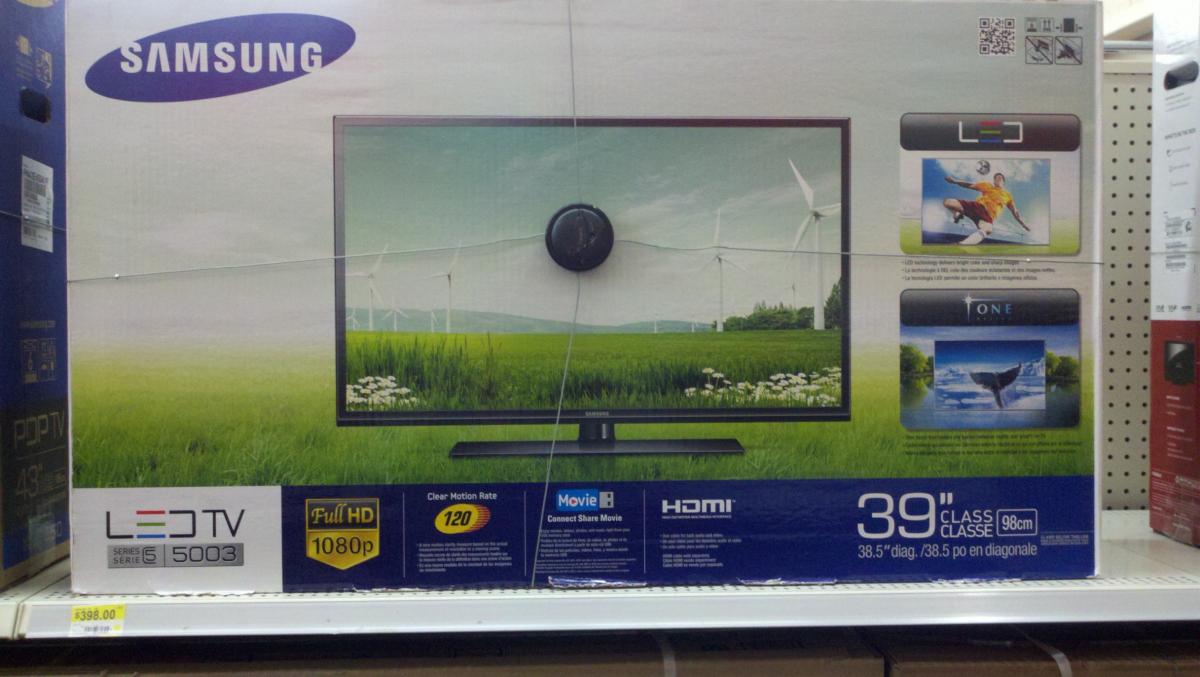
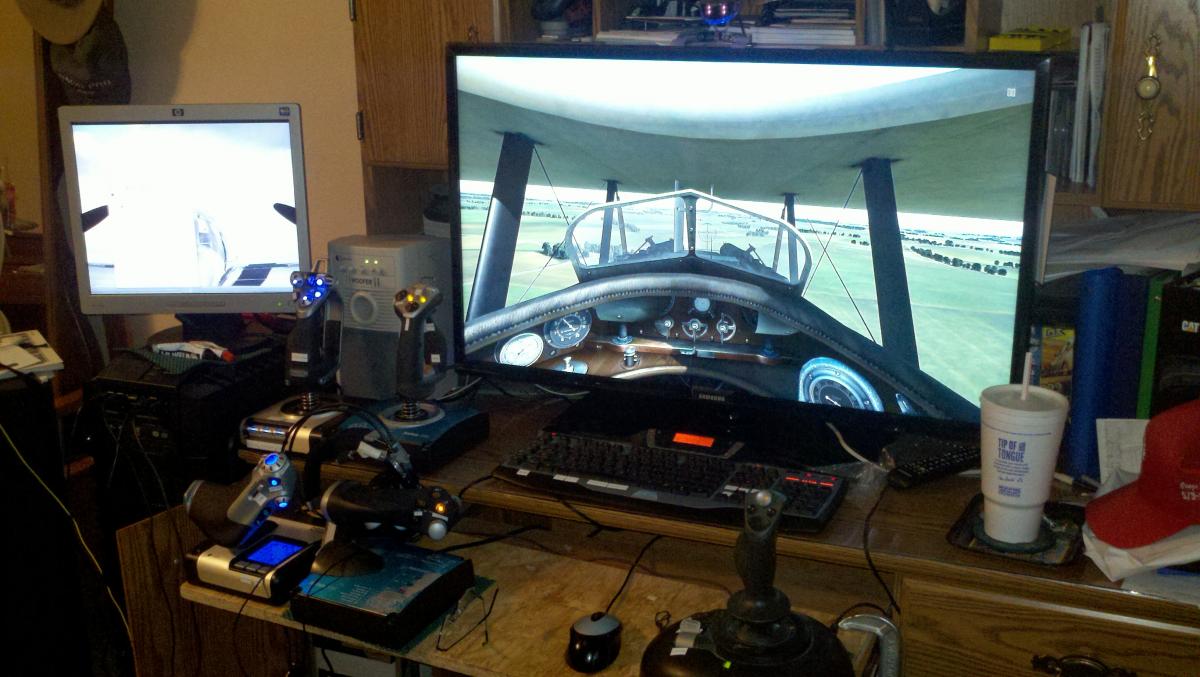
Last I am running the new system into a Samsung 39" HDTV (low latency model). So IL2 with some mods (mainly HSFX) looks pretty sweet. I used the PVC pipe method and built a dedicated virtual cockpit area to mount the touchscreen and HOTAS stand.

I don't plan on becoming a purist but rather just playing for fun. I want to lean how to fly better and to fight.

I did ask on a couple other boards which plane was suggested to start with and it was like I was bringing up religion... lol

Overall opinions seem to be the 109, Spitfire and the P40

When I get my HOTAS working again and configured I will jump in to them and see which one I take a liking to and then start practicing.

I thought you might like to see some of my work in progress so I will post a couple pictures.

One is of my cockpit (early stage) running Helios with the Falcon BMS screen I am working on

8310483841_bd8b63e866_b.jpg

Second one is my latest Helios/UDP Speed screen for IL-2

8390450746_668489b4de_b.jpg

I am sure I will be posting some questions soon

OverDhill

Posted January 17, 2013

Welcome aboard OverDhill!

Jabo

new sig copy.jpg

Posted January 17, 2013

Welcome !

There's only one plane one needs to master: The IL2.

The rest is just silly ...

(Oh, except maybe for the Swordfish)

DD-Signature.jpg

Posted January 17, 2013

The Swordfish is VERY silly ;)

image.png

siggy.jpg

Posted January 17, 2013

Welcome OverDhill!

Very nice setup. Are you using TouchBuddy on that touchscreen with your UDPSpeed by chance?

Snacko

Posted January 17, 2013

Ok guys... I decided to get a Saitek X-45 HOTAS set off Ebay. They arrived today and are in excellent condition. So far I don't seem to have the huge deadzone issue that I and other saw with the X-52 Pro. They will be great for now

I would like some recommendations as to how you have your HOTAS controls setup for IL-2

I have two eight way hats on the stick and a four way on the throttle. Also the mouse thingie with button on the throttle. Six buttons on the stick and two on the throttle. Also there is a AUX slider switch on the throttle. Last there is two rotary pots on the throttle and of coarse 3 mode settings. I prefer not to have to use the mode setting and try and figure out what is what. The touchscreen will handle a lot of the less common or needed functions.

So what functions do I need at my finger tip besided the obvious like fire.

OverDhill

Posted January 17, 2013

Sliders and rotaries: Trim: Elevator, Rudder, Aileron. Proppitch Radiator.

Main hat switch: use for changing FOV, like zoom, normal, wide ...

DD-Signature.jpg

Posted January 17, 2013

Welcome mate look forward to seeing you about. Salute!

Posted January 17, 2013 · edited Jan 17, 2013 by T_O_A_D

Welcome OverDhill!

I don't plan on becoming a purist but rather just playing for fun. I want to lean how to fly better and to fight.

LOL it looks like its too late for the disclaimer.

I'm curious about your setup, I tested the UDP thing a few years ago, but the gauges lagged behind too much for me to get serious about building a pit for it. So I backed off all the work and hardware to manage it.

Also curious about your TV I tried a 39 120 hrz Samsung a month or so ago and I couldn't get it to work well Either, So I dropped back and bought a 27" monitor, and it's just barely acceptable picture for 1080 at my viewing distance, I really wanted my my dash gauges life size, is why I tried a TV. The 240mhz tv are a bit out of my price range, and I doubt they have any better picture either due to the 1080 restriction.

Oh I'm using the same gpu for the most part. Mine is GTX660 ti 3g

Posted January 18, 2013

Welcome OverDhill,

Another Falcon BMS flier. There are a couple of BMS fliers here including myself so we'll have to host some missions soon.

That's a great setup you've got there. I'd like to get a touchscreen but the prices are kind of high. I hooked up a 32inch LCD to test it out and it was pretty awesome, except for the fact it was 720p so the clarity wasn't that good. I imagine a 1080p would be have been much better but for now I'm sticking with my 27inch 1920x1200 monitor. I've always heard that networked gauges were a bit laggy, how does your network machine perform in that capacity? Perhaps things have changed a bit.

As for HOTAS setups, I'd say whatever make it easier for us to shoot you down in a dogfight. But seriously, nice to have you on board I'm sure you can probably talk a bit of tech with the best of us.

Posted January 18, 2013 · edited Jan 18, 2013 by OverDhill

Thanks guys for the warm welcome.

Mayhem I am a total newbie with Falcon BMS. I have been working on a Helios/MFDE skin and am amazed by how many key binds there are. I am not sure how anyone can play that sim using the keyboard (LOL) and can see the necessity for a good HOTAS setup for all the functions you need at your finger tips. I also own Lockon FC2 and it looks nice and seems to be easier to operate. I figured I would test out a few programs and see which ones I like enough to spend the time learning. I got IL-2 1946 and Lockon Platinum pretty cheap so it seemed like a good decision. I want to have the sim real enough but not over the top to the point that it is more like work than fun to play it.

Waiting for my HOTAS has given me time to create these Helios/UDP Speed/MFDE skins for my touchscreen. Speaking of which.... I actually bought that Samsung ELO touchscreen off Ebay as a refurb for under $200. I already had my old game PC to use with it. That PC is pretty fast with a decent graphics card which handles UDP Speed as it is not at all efficient when producing those gauges. In fact it takes over 50% of the processor when it is running. As for the lag, I tested it out by comparing the RMP gauge on the screen to the UDP one and I couldn't see much lag at all. I think the key is having a networked PC powerful enough to run it. Too bad that it was not more like MFD extractor as it runs so well.

As for the display. I did a lot of searching online to see what other people were saying about using a HDTV for a display. I was pretty leery myself wondering if the picture would be good enough. Well this model of Samsung seemed like a good choice and happened to be one that was on sale for Black Friday. I have to say that for flight sims it looks pretty dang good. I run it at 1690X1050 and IL-2 with HSFX and Falcon BMS with the HiTex III high rez texture pack looks great to me. So far I am pleased with this setup. The PVC pipe was easy to work with and allowed me to custom design a stand for the touchscreen and HOTAS that fit my needs easily and was inexpensive.

As for the HOTAS I am amazed at the lack of quality for sticks costing in the hundreds of dollars. Besides the defective X52 Pro calibration issue I also was having a hard time dealing with the large deadzone. Yes there is a MOD to go in and move the magnets but being under warranty that was not an option. Using it I found myself over-steering and having a difficult time keeping the plane/jet flying straight. When I sent it back I grabbed by old plain jane stick to mess with and wow I could fly again. So I am leaning towards using a CH Products Fighterstick along with an X52 throttle. I really dislike the CH Product throttle. I had one many years ago when they were still non USB and was not impressed with it nearly as much as the X52's throttle. I have read that you can disconnect the X52 stick and just use the throttle alone. Heck the X52 is the same price as the CH Product throttle and you could sell off the stick and save even more. Such a shame about the X52 pro. Between the large dead zone, sloppy center on handle, weird spring forces and the calibration issues even with a powered USB hub it was a major disappointment as it is an ergonomically well designed HOTAS with plenty of bells and whistles.

There seems to be a lot of opinions on IL-2 when it comes to planes and MOD packs. I went with HSFX as it seemed to be the one that was most compatible with the current stock version. It looks and sounds pretty nice. Not sure if there are other MODS that would make it look or sound better but for now I think it looks good. I am not so much interested in adding missions at this time as I have not flown any stock ones yet...hahaha

As for for my cockpit I am after function and ease of use. I am not after creating a real cockpit in my basement.

Sorry for the long winded post....

OverDhill

Posted January 18, 2013

Holly crap !! This is like reading a brief ... :)

Welcom to the Pound OD.

B252.jpg

Posted January 18, 2013 · edited Jan 18, 2013 by T_O_A_D

This was the 39 Inch I tried also a Black Friday deal but I took it back as mentioned earlier in the post.

I apparently failed on my TV and Gaming research.

post-468-0-89106300-1358525761_thumb.jpg

post-468-0-25555100-1358525781_thumb.jpg

I could use a little more detail on yours, Model number and such.

I wasn't able to get that high of resolution out of this one, nore this 27 monitor 1920x1080 is all I can get.

The monitor was $300 and I still have time to send it back to Newegg, for a refund, so I can get something with more capability. I am not totally happy being stuck at 1080.

As you can see my viewing distance is quite close. The 27" does slip further back into the desk another 16" and it helps but it is still a bit grainy for my taste. Unless I take off my glasses but then I can't read anything LOL.

You will also notice I'm using a combination of three sticks.

X-45, X-52, and Microsoft forcefeedback. I use the MMFB for flying, the X-45 for throttle and its stick and the X-52 are button bays, and added axis. I only payed full price for the X-45 8+ years ago and it was a Christmas present.

I paid 12 buck IIRC for the X-52 like new used at a Fleamarket, and 12 also for the MFFB same place.

I also have CH pedals also years ago as a Christmas present.

If your going cheap on sticks this is the most efficient system for quality and price. The MMFB is a must, for precise reliable control,all the rest can be just about anything you can get cheap, since its only buttons and axis requirements.

Posted January 18, 2013 · edited Jan 18, 2013 by OverDhill

That looks like the one I have

Samsung UN39EH5003 39-Inch 1080p 60Hz LED HDTV

I am using an EVGA GTX 660 Superclocked. I am also using two displays using a Tripp Lite B116-002A 2-Port DVI Single Link Video Audio Splitter/Booster so that I can use my Desktop monitor and keyboard for normal use. So the output of the GTX-660 feeds both screens at the same time. My eyes are about 3 feet from the HDTV when I am playing. I am also running IL-2 at

[window]

width=1680

height=1050

ColourBits=32

I will post a screen shot showing the settings

8391855127_c6496c5af8_b.jpg

On another note:

I have a question. I created a quick mission with a couple of wing men and a couple of enemy planes. Why are my wing men talking in Russian?

I am using the HSFX MOD with the Tiger_33 Ultimate Sound MOD V3 for STD mode.

Is there a way to get all wingmen to talk in english?

OverDhill

Posted January 18, 2013 · edited Jan 18, 2013 by FoolTrottel
Is there a way to get all wingmen to talk in english?

Change the Army into RAF or USA(F)(MC) like...

Make sure 'Choose side'(top right) is set to 'Allies', and use the button (black, circular) to the extreme right of each flight line to change aircraft properties and their 'Air Force'. You can also make loadout changes via that button.

Impressive setup you got there!

Edit: How can this be, a 1080p monitor, running at 1680x1050 native resolution?

1680x1050 is not 1080p ...

DD-Signature.jpg

Posted January 18, 2013

I downloaded and installed HyperLobby just to get it ready (not that I am) and I don't have a Forgotten Battles selection as someone's nugget thread suggested but I do have a IL-2 Sturmovik 1946 one. Is this what I am suppose to select? Am I missing something? I installed from a IL2 1946 purchased disk which says it has all of them included.

I run 1680X1050 as that is what the 24" desktop monitor's native resolution. It still looks sharp on the 39" and I can read the font quite easily.

OverDhill

Posted January 18, 2013

By the way how to get access to chat and the password to Teamspeak?

Posted January 18, 2013

By the way how to get access to chat and the password to Teamspeak?

Hello John, nice to see you here. I think there is some sort of application process to go through to gain access to our deepest secrets but I'm not quite sure what it is these days.

However, I'm pretty sure part of it was to do with having a VERY big screen so you would seem to be o.k. on that front! :thumbsu:

I'm sure someone more Compus mentis than me will come along shortly and sort you out. :salute:

gallery_440_79_39944.png
Posted January 18, 2013

Here is the newest screen shot of my Helios/UDP Speed touchscreen virtual cockpit. I think it is getting close to the final layout.

8393177391_2f1a02b010_b.jpg

Posted January 19, 2013
I run 1680X1050 as that is what the 24" desktop monitor's native resolution.
Thanks for clearing that up, I get it now, you get the same picture on both screens...

As for getting access to TS and other stuff, go to this application page, press the 'Apply Now' button, answer some questions, and then...well I'm sure something will be done with that ...

DD-Signature.jpg

Sign in to reply.