Just got my nVidia Card today. Got a GTX 660 Ti 3gb. Jabo was nice enough to go over the 3D nVidia settings for IL2.
Can someone please post their OpenGL settings in their conf.ini for their nVidia card?
Thanks, 
Snack

By Snacko, Feb 19, 2013 in Jim's Place
Just got my nVidia Card today. Got a GTX 660 Ti 3gb. Jabo was nice enough to go over the 3D nVidia settings for IL2.
Can someone please post their OpenGL settings in their conf.ini for their nVidia card?
Thanks,
Snack
[Render_OpenGL]
TexQual=3
TexMipFilter=3
TexCompress=0
TexFlags.UseDither=1
TexFlags.UseAlpha=0
TexFlags.UseIndex=0
TexFlags.PolygonStipple=0
TexFlags.UseClampedSprites=0
TexFlags.DrawLandByTriangles=0
TexFlags.UseVertexArrays=1
TexFlags.DisableAPIExtensions=0
TexFlags.ARBMultitextureExt=1
TexFlags.TexEnvCombineExt=1
TexFlags.SecondaryColorExt=1
TexFlags.VertexArrayExt=1
TexFlags.ClipHintExt=0
TexFlags.UsePaletteExt=0
TexFlags.TexAnisotropicExt=1
TexFlags.TexCompressARBExt=1

TexFlags.TexEnvCombine4NV=1
TexFlags.TexEnvCombineDot3=1
TexFlags.DepthClampNV=1
TexFlags.SeparateSpecular=1
TexFlags.TextureShaderNV=1

HardwareShaders=1

Shadows=2
Specular=2
SpecularLight=2
DiffuseLight=2
DynamicalLights=1
MeshDetail=2
VisibilityDistance=3

Sky=2
Forest=2
LandShading=3
LandDetails=2

LandGeom=3
;LandGeom=2
TexLarge=1
TexLandQual=3
TexLandLarge=1

VideoSetupId=17
Water=4
Effects=1
ForceShaders1x=0

PolygonOffsetFactor=-0.15
PolygonOffsetUnits=-3.0

What name brand 660 did you get?
[Render_OpenGL]TexQual=3
TexMipFilter=2
TexCompress=0
TexFlags.UseDither=1
TexFlags.UseAlpha=0
TexFlags.UseIndex=0
TexFlags.PolygonStipple=1
TexFlags.UseClampedSprites=0
TexFlags.DrawLandByTriangles=1
TexFlags.UseVertexArrays=1
TexFlags.DisableAPIExtensions=0
TexFlags.ARBMultitextureExt=1
TexFlags.TexEnvCombineExt=1
TexFlags.SecondaryColorExt=1
TexFlags.VertexArrayExt=1
TexFlags.ClipHintExt=0
TexFlags.UsePaletteExt=0
TexFlags.TexAnisotropicExt=1
TexFlags.TexCompressARBExt=1
TexFlags.TexEnvCombine4NV=0
TexFlags.TexEnvCombineDot3=1
TexFlags.DepthClampNV=0
TexFlags.SeparateSpecular=1
TexFlags.TextureShaderNV=0
HardwareShaders=1
Shadows=2
Specular=2
SpecularLight=2
DiffuseLight=2
DynamicalLights=1
MeshDetail=2
VisibilityDistance=3
Sky=2
Forest=2
LandShading=3
LandDetails=2
LandGeom=2
TexLarge=1
TexLandQual=3
TexLandLarge=1
VideoSetupId=8
Water=1
Effects=1
ForceShaders1x=0
PolygonOffsetFactor=-0.0625
PolygonOffsetUnits=-1.0

My Track Ir Fix 
In the heat of battle you will not rise to the occasion
You will shrink to the level of your training
Gigabyte.
I was getting black textures until I read to set these like this on the SAS forums:
TexFlags.TexEnvCombine4NV=1
TexFlags.DepthClampNV=1
TexFlags.TextureShaderNV=1
They also said the highest setting for nVidia water was water=4.
Thanks.
Thanks didn't know about the black textures, I'll pay attention and see if I'm getting any.
I run water @ 1 because personally prefer the look of it over the other settings.
My Track Ir Fix
In the heat of battle you will not rise to the occasion
You will shrink to the level of your training
water=4 can cause low fps with high anisotropic filtering down low over the water in my experience, i run water =2.

B-52 Electronic Warfare Officer (EWO) veteran Jack Donovan’s natural response, when he was introduced to the tactics and mission details. His exact reply was: “you want me to fly in the back of a little tiny fighter aircraft with a crazy fighter pilot who thinks he’s invincible, home in on a SAM site in North Vietnam, and shoot it before it shoots me, you gotta be shitting me!
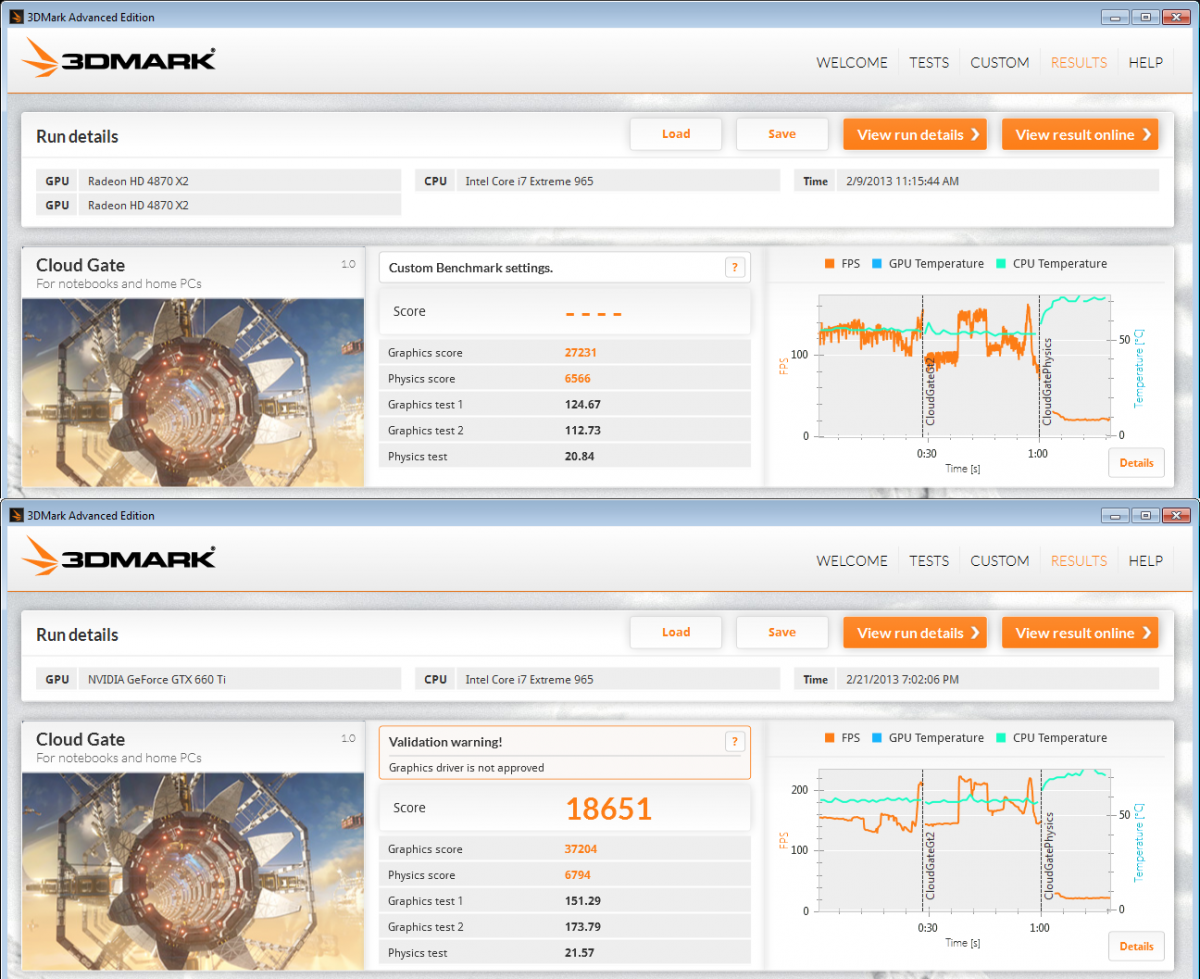
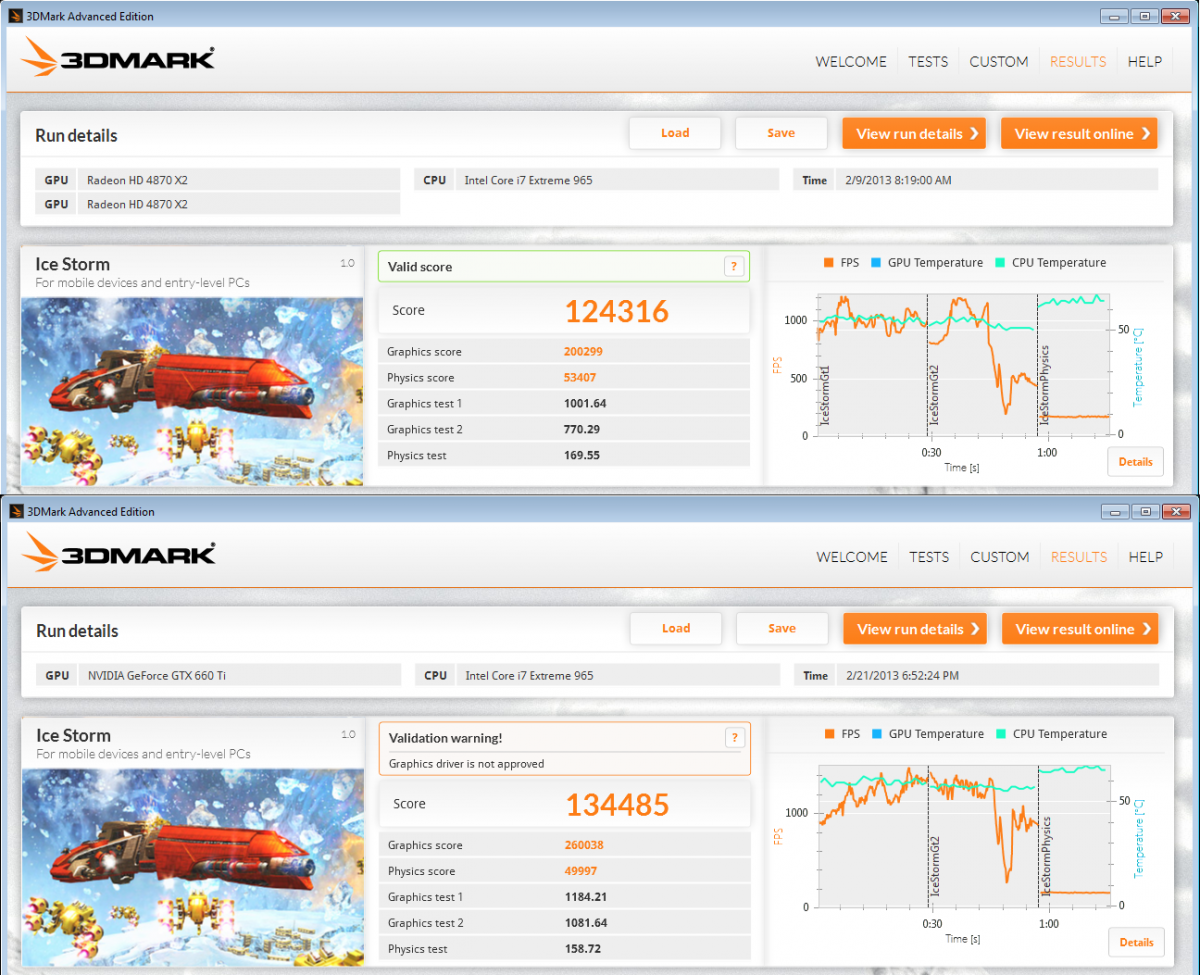
Streak wanted a compare of my old card (ATI 4870x2 2gb) and new (Gigabyte nVidia GTX 660 Ti 3gb), so here it is. 3DMark had a 3rd test for DirectX11, but my old card could not run it.
See Attached..
Sign in to reply.

