My X55 Rhino Came Today

By Snacko, Feb 20, 2014 in Hardware Hell

Posted March 31, 2014

Not sure what that's for Arthur, unless your just saying the x55 is a big April Fools joke?   :roadrage:

But at least I may have found my problem.  Should have bypassed the USB Hub earlier, but my x52 Pro worked there just fine.  I am going to be very happy if this fixes it.  I do love the x55 when it works.


BTW, Saitek Support should have a Support Script that all their support reps follow.  This is standard in tech support as I am sure Jabo can attest.  Just go through the basics: 1) Did you install the drivers?  2) Did you install the software? 3) What ports do you have your x55 plugged in?........  They never even asked me anything about my computer.  But this was my mistake.

Posted March 31, 2014

I thought the interesting bit was about new software that is available from the Saitek site but not the Madkatz site yet.

gallery_440_79_39944.png
Posted March 31, 2014

I just did a search for Madcatz and Saitek and didn't find anything... where is that?

Posted March 31, 2014

Doh!!!  Sorry Snacko - just realised I posted the wrong link. :rolleyes:


This is what I'm trying to show you;


http://forum.il2sturmovik.com/topic/5104-project-x-55-germany-mod/


Sorry for the confusion - I'm an idiot. :thumbsu:

gallery_440_79_39944.png
Posted March 31, 2014

I'm glad that I hung in there with you... I'm downloading them now.


You are by no means an idiot... a bone head, moron, imbecile maybe, but never a simple idiot!   :thumbsu:  :P

Thanks!

Posted March 31, 2014

You are by no means an idiot... a bone head, moron, imbecile maybe, but never a simple idiot!   :thumbsu:  :P

Thanks!


:salute:

gallery_440_79_39944.png
Posted May 26, 2014 · edited May 26, 2014 by Snacko

Here is a video of one of the bugs that I have been having with the x55 for anyone who is interested.  I wish I knew someone who had this same stick to do this test so I could see if this is unique to me.  I have uninstalled TS, deleted it's folder, rebooted and reinstalled it to no avail..  The bug still occurs...


I made this video to show to Saitek Support.  I am currently waiting for a response.


Their last software update said it fixed a repeating keypress bug.  I had this same type of bug when I tested the x55 on 3 different pcs.  And during that testing several months ago I was 'not' using TS on those computers.  So maybe the did fix some other repeating bug.  

Posted May 26, 2014 · edited May 26, 2014 by FoolTrottel

Any Whisper- or Hot keys in TS?

DD-Signature.jpg

Posted May 26, 2014

Nope, just RAlt for push to talk.  But I have deleted all hotkeys and did a test too.  That did not fix it.

Posted May 26, 2014

Looks like there's some conflict between TS and that Saitek SW/HW....


In TS, try and switch off Push-To-Talk.

And/or 'Delay releasing Push-To-Talk' should you have it checked.


For TS to work okay in 'all circumstances' it must look at all key and button presses, and filter out some of them...


While programming, watching keys and buttons, and Capturing them can be very.... tricky. Finicky.

Especially if a program needs to 


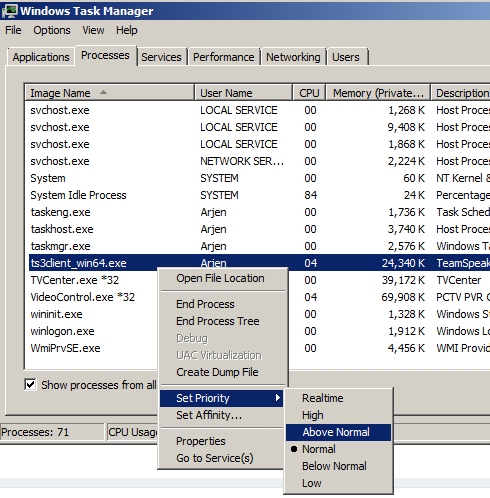
Here's a wild guess: Try and use the Task Manager to change the priority of the TS3Client process, or of the Saitek Software.... one up, to 'Above Normal', or 'High'... just for the fun of it :)

Maybe if one of the two has the 'power/speed' over the other.... (Oh, disclaimer... if it all goes haywire, this was not my advice!)


post-947-0-24521500-1401127097_thumb.jpg

DD-Signature.jpg

Posted May 26, 2014

Have you tried using voice activation instead of push to talk command?

Posted May 26, 2014

You may have already seen this but it looks like the same problem with a solution.


http://forums.eagle.ru/showthread.php?t=122307

Posted May 26, 2014 · edited May 26, 2014 by Snacko

That did it!  It appears to be fixed!!


I HATE SAITEK!!!  They are MORONS!  They should be telling customers about this and other basic things to try, but they have not been any help at all in the past 4 months.  I solved one problem by bypassing my usb hub, and now this problem without their help.


Thanks Jack!   :thumbsu:


I can't wait to hear what they say to my Support Ticket with that video.  I cannot believe they know anything about this problem.  And if they do, why have they not mentioned it anywhere or even in any of my 4 support tickets?

Posted May 26, 2014

:thumbsu:  Good show!


So, it was that TS 'Keyboard and mouse only' setting?

(Just checked my TS, and it is on that setting...)


That's one to remember ....

DD-Signature.jpg

Posted May 26, 2014

Yes, it was that setting. I set it to just Mouse & Keyboard Only and that fixed it. Thx! :-)

Sent from my Galaxy Note 2 with Tapatalk 4.

Posted April 19, 2015

Just placed my order for an X55, having been given an award at work out of the blue :)


Old topic being necro'd I know, but..


Any profiles to share?


Any hints that are new with this HOTAS?

Posted April 19, 2015
  1. In Teamspeak, Settings, Options, Hotkeys, select "Keyboard & Mouse Only" in the bottom/right combobox.  Or TS will cause problems when the x55 sends keys.
  2. Do not have the Profile Editor open when testing in game, or just using in game.  It can capture sent keystrokes.
  3. Right-Click on the icon in the SysTray to select (download) your profile.  Click on it to open the Profile Editor.
  4. Grease your shaft.
  5. If you have problems, plug them directly into your motherboard USB.
  6. Again, if you have problems.  Search x55 USB 3.0 HUB Ghosting.  I have not had this, but there seems to be a problem on some systems with USB 3.0.  
  7. Last, don't ever call Saitek Support.  

Here are my profiles.  I assign all of the buttons with the Saitek Profile Editor, and all of the Axis 'in-game'.  


X-55 Rhino.rar

Posted April 19, 2015

Cheers Andy, good tips and nice to have starting profiles :)

Posted April 20, 2015 · edited Apr 20, 2015 by Snacko

Some of my profiles were setup when I first got the x55 and was having problems.  Saitek Support said to make the commands 'Advanced Commands' to fix their bugs.  But that is not necessary now from my experience now.  So, if you see any simple Advanced commands, and have problems with them, just change them to basic Keypresses.   :thumbsu:

Posted April 23, 2015

Came within a gnats whisker of RMA'ing the X55.


Rudder (I don't actually need it due to having pedals) was spiking like crazy and reporting less than 10% displacement.

Throttle #1 was not registering 100% full throttle and was out of sync with throttle #2.


No way to calibrate either issue out so out came the screw driver.


Throttle was a case of loosening off the gear wheel carrier, rotating it 2 teeth and re-tightening.

Now reports correctly.


Rudder was a little harder to track down cause and correct, I checked internal (to base) wiring for chaffed or loose wires, no joy.

It then occurred to me to detach, clean the contacts, and re-attach the joystick handle, now works perfectly.


Had a 'mare with the software when I tried to uninstall it and re-install, found the USB (including hidden) device deletion and registry cleaner worked a charm.


Finally I can now start to learn what is where and see how well the Rhino and I can merge :)

Sign in to reply.