Virtual Cockpit

By OverDhill, Aug 24, 2014 in IL-2 Sturmovik: Cliffs of Dover Blitz and Desert Wings: Tobruk

Posted August 24, 2014

When rebuilding my pit after the flood (and having my touchscreen die) I decided on adding a second monitor to my system and get rid of the server/client setup. I did it to make things easier when deciding to jump on to fly (not having to boot a second machine and run all the apps to tie things together) as well as to be able to use the VirtualCockpit app for Cliffs of Dover.


I have to give two thumbs up for VC as it runs great on my i7 with the EVGA 660 superclocked graphics card.


If your looking for extracted gauges for Cliffs then check this thread out


http://theairtacticalassaultgroup.com/forum/showthread.php?t=3887


I especially like the ones that tom.doniphon has shared. They scale very nicely to the resolution on my 19" second monitor


Now on to the next phase of my rebuild.

Posted August 31, 2014

Some nice gauges by tom.doniphon


14914902478_ffdbf73b0d_b.jpg

Posted September 1, 2014

the picture u posted is from some android device. do you know witch software is that?

gallery_440_79_23940.png

sig.GIF

No matter how good the violin may be, much depends on the violinist.

Posted September 1, 2014

No it was a screenshot taken from my VC setup on a second monitor off my i7/ Nvidia 660 Superclocked graphics card. VirtualCockpit runs on Windows. There are some using an app to span a second monitor over to a tablet from what I have read. Read through the thread I posted and there are lots of gauge sets to download and play with (there is a test mode built into VC to play around without being in Cliffs). I just happen to like the ones tom.doniphon has shared.


http://theairtacticalassaultgroup.com/forum/showthread.php?t=3887


Spitfire and Hurricane


http://theairtacticalassaultgroup.com/forum/attachment.php?attachmentid=9534&d=1399716327


Luftwaffe Virtual Cockpit Collection


http://www.mediafire.com/download/h687qu23ooivuo2/LWVirtualCockpits.zip

Posted September 15, 2014 · edited Sep 15, 2014 by DD_OverDhill

Well here is my new pit so far. The center screen and button panel cockpit frame is complete. I am waiting on some switches I ordered (back ordered) and then I will start mounting them. I will have over 60 buttons as well as a few special red and yellow ones. I have worked out a way to use my wife's Silhouette Cameo to make templates to lay over the buttons so I can change the labels based on which sim I am using (1946, COD or Freespace 2, ect). First I need to sit down and figure out the button label arrangements.

I also have to finish my Warthog extension.

Here is IL-2 1946 with UDPSpeed gauges.

15061492959_e4a1ca4ff0_b.jpg

Here is IL-2 Cliffs of Dover running VirtualCockpit gauges
 

15061885738_741148707c_b.jpg

Like 1
Posted September 15, 2014

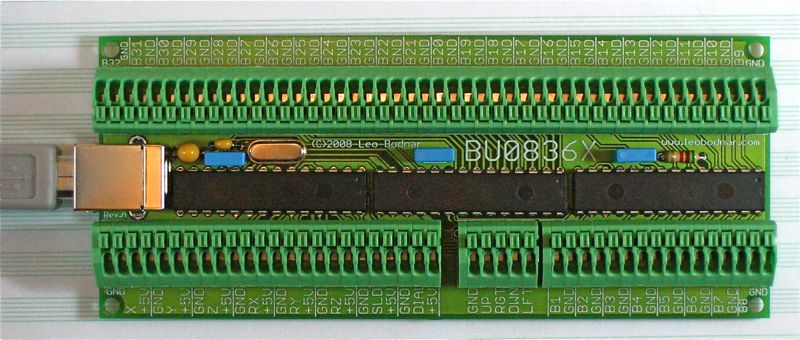
These are the buttons I am going to be using and the two USB cards


GP40MAX_MED.jpg


BU0836Xlarge.jpg
 
14755851501_463cd39de2_c.jpg
14756742044_878e5f7a42.jpg


15248544535_e8b886d779_n.jpg


Posted September 16, 2014

are those illuminated buttons ODH? and do they latch or not?

new sig copy.jpg

Posted September 16, 2014

The rectangle ones are illuminated buttons and they are only momentary. The rotary is also just momentary twist side to side. They should work well for most sims. They have a nice tactile feel. Something that was missing with a touchscreen in the mist of a battle.

Posted September 16, 2014

Hmm, you might struggle with the illuminated buttons on the bodnar - there's only a tiny voltage for each of those connectors and I found that illuminated buttons affected the voltage drop too much, but I was using latched buttons not momentary so...

new sig copy.jpg

Posted September 16, 2014

Actually they are 12 volt and will be on a separate power supply and will be used for illumination since they are momentary. The contacts are totally separate from the lights so will not interfere with the board.

Posted September 17, 2014 · edited Sep 17, 2014 by Jabo

So do they only illuminate when you press the button?

new sig copy.jpg

Posted September 17, 2014

No I will have them illuminated all the time (at least that is the plan). Not much sense in illuminating a momentary button when pushed.

Posted September 17, 2014

Seriously impressed ODH ! A little green with envy here lol

Painless.

P10002571.jpg JORibbonspeciality.gif

DDzsigMarch2012-1-1.jpg

DSC01396-1.jpggallery_440_79_39944.png

Posted September 17, 2014 · edited Sep 17, 2014 by DD_OverDhill

Well it is me that is envious of all of the flying skills you guys have. I have committed to try and spend more time this winter and get better (barring anymore health issues). For me half the fun has been to build this. Keeps my skills from getting totally rusty.

It will look a lot better when the buttons are mounted on the black plexiglass. I ordered a metric step drill to try and prevent chipping it with all the holes I have to make.

Posted September 17, 2014 · edited Sep 17, 2014 by BadAim

That's impressive, mate. I hope to get to setting up a button panel and some trim wheels with the bodnar board this fall/ winter, and maybe even complete my cockpit too!

 gallery_440_79_39944.png
Democracy is two wolves and a lamb voting on what to have for dinner. Liberty is an armed lamb.

Posted September 28, 2014

Well these step drill bits are nice for drilling plexiglass. Make an easy and clean job with no risk of splitting the plexiglass


I ordered the metric set as the switches I have all have metric mounting hole sizes. I have one panel drill and switches mounted. Will take a picture when I get the other one done. Then its on to wiring the cards.

Posted September 29, 2014 · edited Sep 29, 2014 by DD_OverDhill

Here are the button panels with the buttons, switches and pots mounted. Also a blank template which will be labeled with my Brother PT-P700. The templates were cut using my wife's Silhouette Cameo. All I need to do is wire the cards for each panel.
 
15211553110_8ae9f6eb83_c.jpg


15398212835_7461405bec_c.jpg

Like 1
Posted September 30, 2014

Good grief - now THAT'S a nice sim pit! Good work ODH!

new sig copy.jpg

Posted September 30, 2014

Wow!  It reminds me of the bridge of the Starship Enterprise!

gallery_440_79_39944.png
Posted September 30, 2014

With the button templates I can quickly change the labels.  I plan on using this for everything from racing to Star Citizen when its out.

Like 1

Sign in to reply.