Ehh hello guys, I have a trouble. My il 2 not detect my joystick. Anyone please help me.
*win7
*laptop
*il 2 version 4.0.7m
*my joystick working on flight simulator X
Thanks before.

By dimaz45, Sep 17, 2014 in IL-2 Sturmovik: 1946
Ehh hello guys, I have a trouble. My il 2 not detect my joystick. Anyone please help me.
*win7
*laptop
*il 2 version 4.0.7m
*my joystick working on flight simulator X
Thanks before.
Welcome here!
IL-2 can be a bit special in setting up your controls, and chances are you need to do something special.
I'll try and talk you through it.
Start the game, go to 'Controls', then scroll all the way down to the 'HOTAS Control' section.
Now use the mouse to click on the right hand side of the screen, at the level of the control you want to assign, in the screen below it's the Aileron function. Click so a box appears.
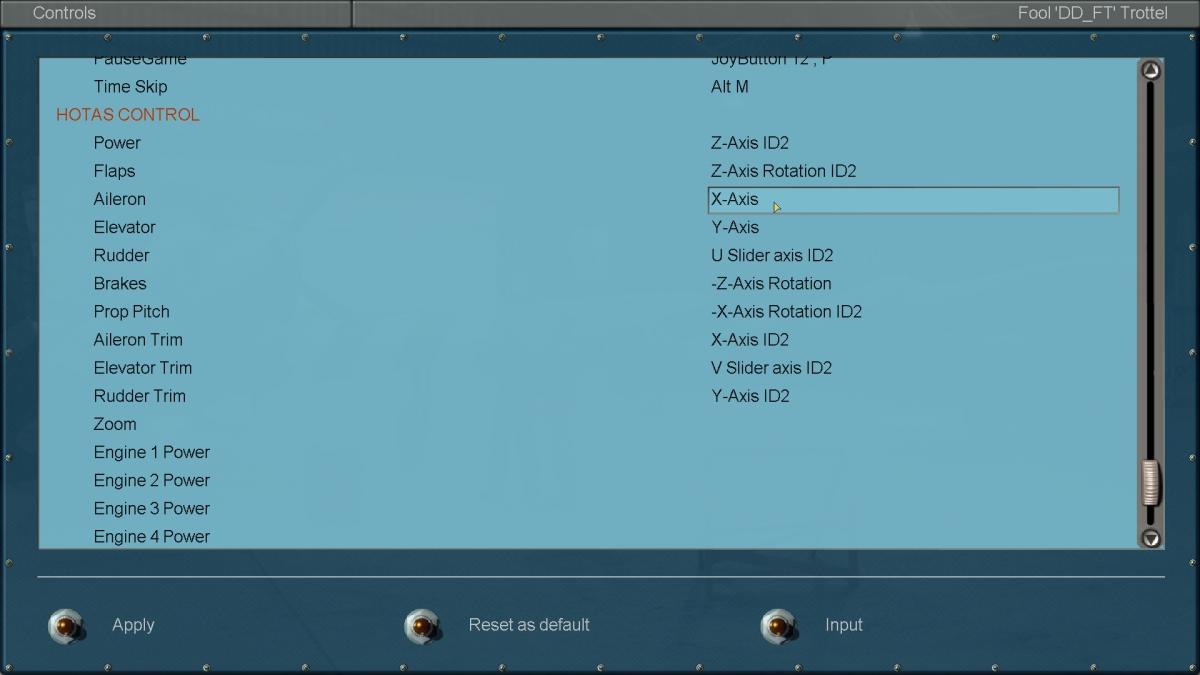
Now move the stick to the right, so you have to move the Axis of the stick that you want to assign to Ailerons.
Do the same for Elevator, moving the stick forward.
And for rudder, if you have it on the stick that is, other wise, kick your rudder pedals.
Test it in game. In cockpit, use external view to see whether the surfaces move correctly...
If they move in the wrong direction - suppose the Aileron does - then go back to the controls, click on the Aileron part again, then move the stick the other direction (left in this case ie. my example / my instructions.) You should see the directional change in that a - appears in front, or disappears if it was...
Hope this helps!

I did that, but nothing change. When I click on hardware set up ( on main menu ) then input, there is nothing. No joystick configuration
Sleep tight!
Edit: Hold on, 1:00 PM? That's daytime!
Where are you located?
Where are you located?
Indonesia according to his flag.
Ah, thanks... makes sense then 
Im sorry, im forget 
edit : Here's my conf.ini
[il2]
title=Il2-Sturmovik Forgotten Battles
hotkeys=HotKey game
[window]
width=640
height=480
ColourBits=32
DepthBits=24
StencilBits=8
ChangeScreenRes=1
FullScreen=1
DrawIfNotFocused=0
EnableResize=0
EnableClose=1
SaveAspect=1
Use3Renders=0
[GLPROVIDER]
GL=Opengl32.dll
[GLPROVIDERS]
Open GL=Opengl32.dll
DirectX=dx8wrap.dll
[NET]
speed=5000
routeChannels=0
serverChannels=31
localPort=21000
remotePort=21000
SkinDownload=1
serverName=No Name
serverDescription=
remoteHost=
localHost=
socksHost=
checkServerTimeSpeed=1
checkClientTimeSpeed=0
[MaxLag]
farMaxLagTime=10.0
nearMaxLagTime=2.0
cheaterWarningDelay=5.0
cheaterWarningNum=-1
[chat]
region=(dx=0.6925,dy=0.071666665,x=0.0,y=0.0)
[game]
Arcade=0
HighGore=0
mapPadX=0.6689453
mapPadY=-0.046875
viewSet=32
Intro=1
NoSubTitles=0
NoChatter=0
NoHudLog=0
NoLensFlare=0
iconTypes=3
eventlog=eventlog.lst
eventlogkeep=0
3dgunners=1
[HotKey game]
PrintScreen=ScreenShot
P=pause
Pause=pause
[HotKey gui]
Escape=activate
[HookViewFly Config]
timeFirstStep=2.0
deltaZ=10.0
[HookView]
MouseLeft=Len
[HookView Config]
AzimutSpeed=0.1
TangageSpeed=0.1
LenSpeed=1.0
MinLen=1.0
DefaultLen=20.0
MaxLen=3000.0
Speed=6
[HotKey builder]
MouseLeft=objectMove
MouseRight=popupmenu
Enter=freeView
Shift MouseLeft=worldZoom
Alt MouseLeft=select+
Alt MouseRight=select-
Alt Ctrl=unselect
PageDown=change+
PageUp=change-
End=change++
Home=change--
Ctrl MouseLeft=insert+
Insert=insert+
NumPad-0=insert+
F=fill
Ctrl MouseRight=delete+
NumPad.=delete+
Delete=delete+
Backspace=cursor
Tab=cursor
F10=land
F11=onLand
NumPad-=normalLand
NumPad+=toLand
NumPad-5=resetAngles
NumPad-8=resetTangage90
NumPad-7=stepAzimut-5
NumPad-4=stepAzimut-15
NumPad-1=stepAzimut-30
NumPad-9=stepAzimut5
NumPad-6=stepAzimut15
NumPad-3=stepAzimut30
[MouseXYZ]
F1=SpeedSlow
F2=SpeedNormal
F3=SpeedFast
MouseRight=XYmove
F4 MouseRight=Zmove
MouseMiddle=Amove
F5 MouseRight=Amove
F6 MouseRight=Tmove
F7 MouseRight=Kmove
[MouseXYZ Config]
RealTime=1
[HotKey Console]
Shift Tab=Activate
[Console]
HISTORY=1024
HISTORYCMD=1024
LOAD=console.cmd
SAVE=console.cmd
LOG=0
LOGTIME=0
LOGFILE=log.lst
LOGKEEP=0
[sound]
SoundUse=1
SoundEngine=1
Speakers=0
Placement=0
SoundFlags.reversestereo=0
RadioFlags.Enabled=1
RadioEngine=2
MusicVolume=8
ObjectVolume=14
MusState.takeoff=1
MusState.inflight=1
MusState.crash=1
MusFlags.play=1
MasterVolume=14
Attenuation=7
SoundMode=1
SamplingRate=2
NumChannels=2
SoundExt.occlusions=0
SoundFlags.hardware=1
SoundFlags.streams=1
SoundFlags.duplex=1
SoundExt.acoustics=0
SoundExt.volumefx=0
SoundFlags.voicemgr=0
SoundFlags.static=1
VoiceVolume=12
Channels=2
SoundExt.extrender=0
SoundFlags.bugscorrect=0
SoundSetupId=8
ActivationLevel=0.02
Preemphasis=0.85
RadioLatency=0.5
AGC=1
PTTMode=1
SoundFlags.UseRadioChatter=0
SoundFlags.AutoActivation=0
RadioFlags.PTTMode=0
RadioFlags.PlayClicks=0
ActLevel=0
MicLevel=0
SoundFlags.forceEAX1=0
[rts]
;ProcessAffinityMask=1
mouseUse=2
joyUse=1
trackIRUse=1
DisableIME=0
locale=
[rts_mouse]
SensitivityX=1.0
SensitivityY=1.0
Invert=0
[rts_joystick]
X=0 1 4 9 16 25 36 49 64 81 100 0
Y=0 1 4 9 16 25 36 49 64 81 100 0
Z=0 10 20 30 40 50 60 70 80 90 100
RZ=0 10 20 30 40 50 60 70 80 90 100 0
FF=0
U=0 10 20 30 40 50 60 70 80 90 100 0
V=0 10 20 30 40 50 60 70 80 90 100 0
[Render_DirectX]
TexQual=3
TexMipFilter=2
TexCompress=0
TexFlags.UseDither=1
TexFlags.UseAlpha=0
TexFlags.UseIndex=0
TexFlags.PolygonStipple=1
TexFlags.UseClampedSprites=0
TexFlags.DrawLandByTriangles=1
TexFlags.UseVertexArrays=1
TexFlags.DisableAPIExtensions=0
TexFlags.ARBMultitextureExt=1
TexFlags.TexEnvCombineExt=1
TexFlags.SecondaryColorExt=1
TexFlags.VertexArrayExt=1
TexFlags.ClipHintExt=0
TexFlags.UsePaletteExt=0
TexFlags.TexAnisotropicExt=0
TexFlags.TexCompressARBExt=1
TexFlags.TexEnvCombine4NV=0
TexFlags.TexEnvCombineDot3=0
TexFlags.DepthClampNV=0
TexFlags.SeparateSpecular=0
TexFlags.TextureShaderNV=0
HardwareShaders=0
Shadows=2
Specular=2
SpecularLight=2
DiffuseLight=2
DynamicalLights=1
MeshDetail=2
VisibilityDistance=3
Sky=2
Forest=2
LandShading=3
LandDetails=2
LandGeom=2
TexLarge=1
TexLandQual=3
TexLandLarge=1
VideoSetupId=4
ForceShaders1x=0
PolygonOffsetFactor=-0.15
PolygonOffsetUnits=-3.0
[Render_OpenGL]
TexQual=3
TexMipFilter=2
TexCompress=0
TexFlags.UseDither=1
TexFlags.UseAlpha=0
TexFlags.UseIndex=0
TexFlags.PolygonStipple=1
TexFlags.UseClampedSprites=0
TexFlags.DrawLandByTriangles=1
TexFlags.UseVertexArrays=1
TexFlags.DisableAPIExtensions=0
TexFlags.ARBMultitextureExt=1
TexFlags.TexEnvCombineExt=1
TexFlags.SecondaryColorExt=1
TexFlags.VertexArrayExt=1
TexFlags.ClipHintExt=0
TexFlags.UsePaletteExt=0
TexFlags.TexAnisotropicExt=1
TexFlags.TexCompressARBExt=1
TexFlags.TexEnvCombine4NV=1
TexFlags.TexEnvCombineDot3=1
TexFlags.DepthClampNV=1
TexFlags.SeparateSpecular=1
TexFlags.TextureShaderNV=1
HardwareShaders=0
Shadows=2
Specular=2
SpecularLight=2
DiffuseLight=2
DynamicalLights=1
MeshDetail=2
VisibilityDistance=3
Sky=2
Forest=2
LandShading=3
LandDetails=2
LandGeom=2
TexLarge=1
TexLandQual=3
TexLandLarge=1
VideoSetupId=3
Water=1
Effects=1
ForceShaders1x=0
PolygonOffsetFactor=-0.15
PolygonOffsetUnits=-3.0
I did that, but nothing change. When I click on hardware set up ( on main menu ) then input, there is nothing. No joystick configuration
You first tried to do what I suggested? Start the game, go to 'Controls', then scroll all the way down to the 'HOTAS Control' section.
(As in: not the Hardware setup...)
[rts_joystick]
X=0 1 4 9 16 25 36 49 64 81 100 0
Y=0 1 4 9 16 25 36 49 64 81 100 0
Z=0 10 20 30 40 50 60 70 80 90 100 0 <--- this zero is missing
RZ=0 10 20 30 40 50 60 70 80 90 100 0


[rts_joystick]
X=0 1 4 9 16 25 36 49 64 81 100 0
Y=0 1 4 9 16 25 36 49 64 81 100 0
Z=0 10 20 30 40 50 60 70 80 90 100 0 <--- this zero is missing
RZ=0 10 20 30 40 50 60 70 80 90 100 0
nothing change 

I did that, but nothing change. When I click on hardware set up ( on main menu ) then input, there is nothing. No joystick configuration
You first tried to do what I suggested? Start the game, go to 'Controls', then scroll all the way down to the 'HOTAS Control' section.
(As in: not the Hardware setup...)
yes I do what you suggested, but u know, nothing change
When you make a change to the config file does it stay changed, that it save correctly?
"nothing change" as in ... you mouse click on the line, get the box to show, move the control, but the 'Axis-Y' text does not show up? 
That is just weird.
What joystick is it? Brand? Model?
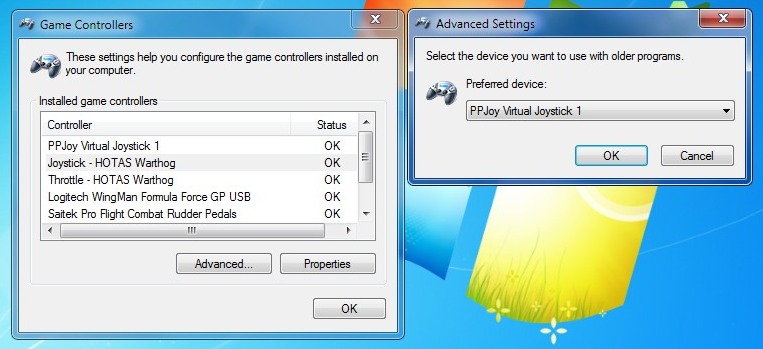
Does it show up as a Game Controller?
- Press Start Button, type game controllers and select it in the list above ...
"nothing change" as in ... you mouse click on the line, get the box to show, move the control, but the 'Axis-Y' text does not show up?
That is just weird.
What joystick is it? Brand? Model?
Does it show up as a Game Controller?
- Press Start Button, type game controllers and select it in the list above ...
Yeah i know thats weird.
My joystick : logitech extreme 3D pro
Yes its show up as a game controller.
When i test the joystick on fsx and gta its working. Maybe tomorrow I will send the screenshot of my il 2
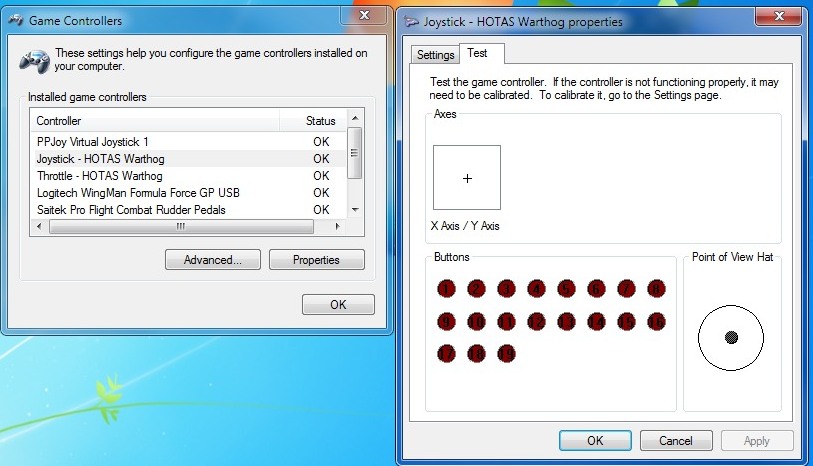
How about a screen shot of the Game Controllers Panel as well as the Advanced screen as well as the Properties screen for the Logitech.
Sign in to reply.