Computer Dilemma

By APHill, Feb 23, 2015 in Hardware Hell

Posted February 23, 2015
Hi Gents,

I need some advice as to micro stutters in all of my Sims (COD, ROF, DCS, and IL 2) I’m trying to figure out why it’s happening. I recently replaced my GTX 770 card with a GTX 980 and it made no difference at all. I also replaced my 1920 X1200 res monitor with one that is 2560x 1440


Here are my system specs,

Processor: Intel® Core™ i5-2500K CPU @ 3.30GHz (4 CPUs), ~3.3GHz

Video Card: NVIDIA GeForce GTX 980, Memory size 4095 MB

Board Manufacturer EVGA Corp

Memory: 8192MB RAM

Available OS Memory: 8160MB RAM

Mainboard Model: Asus P8P67 

Monitor

ASUS PB278Q 27-Inch WQHD LED-lit Professional Graphics Monitor (2560x1440 resolution)

Thinking of replacing it with this one ASUS PG278Q ROG Swift 27-Inch Screen LED-Lit Monitor (2560 x 1440 res) that supports G Sync technology, Link: http://www.amazon.com/PG278Q-27-Inch-Screen-LED-Lit-Monitor/dp/B00MSOND8C/ref=sr_1_3?ie=UTF8&qid=1424652653&sr=8-3&keywords=g+sync+monitor%27s 

(I am not sure if you need the graphics card to support if too if so I would need to swap out my brand new GTX 980 for a 980 that does support it)

Power Supply 550W


Can anyone spot the weak link here that might be the problem?

Not enough RAM?

Thanks for any help


Tom

Posted February 23, 2015

Have you tried overclocking your CPU? As for G Sync I think you set that up in the G force experience screen

image.png

siggy.jpg

Posted February 23, 2015

The only thing I can think of, is missing or invalid chip set drivers.


I got a quite similar board (P8P67 LE), and these are the ones I have installed:

************************************************************
*  Product: Intel® Chipset Device Software
*  Release: Production Version
*  Version: 9.2.0.1015
*  Target Products: Intel® 6 Series/C200 Series Chipset Family
*    2nd generation Intel® Core™ processor family
*  Date: October 04 2010
************************************************************
 
I downloaded those a while ago from here: http://www.asus.com/Motherboards/P8P67/HelpDesk_Download/
(this is a direct link to P8P67 board, not sure which sub-version (Pro, Q or other) you are using, but do check!
 
Let's do some old fashion trouble shooting: Post your DxDiag report, the 64bit one.
(Start, Run, DxDiag.exe, press the 'Run 64Bit DxDiag' , press save all information, then upload or paste the DxDiag.txt file here)
 

DD-Signature.jpg

Posted February 23, 2015

FT,

Thanks much for your help.

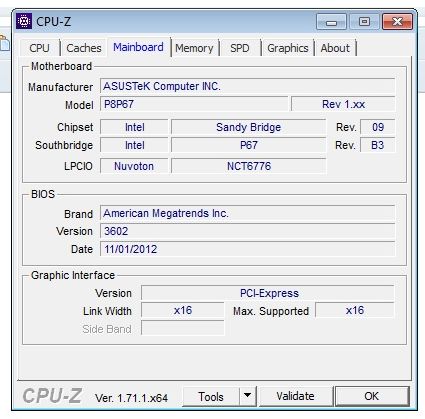
Attached is my 64 bit DXDIAG and a screenshot of my mother board info using a little program called CPUID I'm not sure if it says what version of mother board it is. maybe it says on the board itself?


Have you tried overclocking your CPU? As for G Sync I think you set that up in the G force experience screen

Not yet Crash, I wouldn't have a clue as to how to do that, I would have to beg my son for help. LOL!

I may do some begging in the future though.

64 bit DxDiag.txt

post-428-0-57697700-1424722472_thumb.jpg

Tom

Posted February 23, 2015

I downloaded drivers for the MB. What a bewildering thing. Do I run the first AsusSetup.exe in the main folder , or the one thats in the Driver folder. When I open the Driver folder there is another folder called "Chipset" inside that is another AsusSetup.exe! So, which .exe do I run? all ?

Tom

Posted February 23, 2015

Here's what I found after a first look:


- From your DxDiag report:

Line 67 in your report shows empty space past Video Accel: , where as mine states: 

 
        Video Accel: ModeMPEG2_A ModeMPEG2_C ModeVC1_C ModeWMV9_C 
 
Not too sure why it is different, or how to fix that ... they look like installed video renders.
I can only find the line being empty in existing reports, on systems where no video drivers have been installed...


- There are later versions of your Bios (you are on 36.02, looks like latest is 38.01)


I downloaded drivers for the MB. What a bewildering thing. Do I run the first AsusSetup.exe in the main folder , or the one thats in the Driver folder. When I open the Driver folder there is another folder called "Chipset" inside that is another AsusSetup.exe! So, which .exe do I run? all ?

I do not think it matters much, really can't remember ... lol

DD-Signature.jpg

Posted February 23, 2015

The latest Bios I can find on the asus site is  3602. Can you post a link to what you saw? My MB is a version 1.02

Tom

Posted February 23, 2015

Well, you are right about 36.02 being the latest version for your board, if indeed you have a bare P8P67...


There's a lot of sub-types for the P8P67... that have later BIOS versions available.

You 100% sure it's a plain P8P67?


How to tell for sure?

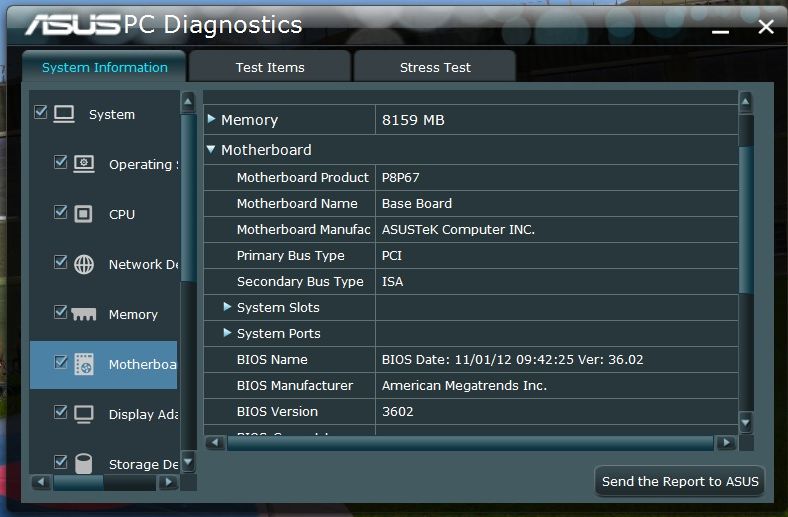
Download ASUS PC diagnostics, install it and run it... it's first screen will show the correct type and sub-type...

(Only if you are unsure of the type, for sure!)

DD-Signature.jpg

Posted February 23, 2015

Pretty sure its a plain one. Thanks for the nice utility. I ran it and the screen shot is below.

post-428-0-33758800-1424734260_thumb.jpg

Tom

Posted February 23, 2015

After installing them Chipset drivers, can we have a look see at a fresh 64bit DxDiag Report please?

DD-Signature.jpg

Posted February 23, 2015

Yes, here it is.

DxDiag latest.txt

Tom

Sign in to reply.