

Democracy is two wolves and a lamb voting on what to have for dinner. Liberty is an armed lamb.
4.13 Is Here!
By BadAim, Jun 5, 2015 in IL-2 Sturmovik: 1946
"New bombardier & co-pilot position that can be manned in online coops" - Yeah!!
Read more: http://simhq.com/forum/ubbthreads.php/topics/4129551#ixzz3cCZJSywq
Follow us: @SimHQ on Twitter | SimHQ on Facebook"


I keep a stock install ready for updates seperate from playing versions.
Just messed around a bit, looks good.

My Track Ir Fix 
In the heat of battle you will not rise to the occasion
You will shrink to the level of your training
There's a retro mod available in my special package that means you wouldn't have to have a complete separate install.
You can create one yourself.
The ONLY files that are needed to retro-patch over a working 4.13m RC4 game are:
- DT.dll
- files.SFS
Even the new SFS files that come with 4.13m RC4 will be ignored by 4.12.2m if you use the above two files.
ALL THAT BEING SAID... use my advise at your own risk.
I keep a stock install ready for updates seperate from playing versions.
Just messed around a bit, looks good.
Alpha. You should know better.
http://forum.1cpublishing.eu/showthread.php?p=709965#post709965
Do you have the patch? Have you tested it? Don't download mine. Download the official one and try it yourself.
If you want, make an entire NEW install and try it.
Give it a shot and post back.
I get irritated when people don't test reports and just disagree for the sole purpose of being contrarian.
I have years of experience as a beta tester (we were called the punch team) with 1C Maddox way before DT started with this game... when it was Forgotten Battles (and even before Pacific Fighters). In that time, it is COMMON PRACTICE to utilize the previous files.SFS file to retro-grade an RC, a new patch, etc. All the additional file pointers to the official SFS files are CONTAINED in the files.SFS file. If you replace the current one with the last one (and now the DT.dll file), the game doesn't know any different.
It's why they stopped the practice of overwriting EXISTING SFS files and why they only INCREMENT now.
I know which files dictate how the game versions itself. THE SOLE DIFFERENCE to what I linked in the Vault to the OFFICIAL patch is simply a folder in the jsgmemods folder so people can easily go back to 4.12.2. If you read that, you would know that ALL THE OTHER 4.13RC4 files are untouched. So, I have a clean, vanilla 4.13RC4 version. If you delete that little mod meant to help people out, then it's just the offiical 4.13mRC4 patch.
Grrr.
I'm removing my linked file from the vault.
If you want to retro-patch back to 4.12m, make your own little mod that has
files.sfs
and
dt.dll
and you'll be back at 4.12.2.
Or, you can make a 15GB copy of your game install. 
Well, good show...
At least this beats the cr@p that's been shouted out loud over at the shout box ...  \ :huh:/

Yeah ...

One of the risks in having a shoutbox I guess.
Well, good show...
At least this beats the cr@p that's been shouted out loud over at the shout box ...
Yeah ...
One of the risks in having a shoutbox I guess.
Well, good show...
At least this beats the cr@p that's been shouted out loud over at the shout box ...
Yeah ...
Yep, you're right about that, but it takes at least one git to start, and ... 

It's just... I can't stand it... but I can't help it or do anything about it really.... I nearly started shouting about it in the shout box ... lol
Is this a 30 minute shout argument or a full hour?
Alpha and I had a GREAT chat on TS and we were both barking at the same tree... just catered to differrent languages.
Hey Tolwyn,
In English, How do I get 4.13 to be select able in the JSGME?
Thanks for stepping it down to my level.

Hmmm. Again, do this at your own risk.
Begin with 4.12.2m.
It doesn't matter that you use this installation with HSFX.
Following me so far? And we begin:
- BEGIN with 4.12.2m
- DISABLE ALL MODS
- Create a folder in your jsgmemods folder called 4.12.2 Stock.
- Copy Files.sfs and DT.dll into the 4.12.2 Stock folder. This "makes" a new MOD for 4.12.2m.
- You may now update your game to 4.13mRC4
- If you wish to "downgrade" your game back to 4.12.2 to take advantage of HSFX (or whatever), ACTIVATE the 4.12.2 Stock MOD
- When you want to go back to 4.13mRC4, simply "disable" the 4.12.2 Stock MOD
For me, when I fly with you guys, I activate (from 4.13mRC4):
4.12.2
HSFX
etc.
When I'm done (to get back to 4.13), I simply disable those MODS.
You won't be making 4.13m selectable; you are USING 4.13m; and you have to make 4.12.2m Selectable. There's no way to do it the other way.
Got it.
Bullet points help me thanks. I will work on this another time. Now it is easier just to point Hyperlobby to my 4.13 install when I need it then mucking with the JSGME. I was hoping it was much less of a chore.
Thanks for the info
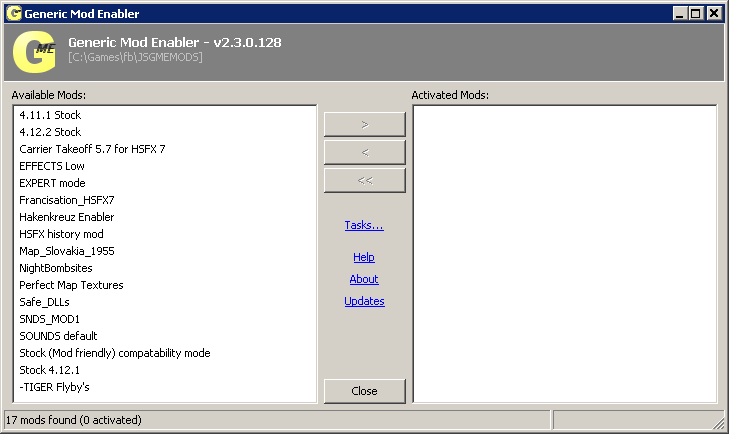
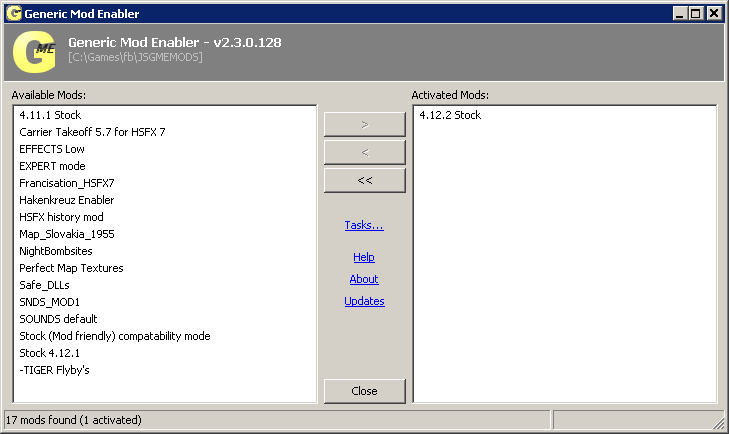
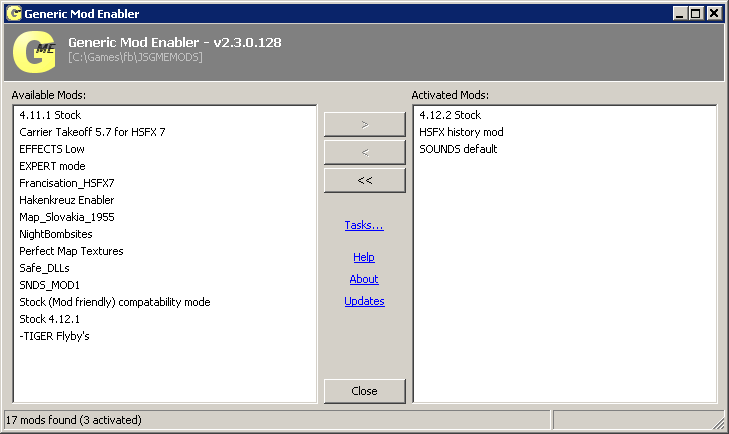
Complicated? Here's screenshots of my JSGME:
When I want to fly 4.13m RC4:
When I want to fly 4.12.2m:
When I fly with you goofballs:
Tolwyn,
I didn't say complicated. I said chore  My PC/game time is valuable these days and I don't feel like spending it on re configuring something that is currently workable. It creates the chance of me screwing up what I do have and spending more time trying to fix it.
I was looking for 1 line of magic code to stick in a folder. 


Sign in to reply.