Bos For 8 Bucks

By gec, Jan 11, 2016 in IL-2 Sturmovik: Great Battles Series

Posted January 11, 2016 · edited Mar 25, 2016 by gec

G2A is offering BOS Start key for 8$ here : https://www.g2a.com/il-2-sturmovik-battle-of-stalingrad-cd-key-global.html    pls do not use the link! it's for the start edition with 2 planes!


that's about 41$ cheaper than on official pages.


DL ing it now. 


here's also how to activate the key:


http://forum.il2sturmovik.com/topic/1366-game-key-activation-faq/

gallery_440_79_23940.png

sig.GIF

No matter how good the violin may be, much depends on the violinist.

Posted January 11, 2016 · edited Jan 11, 2016 by DD_Arthur

Wow!!!  Absolute bargain!   Grab it quick m8 :thumbsu:


Here you go, Gec.  A quick landing the LaGG video tutorial.


I still can't stop the bloody thing ground looping!

gallery_440_79_39944.png
Posted January 11, 2016 · edited Jan 11, 2016 by gec

Hey thx Arthur. Maybe pulling back on the stick while on the ground would help?


nope.

i see u did that.

no other suggestions :P 

gallery_440_79_23940.png

sig.GIF

No matter how good the violin may be, much depends on the violinist.

Posted January 11, 2016

Arthur, do you fly multiplayer with other mates like IL-2 ?

pheart-1-1.gifCAR-1-1.gifpuc-1-1.gifnmu-1-1.gifusmcgc-1-1.gifnatdef-1-1.gifafem-1-1.gifvser-1-1.gifusmcrec-1-1.gifgcuc-v-1-1.gifvcm-1-1.gif
gallery_440_79_23940.png

Posted January 11, 2016

Too heavy on the brakes perhaps?

new sig copy.jpg

Posted January 12, 2016

Arthur, do you fly multiplayer with other mates like IL-2 ?


Hello Pooka.  I do occasionally play BoS in multiplayer but the game - and RoF too - seems to require an internet connection of a higher order than CLoD or IL2 1946.


My internet is still stuck in the stone age for several more months so if i want to fly BoS online it's got to be after 11p.m. - when local internet useage is going down.


You really do need a wing man at least to make the most of BoS multiplayer so I'm waiting.....for a decent connection and enough Dogz to take an interest to make it worth while.  Plenty of stuff to do in BoS off line nowdays.

gallery_440_79_39944.png
Posted January 13, 2016

Arthur,


Can you share your SweetFX settings?


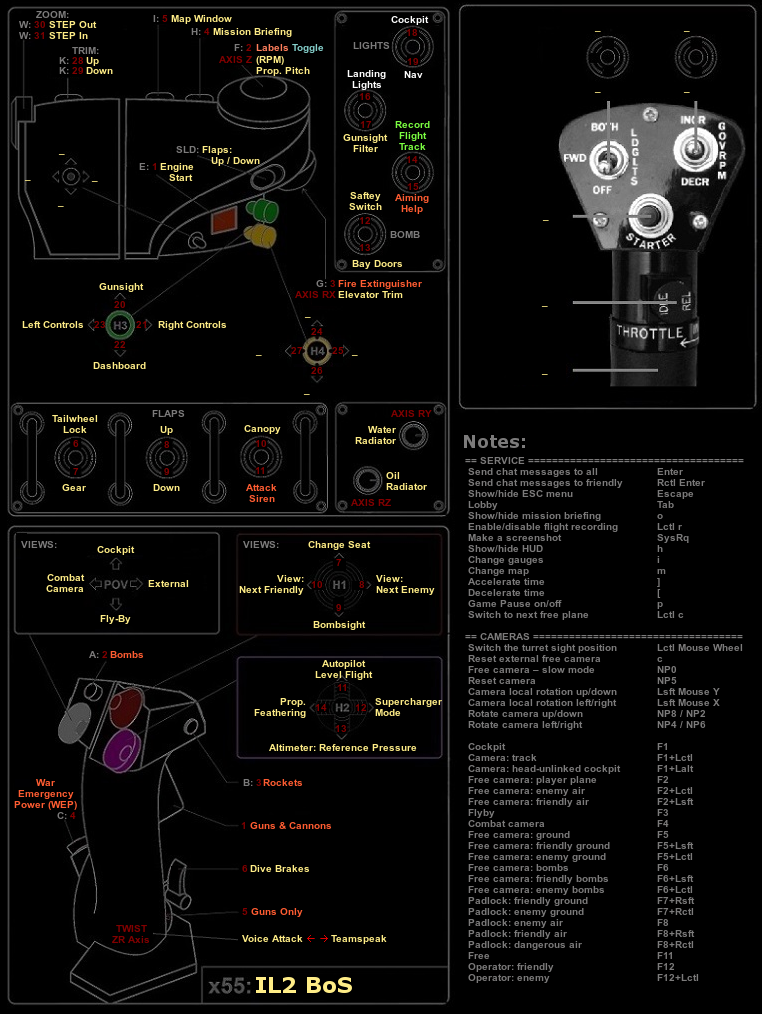
Also, do you have a list of key commands, or a HOTAS legend with the commands that you have assigned that you could share?  I am having problems with figuring out which commands I need, which ones work, and just confused generally setting up my hotas with the commands that I will need most of the time.


I have a lot of commands setup and working, but I have spend about an hour trying to get LShift+M to toggle Auto Supercharger & Mix.  At first when I pressed my Hotas button, it was just opening and closing the Map!  As if the game was not receiving the LShift part of the command. (but when I test the button in the test window, it registers the LShift+M just fine.)  The same happened when I used the keyboard I think?  (I'm getting confused)  So, I've made it a macro and now it does nothing.  My x55 has had problems in the past, but has been working great for months now.  And BoS has had some issues as well IIRC.  So, I am getting confused as to where my problems lie.  A list of working and needed commands would help me sort through these weeds.


I am getting the feeling that this LShift+M command is either not needed, or not working?  Since this game was ported over from RoF they left a few unnecessary commands in the game that don't really work I think.  

Posted January 13, 2016

Flaps are still down,  Maybe still providing lift.  I like to pull in my flaps once I hit the ground (horizontally).  

B252.jpg

Posted January 13, 2016

Same technique but this time in a Mig.  Even though I stand on the brakes - no ground loop.  


@Snacko, I'll have a good rummage round tomorrow and check my settings and see what I can come up with.

Like 1
gallery_440_79_39944.png
Posted January 17, 2016 · edited Nov 25, 2017 by DD_Arthur

@Snacko, here we go;


First of all SweetFX.  I'm now using something called Reshade 2.0 to apply SweetFX.  It's easy to install and works very well with a minimum effect on performance. 


Check out this thread;


http://forum.il2sturmovik.com/topic/14425-bos-and-sweetfx/


The actual settings I use are from a guy called SnowSniper.  Click on this thread;


http://forum.il2sturmovik.com/topic/2183-bos-and-sweetfx-works-great/page-3?hl=sweetfx#entry311560


and check out post # 82.  At the bottom of his sig. he has links to the SweetFX settings he's using.  The first ones are for BoS. I've checked the links and they're still working.  Once you have Reshade installed in your game you can copy paste these settings into your SweetFX folder.


Find these settings in 1C Game Studios/IL2 Sturmovik Battle of Stalingrad/Bin/Game/SweetFX.   Open the SweetFX file and copy/paste these new settings into it.

SweetFX is enabled/disabled by using the Scroll Lock key.


Once you know how to change settings, plenty of others out there to try.  I use SweetFX with BoS, RoF, CoD and DCS.


As to key commands and set up;  first of all, I suggest downloading the excellent community made manual for the game from here;


http://forum.il2sturmovik.com/topic/16752-il-2bos-user-manual-released-first-edition-english/


Very well written by the same guy who did the RoF manual, it gives you just about all the information you'll need.  The whole set up arrangement is also identical to RoF's. Before I talk about key settings it would be best to go into your games Realism settings and in the Custom tab uncheck everything except;


Object Markers

Allow spectators

Warmed up engine

Auto pilot.


and then leave your game running under these Custom settings. This will get rid of auto engine management and has the game running in settings we would normally use in IL2 1946 but you should be able to see the games quite useful "technochat" indicators. 


As my small brain shrivels on a daily basis I've tried to retain as many key commands/procedures that I am used to in IL2 1946 across all the sims I own. This means I have a lot of keyboard assignments that you may want to put on your Hotas set up but it works for me. 


I don't have a Saitek set up but I do have Hotas arrangement.  I'm using a Microsoft Forcefeed back 2 stick and FT's old Logitech G940 throttle unit. This has two nice big levers that I use for prop pitch and throttle.  I have assigned the throttle on my MSFFB2 as the water radiator control.  The water radiator and cowl flaps for air cooled engines are about the only thing BoS allows you to assign to an axis or slider.  I also have double assignments where they don't interfere with each other. 


Also, do you have Battle of Moscow too?  Some of the assignments in controls in the game will refer to specific planes like the Bf 110 which you wont have if you don't have BoM.  


Once again, bearing in mind that I try to retain my familiar IL2 1946 settings, here is a run down of what I use/have assigned in game - different from the stock settings - by how it appears in the Main Menu/Settings/Key Mappings/Controls section of the game.  From left to right we have Service, Camera Controls, Pilot Head Controls, Main Controls, etc. tabs so I'll with start with


SERVICE


About the only assignment I've changed in here from the stock settings is assign the Record button to my stick


CAMERA CONTROLS


Camera Zoom is on my mousewheel.

Rotate Camera Up/Down = Mouse Y

Rotate Camera Left/Right = Mouse X

Camera Player Cockpit F1

External Free Cam/Player = F2


Other cams are also assigned to the F keys.


PILOT HEAD CONTROL


Pilot Head Zoom = Mousewheel

Pilot Head Zoom In = Joystick POV hat up

Pilot Head Zoom Out = Joystick POV hat down


MAIN CONTROLS


AI Autopilot For Level Flight = Q

Adjustable Stabilizer Axis = a couple of buttons on my throttle unit - same controls used for FW190 adjustible stabiliser further down the list


Trim controls in BoS are important but the game does not allow them to be assigned to any sliders or rotarys so I use the same configuration as in IL2 1946 - the number pad on my key board!  Flaps and gear assignments; like my IL2 1946 install.  Assigning something to Tail Wheel Lock is essential!


Wheel Brakes for Russian aircraft work on both wheels simultaneously so are assigned to a hat switch on my throttle.

Wheel brakes for German aircraft are toe brakes and have separate assignment for left and right so I have them on bottons on my throttle as I don't have pedals


Gunsight filter; applicable to P40 only at the moment.


Altimeter: Reference Pressure Toggle on keyboard - important assignment!


ENGINE CONTROLS


Ignore the Auto Mixture and Supercharger control.  Thats the confusing one you mention in your post.  You don't need it!  You don't need Auto RPM Limiter either.


Throttle and Pitch are assigned to the two nice big levers on my throttle and work for all planes with CSU's - mainly Soviet. German planes with DB engines like the BF109 and the 110 are designed to run in auto prop pitch and this is modelled in BoS very well.  You can assign manual controls but I don't use them as it's just a quick way to blow your engine. There is no performance advantage.  Same goes for the FW190.


Mixture and Supercharger Mode Switches are vital for Soviet planes as they had manual mixture and supercharger stage switch controls so I've assigned them to my keyboard as per IL2 1946.


Switch Engine Boost ON/Off - only applicable to the LA-5


Switch Propellor Pitch Control Mode Manual/Auto and

Propellors High Pitch/Low Pitch = as above, to work LW 'planes in manual prop. pitch control - see above' I don't use them.


Prop Feathering On/Off = I have a key assigned but I'm not sure which planes have this function.  PE-2 and HE-111 perhaps?


Switch Water Radiators Control Mode: Manual/Auto?  Another assignment for LW fighters that is not needed.


Water Radiators Shutters = assigned to the throttle on my MSFFB stick


Oil Radiators Shutters?  Thats the oil cooler in plain english - you'll need key assignments for it

Engines Inlet and Outlet Cowl Shutters? for Soviet planes with radialengines only.  These are a double assignment to my MSFFB throttle.


Switch Engine Controls = key pad.


No need to assign all those controls for engine 1, engine 2 at the moment in my opinion.  I simply don't have enough levers!


WEAPONS CONTROLS


This is pretty straight forward and I re-use all my usual IL2 1946 assignments. There are some differences.  


Drop Bombs Mode Toggle = assigned to button on my stick and selects whether you want to drop bombs individually or in salvo

Launch Rockets Mode Toggle = same function as above.

Drop Bombs Delay Toggle = no idea what this does!  Ignore it.

Reload All Guns = needed, key on stick assigned to it


Don't use much else except 

Gunners Fire At Will and Gunners Far Engage Distance to wake my AI gunners up and make them fire at enemies.


ORDERS AND GESTURES


A true hang over from RoF.  You can assign stuff if you like firing flares, etc.  Useful for the single player are;


Attack Nearest Air Target

Attack nearest ground Target

Do Like Me

Cover Me.


If you're lucky your AI wingmen might just feel like obeying these commands or.....they might just f#'k off into the distance for no apparent reason!


Phew!  Thats about it for now.  Hope this helps.  Any questions?  Just ask Sweper, lol! :salute:

gallery_440_79_39944.png
Posted January 17, 2016

Thanks Arthur.  That is much more than I was expecting, but all good info.  I will go over it all indeed.


Cheers!

Posted January 19, 2016 · edited Jan 19, 2016 by Snacko

@Snacko, here we go;


First of all SweetFX.  I'm now using something called Reshade 2.0 to apply SweetFX.  It's easy to install and works very well with a minimum effect on performance. 


Check out this thread;


http://forum.il2sturmovik.com/topic/14425-bos-and-sweetfx/


The actual settings I use are from a guy called SnowSniper.  Click on this thread;


http://forum.il2sturmovik.com/topic/2183-bos-and-sweetfx-works-great/page-3?hl=sweetfx#entry311560


and check out post # 82.  At the bottom of his sig. he has links to the SweetFX settings he's using.  The first ones are for BoS. I've checked the links and they're still working.  Once you have Reshade installed in your game you can copy paste these settings into your SweetFX folder.


Find these settings in 1C Game Studios/IL2 Sturmovik Battle of Stalingrad/Bin/Game/SweetFX.   Open the SweetFX file and copy/paste these new settings into it.

SweetFX is enabled/disabled by using the Scroll Lock key.


Once you know how to change settings, plenty of others out there to try.  I use SweetFX with BoS, RoF, CoD and DCS.


Have you used a program called Mediator?  It came with ReShade when I downloaded it.  Or do you just edit all the settings manually?  Just curious, because I do think a tool to help edit all the settings is helpful.. this Mediator is too hard to use.  I tried it once on BoS and removed it today.  I made a SweetFX/Reshade jsgme mod that installs the directx dlls and everything it needs.  Then I made another jsgme mod for each SweetFX_setting.txt file that I want to install.  This way I can just let it overwrite my default settings and change them easily.  I have 3 different settings for DCS.  One is Vietnam settings that came with the Vietnam map terrain mod, and I have some other settings that i like.


I also used some tool a while back for managing SweetFX settings in multiple games, but I can't remember what it was.  It was much easier to use than Mediator..


SnowSniper's settings have a nice balance and color depth.


Thanks for this.  I'll get on with my control settings in the next few days..  Cheers.  :icon_thumright:

Posted January 19, 2016

Never used Mediator.  When I first used SweetFX I tried editing settings manually but it was tedious and I got some very mixed results.  As it got more popular I learnt to use other peoples settings as they'd already one the Donkey work for me.


I haven't found anything better than SnowSnipers settings yet.


Was the tool you used to manage SweetFX in other games called FlightFX?  I used to use that but it was never updated as later, better versions of SweetFX became available.  What I really like about Reshade is ease of use and it also works inconjuction with the ingame anti-aliasing in RoF and BoS.  Previous versions didn't.


Il-2%202016-01-19%2018-48-00.png

gallery_440_79_39944.png
Posted January 19, 2016 · edited Jan 19, 2016 by Snacko

Was the tool you used to manage SweetFX in other games called FlightFX?  I used to use that but it was never updated as later, better versions of SweetFX became available.  What I really like about Reshade is ease of use and it also works inconjuction with the ingame anti-aliasing in RoF and BoS.  Previous versions didn't.

Yes, I think it was FlightFX. I think that's also why I stopped using it. I just know how to use jsgme so well, that it's easier to just use that to install/remove the settings. But editing them is a lot of trial and error..

Why is Reshade easier to use? don't you still have to edit the settings in notepad?

..

I updated my controls today.  Just a first version.  If you find the time, can you take a quick look at my hotas keycard and tell me if you think I am missing any important commands?


In the game, I assigned the Trim Up/Down; Adjust Stabilizers axis; and Fw-190 Adjust Stabilizers Up/Down  All to the same keys RShift+CursorUp /Down.  I saw this in a forum post, and seems to make sense to me.  So, I have two switches on my hotas than just trim the elevators in all the aircraft.  Seems dumb that they separated them all in the first place.

post-440-0-30278800-1453233551_thumb.png

Posted January 19, 2016

Wow.  Looks ok to me!  Have you an assignment for dropping bombs or firing rockets in salvo, pairs or singles?


The only thing I can suggest is your dive brakes assignment.  You've got it on a useful looking lever on your stick?  In BoS the only planes with dive brakes are the Stuka and the PE-2.  The dive brakes are either out or in and are a single toggle assignment.


You also have a toggle assigned for siren.  The only plane with a siren is the Stuka.  If you put the dive brakes on the same toggle as the siren you free up the lever on the stick and still retain the same functions.

gallery_440_79_39944.png
Posted January 20, 2016 · edited Jan 20, 2016 by BluBear

Just leaving this here for anyone who's interested, i've not had a chance to sit through the whole 21 minutes yet, but did listen to him point out the uber-ness of the Russian aircraft compared to the German.

It sure looks pretty and I might be tempted to give it a go, one day... If only DCS wasn't so addictive :)


5118544329_d4a72201d9_z.jpg

gallery_440_79_23940.png

Posted January 20, 2016

I've been pondering on how to wish you a very special Happy Birthday.


Just have to go with, have a wonderful and rememberable 55th birthday. 


Many more too.

Like 1

pheart-1-1.gifCAR-1-1.gifpuc-1-1.gifnmu-1-1.gifusmcgc-1-1.gifnatdef-1-1.gifafem-1-1.gifvser-1-1.gifusmcrec-1-1.gifgcuc-v-1-1.gifvcm-1-1.gif
gallery_440_79_23940.png

Posted January 20, 2016

 i've not had a chance to sit through the whole 21 minutes yet, but did listen to him point out the uber-ness of the Russian aircraft compared to the German.


Unfortunately Mr. Dude is talking out of his backside. The most over-performing 'plane in BoS by general consensus?   The Bf109 F4.


BluBear, you really want to give this a try.   BoS is developing into a worthy successor to IL2 1946.  Lots of good stuff going on at a decent pace and at last the Devs are talking about putting a true coop mode into the game.


Having established a firm foundation, if they've got any commercial sense they'll turn westward for the next expansion.  I want a Spitfire! :thumbsu:  

Like 1
gallery_440_79_39944.png
Posted February 13, 2016

Not a Spitfire.  Curses!


gallery_440_79_39944.png
Posted February 13, 2016

Broke down and bought it 50% off last week, first imression is I don't like that I can't use my rotarys for trim, and the motion blurr when moving my head is annoying.

Sign in to reply.