Users folder can easily be redirected to another location/drive.
http://www.tenforums.com/tutorials/1964-users-folder-move-location-windows-10-a.html
 1


No matter how good the violin may be, much depends on the violinist.

Users folder can easily be redirected to another location/drive.
http://www.tenforums.com/tutorials/1964-users-folder-move-location-windows-10-a.html
1
No matter how good the violin may be, much depends on the violinist.
I think I will need a brave pill before doing that  maybe someone will write a little program to move it.


A word of warning on using sysprep to move the user data files - If you do it and get it wrong their tech support people will not assist you to put it right (basically because you've used sysprep to do something that you're not supposed to do) - That said I used sysprep to do this many times on my 7 install and it worked flawlessly.

I haven't done a fresh install since I got Win 7 when it first came out, So I upgraded to WIN 10. I had the USB issues with rearranging, and not recognizing, and was forced to unplug and replug my sticks. And Saitek Profiler software has not been updated to work with WIN 10 and I have a feeling it won't be either for my X-45, maybe the X-52 though.
So I bought a 480 gig SSD for the first time and have spent the last thee nights making a triple boot.
WinXP for all my really old progs I use and Hardware.
Win 7 dedicated to Gaming and my perifiles for such
Win 10 for normal use, and play with while waaiting for it to support my toys.
By the way Jabo, I had to switch SATA ports before my PC would consistanly see the SSD. But that Port saw my old drive just fine???

My Track Ir Fix
In the heat of battle you will not rise to the occasion
You will shrink to the level of your training
I'd probably update the BIOS on your mobo TOAD, had to do that with mine after problems with an SSD. Fine afterwards though<br /><br /><br />Sent from my iPhone using Tapatalk
RGR Jabo I had already. so far every things working great, short I forgot to backup natural point Arrg!!!! Now to rebuild my profile Doh!!!!!
My Track Ir Fix
In the heat of battle you will not rise to the occasion
You will shrink to the level of your training
RGR Jabo I had already. so far every things working great, short I forgot to backup natural point Arrg!!!! Now to rebuild my profile Doh!!!!!
That leads me to my next question...
What to back-up, save and the order of which to do things?
Here was my plan:
1. Use new 2TB external drive to back up everything from current Win7 system SSD and Data HDD.
2. Take particular note of any controller assignments, profiles etc, especially in DCS and CLOD.
3. Update Bios
4. Remove existing Win7 SSD (keep in safe place just in case)
5. Replace with new SSD and install Win10
6. Establish link to Data HDD for User data etc.
7. Install all games to new SSD copying what I can across from back-up made at point 1.
8. Fliegen!
Have I missed anything?
Is there anything you guys would do differently?
1

Yeah, looks about right Chris. Make sure you have your mobo driver CD handy, cos you'll need to get hooked up to the internet reasonably quickly for all the updates. Although I didn't need to do that in my case, 10 had native driver support for my mobo NIC - might be the same for you.
2. Record the current sequence of your game controllers, like this:
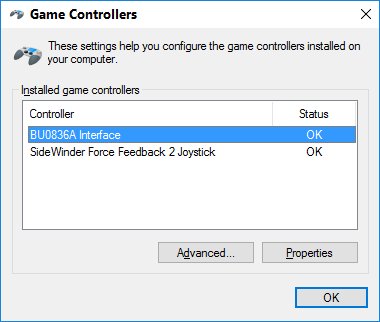
After installing 10, it would be cool if you could achieve the same sequence, as then there's much less fiddlin' with IL2 and all...
Also, check all 'other' hardware you have, printers, scanners, or whatever devices, whether they may/will need a Windows 10 driver, and if so, download it before you start installing.... well, you could postpone it until afterwards, but if you want to be prepared ...

One of the things i like on the Win 10 is return to "factory defaults". So ones windows get crazy i do factory def like on mobile phone. that's good thing about windows. Only thing we need to figure out is how backup important settings so when restored we don't restore old problems.
No matter how good the violin may be, much depends on the violinist.
So I've just re-installed following the instructions in the guide Gec linked in post #21 to move my users folder from my SSD (boot and OS drive) to one of the HDDs and it's worked like a charm - Very straight-forward and no issues found so far.
Gents, I've just spent the best part of 6 hours running Windows 7 backup, only for it to fail due to some random error at the last few %.
It's a trifle frustrating, that's for sure! I'm now 6 hours behind on my upgrade to Win10... Anyway, should I be using a different backup facility other than Windows? I've used other programs in the past, but that was a long time ago. Can anyone recommend a free program that they use? I've googled it and a few crop up quite a bit: AOMEI, EaseUS, Macrium...
Backing up data, I use the normal set of commands available.
Old ones. lol. Like xcopy. And/Or Robocopy 
Or just the copy/paste using Windows Explorer.
As you are saving the Windows 7 SSD - putting it aside-, why back it up at all?
It should be safe...
Was just thinking about starting as I mean to go on with a scheduled program. I am trying EaseUS now, seems to be well received.
Backing up everything from the win7 SSD as well just in case.
If this doesn't work out I will go back to basics for sure.
Thanks FT.
Scheduled programme for backups? Very organised <br /><br /><br />Sent from my iPhone using Tapatalk
If you have a 256GbSSD and a 128GbSSD - then how many light-bulbs  does it take to make an omelette?
No, that didn't come out right. What I mean is, how many SATA ports are there on your motherboard? I have about 4xSSDs at last count, as well as a terabyte or 3 of HDs for storage. Thus I can have games on an SSD - with the OS on another SSD. Maybe another for Linux? It's all just storage space, just some of it is a lot faster to read and write to.


Sign in to reply.


