
Fix For Running Il-2 When On High Desktop Scaling Like 125% Dpi

By FoolTrottel, Jul 14, 2016 in Help!!

Posted July 14, 2016

Here's a fix when running IL2 on higher than 100% desktop scaling (Display Settings, "Change the size of text, apps and other items")


Issue: The mouse pointer is either gone, or just clicks with an offset to the right and to the bottom. Very difficult to hit the button you want to hit ...


Fix: Change the properties of the 1946 desktop icon, switch on the 'Disable display scaling on high DPI settings'
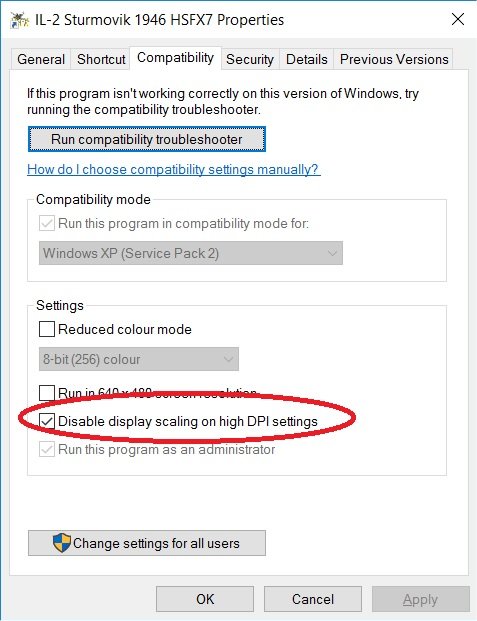
 

IL2-HighDPI.jpg


(IL2 1946 4.12.2m, HFSX v7.03, on Windows 10, not checked/tested for other versions)


post-947-0-75123100-1468492110_thumb.jpg

Like 1

DD-Signature.jpg

Posted July 14, 2016

Why? I'm not up to date on why you would want to run it like that.

Posted July 14, 2016

Well, if you eyes are getting a bit older, and your monitor size is growing, and you got like a 27" screen at 4K resolution, well... you will want to really see what you are looking at ...  icons and icon titles and texts and shift.


That's why you would want to run Windows at higher DPI scaling ... be sure!

DD-Signature.jpg

Posted December 28, 2016

Finally got round to sorting this once and for all, thanks for the tip FT!

PB & BB :salute:

Like 1

5927767033_c06f7facc9_z.jpg

gallery_440_79_23940.png

Sign in to reply.

