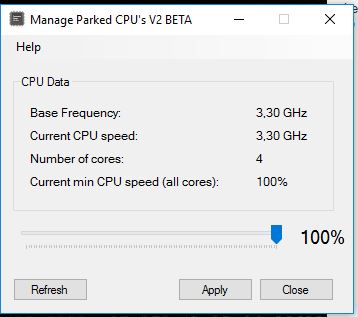
CPU parked cores

By Perfesser, Feb 9, 2017 in Gamers Hell

Posted February 9, 2017

Found this utility to unlock parked CPU cores, one click and I no longer get the 20 fps drop when in cloud..... sweet.

http://coderbag.com/Programming-C/CPU-core-parking-manager

Open Control Panel\All Control Panel Items\Performance Information and Tools\Advanced Tools  then open Resource Monitor.

All your cores should be displayed - see if any are marked as parked.

Like 1
Posted February 9, 2017 · edited Feb 9, 2017 by FoolTrottel

Parked? 

Me thinks one should simply setup your gaming rig as a gaming rig... More Power!

(Edit: this is without an changes to the slider)

Capture.JPG

Like 1

DD-Signature.jpg

Posted February 10, 2017

oooh, will check this out


5118544329_d4a72201d9_z.jpg

gallery_440_79_23940.png

Sign in to reply.