getting back into the game....been awhile,what version of teamspeak is being used nowadays?


By DD_Bucky, Oct 18, 2019 in Gamers Hell
getting back into the game....been awhile,what version of teamspeak is being used nowadays?
Ok great,thanks a lot guys...Ive now got the DDz public,and private servers working on TS.
Now to order a mic from amazon lol
I guess I should've sownloaded the overlay as well
36 minutes ago, DD_Bucky said:Ok great,thanks a lot guys...Ive now got the DDz public,and private servers working on TS.
Now to order a mic from amazon lol
I guess I should've sownloaded the overlay as well
Overlay? Not too sure - quality of TS3 is quite good so you can recognize them voices - quite different from TS2 ...

oh ok....I just remember being able to see who was on TS,and what channel etc....when ingame.
Ok,.....how come I don't see the "Settings" field to setup the "Push to talk" feature???I've downloaded TeamSpeak version 3.3.2.......is mine broken?? lol
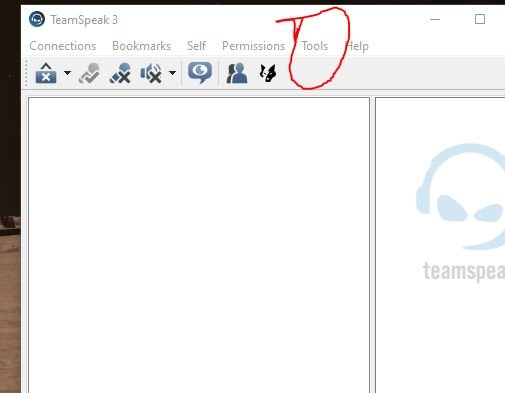
Nevermind,.....found it in the "Tools" tab.lol
Ugh....havin a heck of a time getting my mike/headset to work properly.The guys on TS only hear static and hum when I try to talk.
I'm stumped right now,...googled it and jus can't get it right.Frustrated I am lol
Go to the menu then on the drop down select options. select the key for PTT. then select the begin test button. Not sure if TS can use joystick buttons.
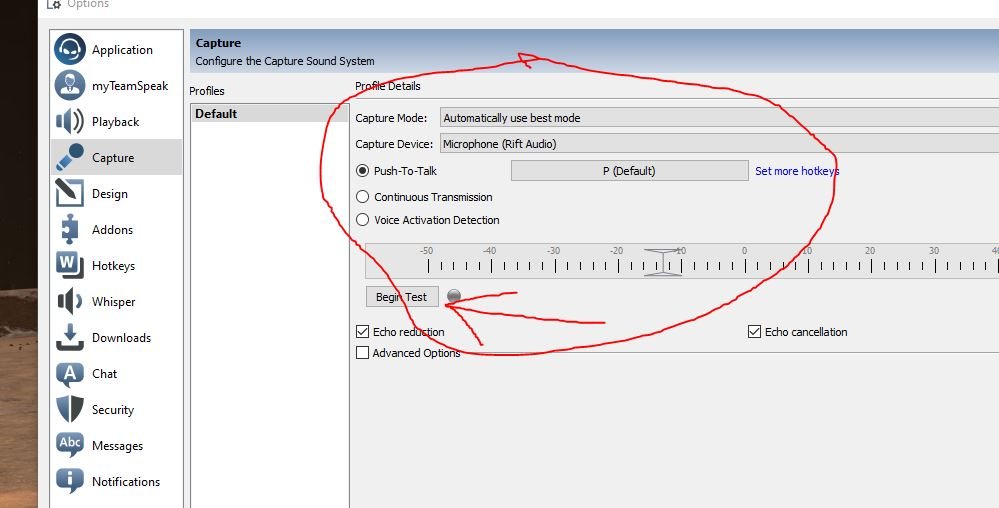


I got the push to talk working fine....its the hook up to the pc I'm having issues with.I have a 3.5mm jack type mic headset.Maybe I should get a usb type headset....
Have you got the TS config set to default input? maybe select the soundcard as input device in the TS settings.
Well guys havin a real heck of a time here....I don't understand it,Ive done this before,.... just been a really long time.
I've googled the heck out of this issue....maybe I need to use a usb headset.Never setup the mic on this computer.Got a friend coming over to see if he can help me lol.
Anyways,I'm still here,..and when U see my light come on in TS,..I can hear you guys....I'll use 1 flash for yes...2 flashes for no lol\
Sign in to reply.


 Got Great Battles yet?