After listening last night I think I need to make sure that I am making the best of what I have got.
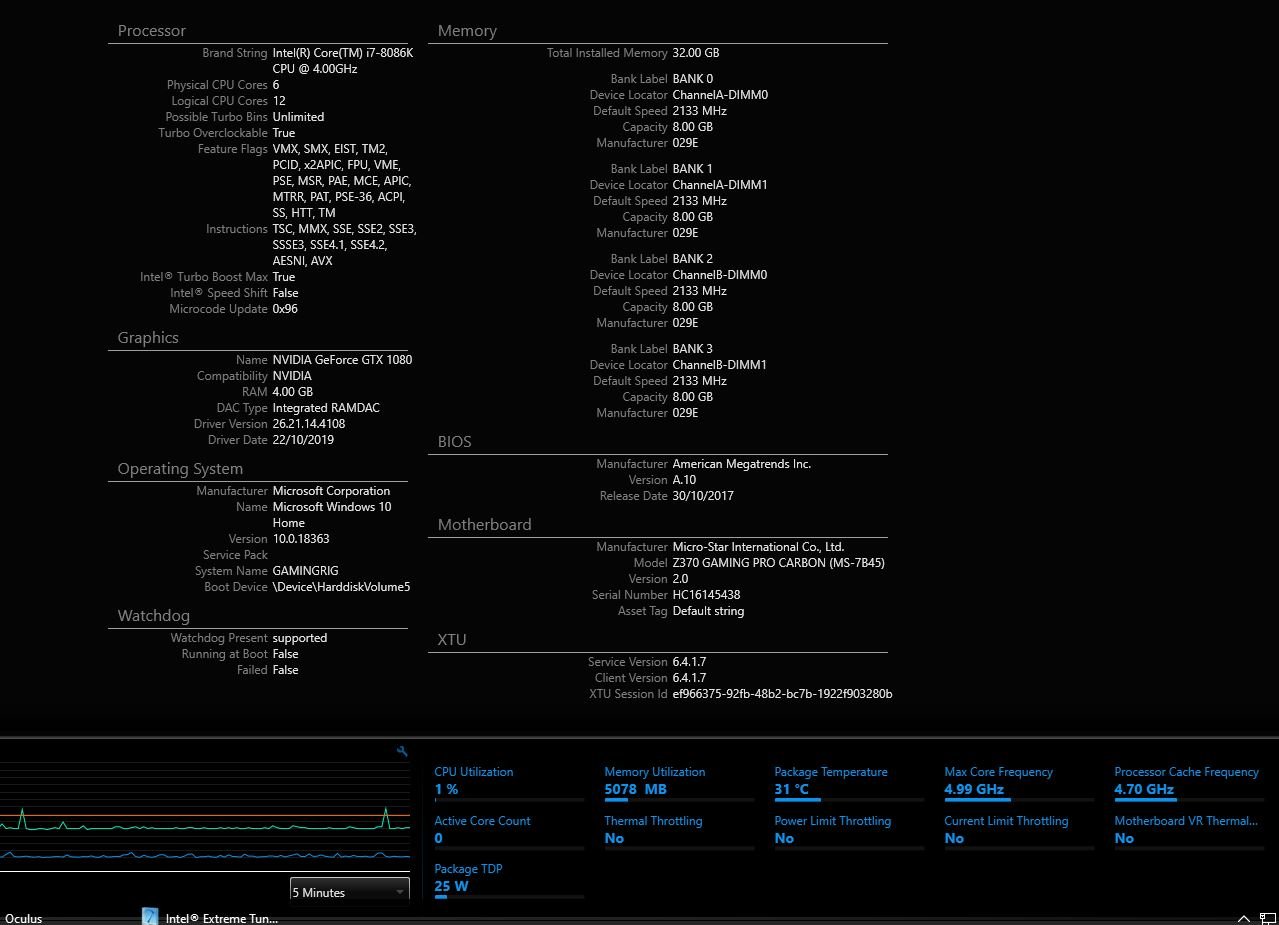
What do I need to do?



By Crash, Apr 29, 2020 in Hardware Hell
After listening last night I think I need to make sure that I am making the best of what I have got.
What do I need to do?
Thats a pretty good, right up there sort of system Crash. What kind of performance do you get in IL2 and what sort of a cooler have you got?

I get 45ish FPS and I use a Corsair water cooling set up with 2 fans on it. I followed a guide to overclock and set it to 5ghz but quite often it reports the speed as 4ghz. Kev was on about CPU settings but I am a bit slow following what he said about turbo and something else. The above report shown video ram as 4 gig but the card has 8 gig ddr5 so I dont know.
I use a couple of little apps to monitor and test things that you probably know about Crash;
https://www.cpuid.com/softwares/cpu-z.html
This is handy for stress testing your cpu to find out what it's doing.
https://www.alcpu.com/CoreTemp/
I watch the effect on temps and cpu speeds with this.
The CPU won't run at it's maximum all the time but will ramp up the speed as required. If you do the cpu stress test in cpu-z with core temps running you should be able to see this.
I'm still using my trusty Occulus CV1 too so I'll have a delve into what settings I'm running that on in IL2 later on and post 'em here.
Oh yeah, make sure Hyperthreading is disabled in bios whether you overclock or not. IL2 depends on the best single thread per core performance it can get and this makes an appreciable difference.
I cant find hyperthreading but I have got the memory speed to 3200 mhz so that should help  . There is a turbo boost button and one which runs this on all cores. I will do a bit more reserch
Found the hyperthreading and turned it off All cores set to run 5 ghz. Hopefully this will make it run better (but I dont really know what I am doing)
2 hours ago, Crash said:Found the hyperthreading and turned it off
Hey Crash, I think I am in a similar boat, though big difference is I am not in VR.
So, I have been tuning and trying to OC-as well due to this thread, went from 4.6Ghz (which my Pc has been running for a long time) up to 5GHz, but next back to Stock 4.3, as the only difference I saw was in temps, not in performance.... lol

Done a test on the quick mission and it seems to be a lot better now. However the game went into pause mode when I fired my guns, unpause and all is fine!
1 hour ago, Crash said:Done a test on the quick mission and it seems to be a lot better now. However the game went into pause mode when I fired my guns, unpause and all is fine!
Cools!
Check your settings, what key/button you've assigned to the Pause function... You will not be hindered by it online, because the game cannot be paused there...
3 hours ago, FoolTrottel said:So, I have been tuning and trying to OC-as well due to this thread, went from 4.6Ghz (which my Pc has been running for a long time) up to 5GHz, but next back to Stock 4.3, as the only difference I saw was in temps, not in performance.... lol
I don't think higher cpu clocks make that much difference after a certain level if you are driving a monitor. It might perhaps help in career missions where you can encounter lots of a.i. driven planes.
I recall on my old system getting over 3.6GhZ was what made a difference. Big, high-res. screen performance is obviously a gpu thing but for VR a high clock speed makes all the difference. Going from 4 upto 4.6 gives me an appreciable difference. As did turning off hyper-threading.
However, there is a lot that can be done in game too that really helps it along.
1 hour ago, DD_Arthur said:I don't think higher cpu clocks make that much difference after a certain level
That's certainly my view Arthur although that's from my position as a non-VR flier. I've never seen an appreciable difference in my applications other than a hotter CPU when running overclocked. Given that I prefer my CPUs untoasted, I rarely bother with it these days. My i7-9700K burbles along quite happily at its stock 3.6GHz but maybe that's more to do with the 8 cores rather than the CPU speed. That said, it does turbo quite nicely when needed - up to 4.9GHz so I'm told although I've never seen it go above 4.8. The biggest change I've seen in my rig since the swap to the i7 was the addition of a m.2 SSD where my windows installation, apps & games now live - very speedy indeed 

I'm pretty sure for BoS turning off hyper-threading makes a difference whether you are on a monitor or in VR.
It is possible, as the action of splitting one physical core into two virtual cores must incur some processing overhead somewhere. My old i5 had it but I never turned it off though as it didn't seem to matter. The i7 doesn't have it so I imagine it would outperform a hyper-threaded quad-core clock cycle for clock cycle.
Just had a quick test on the doggie server, temps didnt go much above 45 with a couple of 109s in a dogfight.
Sign in to reply.
