I thought I would start a thread for things you find out about the sim that you have only recently found out


I thought I would start a thread for things you find out about the sim that you have only recently found out
Salute,
Here is mine...
I have only just found out that there is another level of zoom (in the T34 anyway) when in gunsight view. It has come as a surprize to me after all this time and I know for a fact that two other Dogz were unaware as well so thought I would share it here.
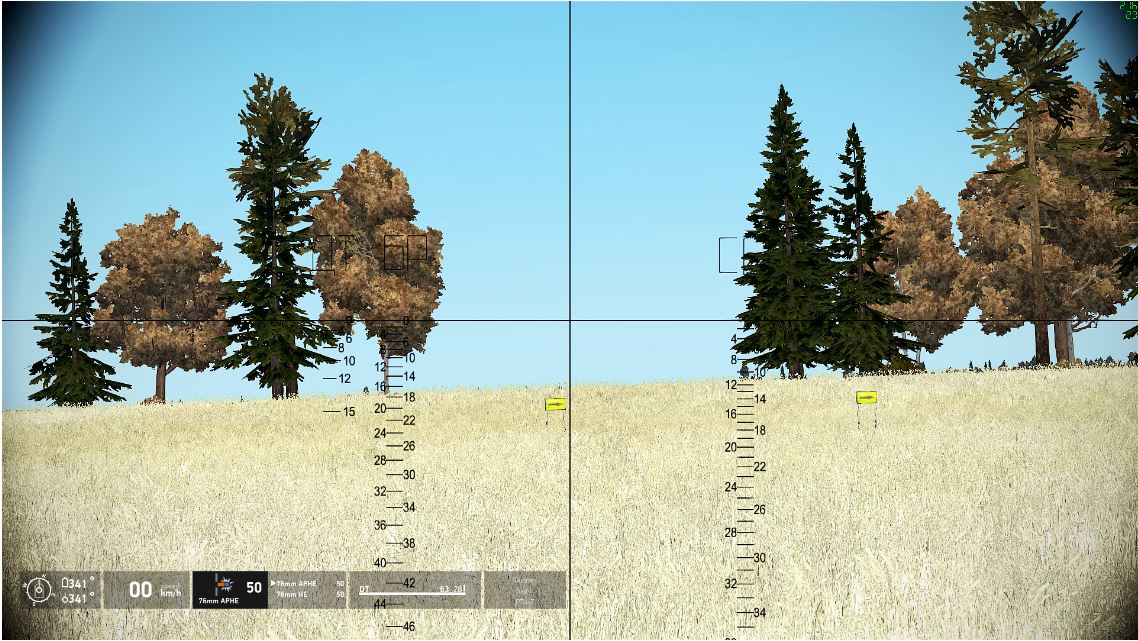
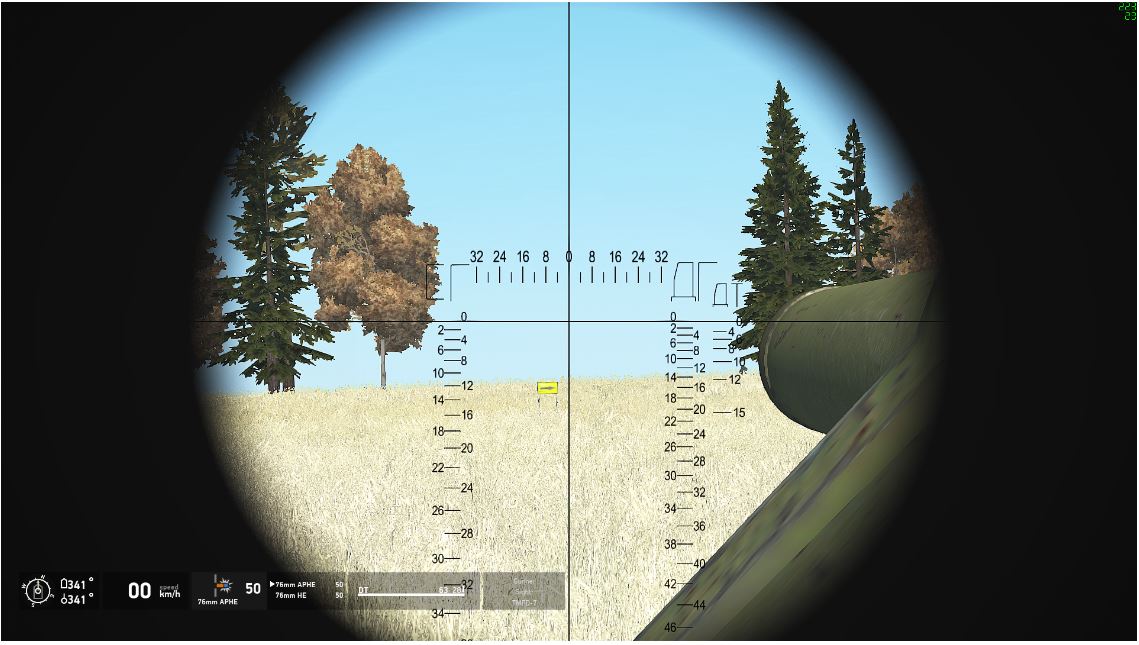
Below are two screen shots showing the maximum zoom I was achieving via the following key commands;
Start the game, sitting in drivers seat, then Left Ctrl + C to take up next position, Left Shift + C to "Nestle To Gunsight" and then press "Pilot head Zoom In". (Pic Zoom 1). That was as far as I thought it went.
My Eureka moment was a second pressing of the "Nestle to Gunsight" key that gets me the second image.
Note: I have not included the "Take Control" (default T) in this sequence to unlock the gun.
I use that two stage sight in the T34 with my normal “zoom” slider.
I can’t make any sense of the sighting arrangement in the ISU122, has anyone worked it out ?


1 hour ago, Painless said:I use that two stage sight in the T34 with my normal “zoom” slider.
I can’t make any sense of the sighting arrangement in the ISU122, has anyone worked it out ?
I think:
One crew member, number one, looks through the gun sight (the aimer). Another crew member, number two, adjusts the horizontal and vertical adjustments. The aimer tells number two how much he should adjust. A third crew member fires the shot (or, any of the crew except the aimer). A fourth man loads the cannon. There may also be a fifth crew member depending on how many projectiles are taken. I think the tank is best used by having live crew working together.
My 5c

Fly High The Swedish Way!

I wouldnt like the SU-122. Is it me or is the gunner set up pants? Tried to use it eventually realised I had to open the visor and then when I fired a shot the whole thing went up in flames 


1 hour ago, Crash said:I wouldnt like the SU-122. Is it me or is the gunner set up pants? Tried to use it eventually realised I had to open the visor and then when I fired a shot the whole thing went up in flames
I’ve not managed to work it out yet! There must be a way and when I get time I’ll play with it until I know how to work it.
1 hour ago, Crash said:I wouldnt like the SU-122. Is it me or is the gunner set up pants? Tried to use it eventually realised I had to open the visor and then when I fired a shot the whole thing went up in flames
Do not fire that gun when you're in an embankment on the range ... 

Mind Blown.....
https://forum.il2sturmovik.com/topic/55987-commander-periscope-in-t-3476/
Apparently, this operates separately from the turret
At just after 4:18 he uses the periscope !

Not yet, but found this....
https://forum.il2sturmovik.com/topic/60151-these-tanks-have-functioning-periscopes/
How to use the Periscope...
T34
From gunners position
Left Shift + T to look down the sight then Left Shift + T again. Originally I thought that this was just a more zoomed in view.
When in this view use "Visor Horizontal Adjustment" My key settings which I think are default is Right Shift + , (comma) and Right Shift + / to swing left and right.
You will see in the top right of the screen the number of degrees you have moved the sight from the original point.
To re-set back to the centre (I assume where the barrel is pointing) "Reset Visor" Right Shift + ' (apostrophe)
M4A Sherman
From Commanders position (closed hatch)
Left Shift + V (Nestle to visor)
Right Shift + , (comma) and Right Shift + / to swing left and right
Right Shift + ; (semi colon) and Right Shift + . (full stop/period) to move up and down
To re-set back to centre - Right Shift + ' (apostrophe)
Panzer IV
From commanders position (closed hatch)
No periscope but Left Shift V gets close to the visor. Then repeating Left Shift + V moves clockwise around the turret to the other windows at right, right rear, left rear, left, front.
 2
All about the periscope chaps!
https://forum.il2sturmovik.com/topic/60151-these-tanks-have-functioning-periscopes/
What about this one ? ........
https://forum.il2sturmovik.com/topic/60151-these-tanks-have-functioning-periscopes/ 😉😁
1
Use of Binoculars in Sherman and German Tanks (and to some extent the T34 as well)
I have long had a niggle with using the above and have this afternoon found a solution.
The problem is that the starting position for your head when engaging bins in the Sherman and the Panzers (well what I have found anyway using TrackIR ) is looking down about 110degrees.
To get them looking straight ahead my actual head is looking up and I am having to look down my nose for the horizonal. This has been causing my real head to move thus making the bins being magnified, unsteady.
The solution I have found is to map a key to Pause the TrackIR after selecting the bins. I can then use the mouse to move them around giving me a rock steady view.
When I have finished using them I put them away and un-pause TrackIR.
This is proving to be a very nice solution to my problem (for me anyway).
On 2/7/2021 at 1:35 PM, Painless said:What about this one ? ........
https://forum.il2sturmovik.com/topic/60151-these-tanks-have-functioning-periscopes/ 😉😁
oil covered semi flexible thin metal rod!
 1
Sign in to reply.