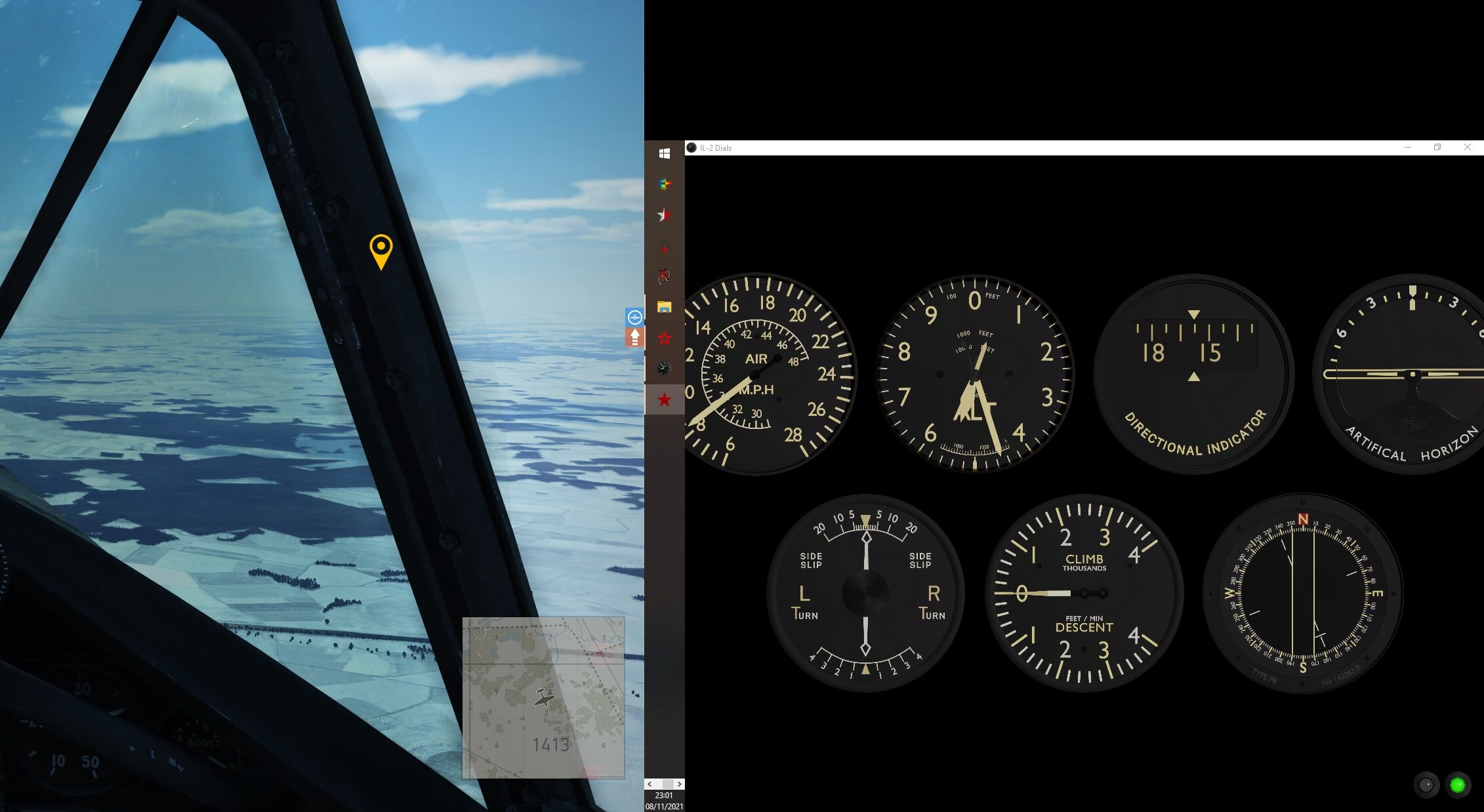
Instrument dials on second monitor....it works!!

By Sid, Nov 8, 2021 in IL-2 Sturmovik: Great Battles Series

Posted November 8, 2021 · edited Mar 15, 2023 by Sid

I have been trying this utility here https://forum.il2sturmovik.com/topic/71086-il-2-dials-instrument-panel-app/?tab=comments#comment-1138624

It works on my second monitor very well. I have been wanting to do this for ages...looks like Jason approves because he has pinned it....

This is a screenshot of my desktop showing the dials as I see them, off to the right of my main monitor. The maker is ironing out bugs and then he will look to including engine management dials. Great stuff...clever chap :)

working dials.jpg

Like 3

large.a_aniahco.GIFbeaufightersig.JPG


Posted November 8, 2021

That looks great! A great aid to my failn' old eyeballs. Thanks for the tip 'ole bean.

Like 1

 gallery_440_79_39944.png
Democracy is two wolves and a lamb voting on what to have for dinner. Liberty is an armed lamb.

Posted November 9, 2021 · edited Nov 9, 2021 by Sid

Once I had asked a couple of questions and sussed out a couple of things the installation is a breeze.

Download the 'Windows Server' and the 'Windows Client' from the links.

Install the server, I put it on a drive of my choosing, and it creates a folder called 'IL-2 Dials' and a desktop shortcut.

Unzip the client to the 'IL-2 Dials'  folder (I got rid of one of the folders that are unzipped and brought the files up a folder level...might not need to do it but it's me tidying up)

I created a desktop shortcut of the 'IL-2 Dials' application found in the client folder.

Run the server. Click on the settings icon in the bottom left corner and tick the 'Local Client (IP 127.0.0.1). This needs to be done if you are using the two screens on the same computer.

Run the client. Tick the 'Don't show me again' reminder about downloading the server, click on the bars at the bottom and click the wireless button. Where it says 'Automatic Scan' enter in 127.0.0.1. Drag the box onto the second screen.

That's the setting up done. Run the game. When you start a mission, actually flying, the gauges appear in the client box.

Away you go!

 

Thanks 2

large.a_aniahco.GIFbeaufightersig.JPG


Posted November 14, 2021

Cool I used to do that with Clod

Posted November 23, 2021

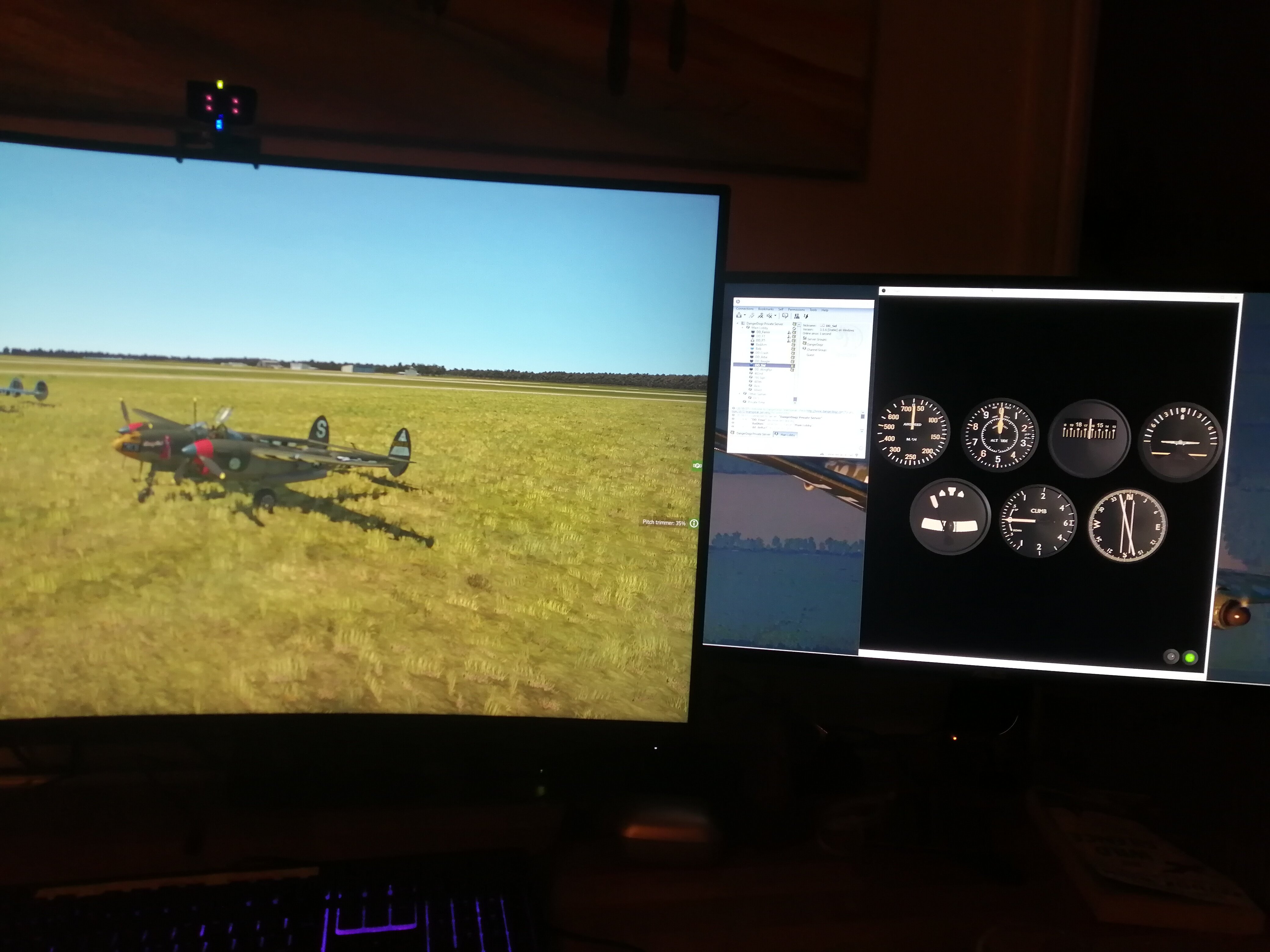
I really like the dials on a second monitor. Can be put on an Android too. Looking forward to the engine management dials being usable.

IMG_20211123_224013.jpg

Like 1

large.a_aniahco.GIFbeaufightersig.JPG


Posted January 28, 2022

Bump!

Engine RPM gauges included in update.

large.a_aniahco.GIFbeaufightersig.JPG


Posted February 19, 2022 · edited Jun 12, 2022 by Patricks


BLorg (IL-2 Dials author) has a Discord set up to answer any questions - https://discord.gg/eXS7sM4y


Aerocool Mid-tower, Gigabyte Z390 Master MB w/F11 BIOS, EVGA 1000w PS, Intel i9-9900K @5.0Gz  - Nfortec Hydrus V2 Liquid CPU cooler - Noctua NT-H2, 64GB Corsair Vengeance DDR4 @3192mhz
1TB M.2 Crucial Boot Drive (IL2 GBS installed here), 1TB M.2 Data drive, Zotac Gaming GeForce RTX 3090 Trinity OC 24GB - Nvidia 516.40 drivers, 3 Samsung LC32G53TQWUXEN 32" curved 7680x1440 at 144Hz, 2 8" Lilliputs, Win11 Pro Ver.  22H2 - Build 22621.160
TIR 5, TM Warthog HOTAS\VirPil stick base, MFG V3 Pedals, TM MFDs, SimGears ICP

Posted June 11, 2022 · edited Jun 11, 2022 by Sid

Pleased to say that this very very useful programme is working great. Mossie dials added and WW1 aircraft included now too. Temperature gauges are next to be added in the future. Thoroughly recommend this if you have the space for it.

large.a_aniahco.GIFbeaufightersig.JPG


Posted June 11, 2022
30 minutes ago, Sid said:

Pleased to say that this very very useful programme is working great. Mossie dials added and WW1 aircraft included now too. Temperature gauges are next to be added in the future. Thoroughly recommend this if you have the space for it.

I believe Blorg has included internal hooks to the WWI aircraft gauges but has not done any gauges yet (not sure if he ever will). The Boost gauges in the Mossie don't work, he states he may fix them later today... 

Aerocool Mid-tower, Gigabyte Z390 Master MB w/F11 BIOS, EVGA 1000w PS, Intel i9-9900K @5.0Gz  - Nfortec Hydrus V2 Liquid CPU cooler - Noctua NT-H2, 64GB Corsair Vengeance DDR4 @3192mhz
1TB M.2 Crucial Boot Drive (IL2 GBS installed here), 1TB M.2 Data drive, Zotac Gaming GeForce RTX 3090 Trinity OC 24GB - Nvidia 516.40 drivers, 3 Samsung LC32G53TQWUXEN 32" curved 7680x1440 at 144Hz, 2 8" Lilliputs, Win11 Pro Ver.  22H2 - Build 22621.160
TIR 5, TM Warthog HOTAS\VirPil stick base, MFG V3 Pedals, TM MFDs, SimGears ICP

Posted June 11, 2022
2 hours ago, Patricks said:

I believe Blorg has included internal hooks to the WWI aircraft gauges but has not done any gauges yet (not sure if he ever will).

Ooooo.....they were there in my Pfalz this morning....4 of them, all working ;)

large.a_aniahco.GIFbeaufightersig.JPG


Posted June 12, 2022
On 6/11/2022 at 3:34 PM, Sid said:

Ooooo.....they were there in my Pfalz this morning....4 of them, all working ;)

Ahhh, ok. He tossed in 4 "generic" WWII gauges as placeholders. I've asked him to see if he can get them to "save" as you can't resize or move them around the way its set up. that and the RPM gauge is fairly useless as the gradations are much too high. What he/we need is a 3D artist to do the WWI gauges as they are quite lovely, would look and function correctly.. he is too busy with the WWII dials and life in general at this point..

Aerocool Mid-tower, Gigabyte Z390 Master MB w/F11 BIOS, EVGA 1000w PS, Intel i9-9900K @5.0Gz  - Nfortec Hydrus V2 Liquid CPU cooler - Noctua NT-H2, 64GB Corsair Vengeance DDR4 @3192mhz
1TB M.2 Crucial Boot Drive (IL2 GBS installed here), 1TB M.2 Data drive, Zotac Gaming GeForce RTX 3090 Trinity OC 24GB - Nvidia 516.40 drivers, 3 Samsung LC32G53TQWUXEN 32" curved 7680x1440 at 144Hz, 2 8" Lilliputs, Win11 Pro Ver.  22H2 - Build 22621.160
TIR 5, TM Warthog HOTAS\VirPil stick base, MFG V3 Pedals, TM MFDs, SimGears ICP

Posted June 20, 2022

New version .54 out, Blorg fixed the Mossie Boost, added some temp gauges, etc..

Like 1

Aerocool Mid-tower, Gigabyte Z390 Master MB w/F11 BIOS, EVGA 1000w PS, Intel i9-9900K @5.0Gz  - Nfortec Hydrus V2 Liquid CPU cooler - Noctua NT-H2, 64GB Corsair Vengeance DDR4 @3192mhz
1TB M.2 Crucial Boot Drive (IL2 GBS installed here), 1TB M.2 Data drive, Zotac Gaming GeForce RTX 3090 Trinity OC 24GB - Nvidia 516.40 drivers, 3 Samsung LC32G53TQWUXEN 32" curved 7680x1440 at 144Hz, 2 8" Lilliputs, Win11 Pro Ver.  22H2 - Build 22621.160
TIR 5, TM Warthog HOTAS\VirPil stick base, MFG V3 Pedals, TM MFDs, SimGears ICP

Posted March 15, 2023

Huge array of realistic working gauges....I think fuel are next :)

large.a_aniahco.GIFbeaufightersig.JPG


Posted March 15, 2023

Good idea, but in VR I have to use the ones we are given.

image.png

siggy.jpg

Posted March 15, 2023

Yep, not for VR

large.a_aniahco.GIFbeaufightersig.JPG


Posted April 5, 2023

Got this working today , very neat

Bf-109-Red-7-D-FWME-300x200.jpg

Posted April 5, 2023
On 3/15/2023 at 12:25 PM, Sid said:

Yep, not for VR

In VR I can actually see/read my gauges quite well, in 2D some are quite hard to see even with TIR5. Its a fantastic aid for 2D, now up to version .63, just hope the latest update(s) didn't mess anything up..

Aerocool Mid-tower, Gigabyte Z390 Master MB w/F11 BIOS, EVGA 1000w PS, Intel i9-9900K @5.0Gz  - Nfortec Hydrus V2 Liquid CPU cooler - Noctua NT-H2, 64GB Corsair Vengeance DDR4 @3192mhz
1TB M.2 Crucial Boot Drive (IL2 GBS installed here), 1TB M.2 Data drive, Zotac Gaming GeForce RTX 3090 Trinity OC 24GB - Nvidia 516.40 drivers, 3 Samsung LC32G53TQWUXEN 32" curved 7680x1440 at 144Hz, 2 8" Lilliputs, Win11 Pro Ver.  22H2 - Build 22621.160
TIR 5, TM Warthog HOTAS\VirPil stick base, MFG V3 Pedals, TM MFDs, SimGears ICP

Sign in to reply.