
I am too embarrassed to post mine
Aww c'mon Crash. Nobody's gonna poke fun at you. Not everyone can afford a high end comp. Heck' date=' I'm using old workstations from 2004 that I'm upgrading. I sure can't afford one of those new whizbang comps. Plus don't forget that what is blazingly fast today will be putting along in a couple of years. I remember when I bought my Pentium 100 mhz comp. That was back when Windows newest release was Windows for Workgroups 3.1.1
I had the hottest thing going for about 3 months.
[/quote']
You got that right and just remember that video card you paid 500 dollars for, I'll pick one up next year for $150 bucks or less. It all boils down to usability. Most stuff is so over priced when it first comes out it's ridiculous. And to be honest with you all the faster processing power does is allow the programmer more leeway as far as writing crappy or unoptimized code is concerned. I usually stay about 1.5 to 2 years behind state of the art especially in video card land and not only is my gaming experience fantastic, but my wallet thanks me. Then you can sell your vid card on ebay for a good price and upgrade for a few extra dollars on top of that. If you want to stay on the bleeding edge (which you really can't do because new products come out almost weekly) it's going to cost you a fortune and the manufactures are more the willing to rape you for keeping up with the Jones so to speak. Not saying there is anything wrong with getting the latest card or processor if you want to treat yourself but you have to admit it kind of hits you in the gut when you see the card you payed 500 buck for going for 300 a few months later.
PassMark Performance Test Results
By Jabo, Jan 1, 2009 in Hardware Hell
Hi Dep' date=' been doing some googling, there is no point in putting 16Gb of RAM in that Xeon unit of yours. 8Gb is all that Vista is capable of detecting (64 bit), and going above that will probably make matters worse as Vista will try and address the additional but make a hash of it and will wind up slowing the machine down. I suggest you go to 8Gb if you must, but save the cash on the additional memory and put it towards your graphics card.
~S~ Jabo
P.S. Need to look into overclocking now as must find a way to beat Jim...
[/quote']
Actually, I am not using VISTA. I am using Windows XP Pro 64 bit. And it DOES recognize the RAM. As a matter of fact, 128 GIG is the maximum RAM you can use that will be recognized by XP Pro 64 bit. But I don't think I need that much RAM. 8 GIG would probably be sufficient for my needs. But it's awfully tempting to go for the max
I tried 64 bit XP and it actually made all my programs run slower because of the extra step down that has to be done. Inside the OS like doing desktop tasks seemed a bit snappier but that was all. When I build my last machine I put 64 in it first and was thinking what a dog. Battlefield 2 ran like crap among other things. Then I popped in 32 bit and the machine just came alive. Everything from that point on ran like a scalded dog and not a lazy one. Of course this might change with 64 bit apps but you'd be better of going with Win 7 then so you can take advantage of DX11 along with the other optimizations for newer technologies and code. Everything is now being designed to run optimally on 7.


Good score Sid. Just as a matter of interest, I compared our individual scores and found something interesting.
Sid Jim
Passmark rating 1714 1705
CPU Mark 6654 4480
2D Graphics 359 426
3D Graphics 1013 2695
Memory Mark 1812 969
Disk 567 761
CD 88 195
You have a 3gb Quad which I assume is Intel and I use a 3.4gb AMD quad. I suspect you are using 6 or 8gb of RAM while I am using 4gb.
Anyone care to comment about the CPU difference?
Sorry, I tried to line up the columns but it doesn't work?
Close, aren't they, but it's interesting to see how the scores are made up and compare.
Yes, it is an Intel i7 and I'm running 6gb of 'Crucial' RAM. The graphics cards are a huge difference, your ATI is a beast and my Nvidia 460 is a slightly oc'd mid-range.


Aren't those bars supposed to be green, Sid? 
Three rules for any forced landing:
1. Don't stall.
2. Don't ever stall
3. Don't never ever stall.
Interesting.
My result with a stock PhenomII x2 (2 cores unlocked so an x4 now):
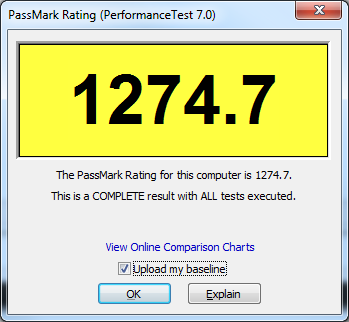
Detail:
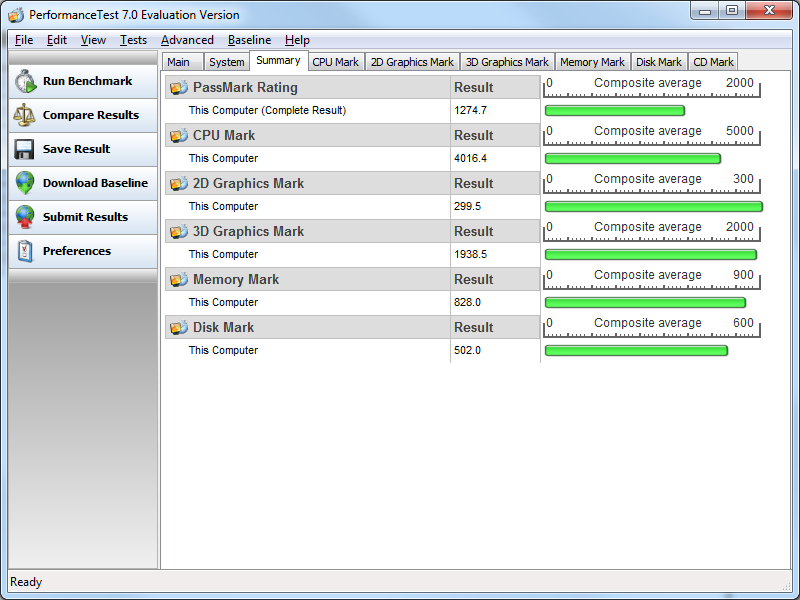
No over clocking, and I can see my CPU and RAM (can't remember brand but it's running at a paltry 667MHz  ) are holding things back.
Pleased to see the 1024 HD4870 has some life in it yet though!
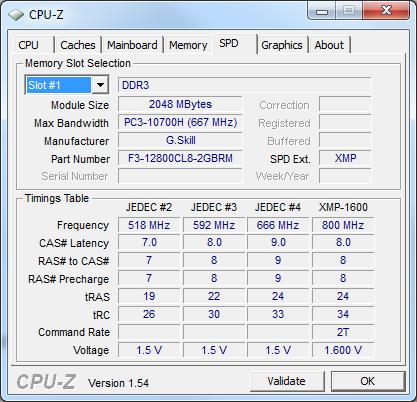
OK my RAM is G.Skill and rated for 800MHz, not sure why I didn't get it running at it's optimum speed...
Me thinks there may be some fettling to do 


Well heres what my Frankensmash (my compys name bahahaha) is getting on that benchmark software.
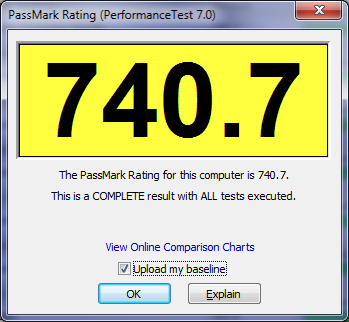
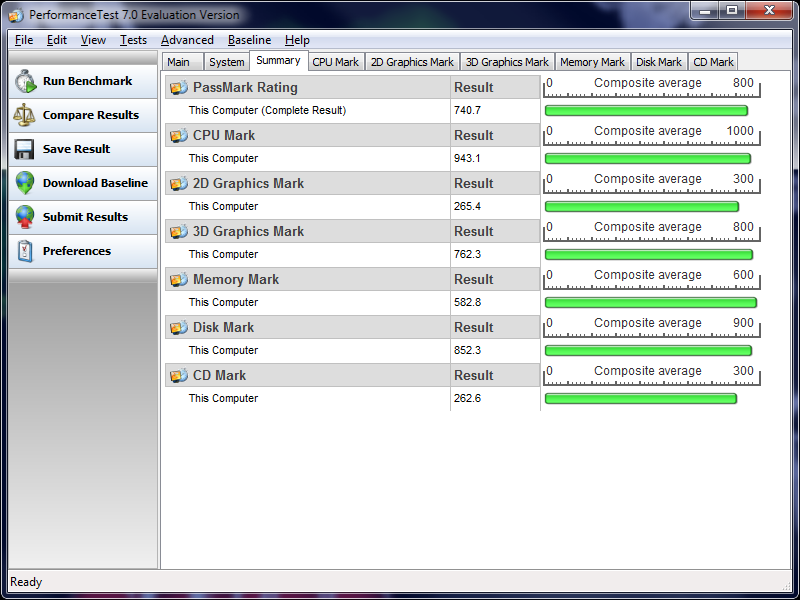

AAwwhh yeah perfect graphics.
Sign in to reply.