Fooltrottle or any other Nvidea owner

By T_O_A_D, Aug 2, 2009 in Hardware Hell

Posted August 2, 2009

I just installed a 260 GTX this week.

http://accessories.us.dell.com/sna/products/Graphics_Cards/productdetail.aspx?c=us&l=en&s=bsd&cs=04&sku=A2383034&dgc=BF&cid=7421&lid=197378

After rebate, and coupon:1B0MP6701R759C it only cost me $130ish with tax pretty good deal.

I've been running a ATI 1950 pro, and have been with ATI cards for over 6 years.

I'd like to know your settings, for the cards, and the config.ini

Posted August 2, 2009

It's been some time since I've been using an ATI card, but you could very well be right, ATI may still have the better image quality...

Sounds like a good deal, $130, I paid a lot more a few months ago, EUR 188,=

Here's my settings, based on a balance between performance and IQ... (GTX260 Core 216, Intel C2D E6600@2.4Ghz)

Conf.ini:

[Render_OpenGL]

TexQual=3

TexMipFilter=3

TexCompress=0

TexFlags.UseDither=1

TexFlags.UseAlpha=0

TexFlags.UseIndex=0

TexFlags.PolygonStipple=0

TexFlags.UseClampedSprites=0

TexFlags.DrawLandByTriangles=0

TexFlags.UseVertexArrays=1

TexFlags.DisableAPIExtensions=0

TexFlags.ARBMultitextureExt=1

TexFlags.TexEnvCombineExt=1

TexFlags.SecondaryColorExt=1

TexFlags.VertexArrayExt=1

TexFlags.ClipHintExt=0

TexFlags.UsePaletteExt=0

TexFlags.TexAnisotropicExt=1

TexFlags.TexCompressARBExt=1

TexFlags.TexEnvCombine4NV=1

TexFlags.TexEnvCombineDot3=1

TexFlags.DepthClampNV=1

TexFlags.SeparateSpecular=1

TexFlags.TextureShaderNV=1

HardwareShaders=1

Shadows=2

Specular=2

SpecularLight=2

DiffuseLight=2

DynamicalLights=1

MeshDetail=2

VisibilityDistance=3

Sky=2

Forest=2

LandShading=3

LandDetails=2

LandGeom=3

;LandGeom=2

TexLarge=1

TexLandQual=3

TexLandLarge=1

VideoSetupId=17

Water=4

Effects=1

ForceShaders1x=0

PolygonOffsetFactor=-0.15

PolygonOffsetUnits=-3.0

Using Nvidia driver: 190.38_desktop_winxp_32bit_english_whql.exe

DD-Signature.jpg

Posted August 2, 2009

TOAD,

I used to have a 8800GT and used these settings found in this thread..

http://www.dangerdogz.com/forums/index.php/topic,3982.msg33097.html#msg33097

They may help.

But now I've recently (3 weeks) got a 275 GTX installed. After using the same settings for the 8800GT, I was getting around 14FPS on those perfect setttings!?

Posted August 2, 2009

Not sure whether this is odd or not, as I get around 70fps in full perfect on my 9800GTX - is it really that much faster than an 8800? Especially as I have a much slower CPU

Jabo

new sig copy.jpg

Posted August 2, 2009

GK, I'm not sure of your OS mine is XPpro 32 I had to use driver cleaner and get rid of all the ATI and Nvidia drivers and reboot and reinstall to get mine to work.

Well since this post this morning, I had adjusted mine to this, and it's gorgeous.

AMD 3700+ Single core

2 gigs 3200 ram

Going to run Black death and post the results shortly

IL2profile.jpg

[il2]

title=Il2-Sturmovik Forgotten Battles

hotkeys=HotKey game

[window]

width=1600

height=1200

ColourBits=32

DepthBits=24

StencilBits=8

ChangeScreenRes=1

FullScreen=1

DrawIfNotFocused=1

EnableResize=0

EnableClose=1

SaveAspect=1

Use3Renders=0

[GLPROVIDER]

GL=Opengl32.dll

[GLPROVIDERS]

Open GL=Opengl32.dll

DirectX=dx8wrap.dll

[NET]

speed=5000

routeChannels=0

serverChannels=19

localPort=21000

remotePort=21000

SkinDownload=1

serverName=TOAD'S House

serverDescription=

remoteHost=friar.servegame.org

localHost=

socksHost=

checkServerTimeSpeed=1

checkClientTimeSpeed=0

[MaxLag]

farMaxLagTime=10.0

nearMaxLagTime=2.0

cheaterWarningDelay=5.0

cheaterWarningNum=-1

[chat]

region=(dx=0.9902344,dy=0.109375,x=-9.765625E-4,y=0.0)

adr0=ALL

msg6=\u0020

adr1=MY_ARMY

msg2=\u00205\u0020lof\u0020them\u0020and\u0020no\u0020TIR\u0020:(

msg9=

msg3=\u0020\u002034\u0020now\u0020

msg1=\u002010\u0020oc\u0020low\u0020

adr5=Server

msg7=

msg8=

[game]

Arcade=0

HighGore=0

mapPadX=0.29003906

mapPadY=0.46354166

viewSet=53

Intro=0

NoSubTitles=1

NoChatter=0

NoHudLog=0

NoLensFlare=0

iconTypes=3

eventlog=eventlog.lst

eventlogkeep=0

3dgunners=1

ClearCache=0

[HotKey game]

PrintScreen=ScreenShot

P=pause

Pause=pause

[HotKey gui]

Escape=activate

[HookViewFly Config]

timeFirstStep=2.0

deltaZ=10.0

[HookView]

MouseLeft=Len

[HookView Config]

AzimutSpeed=0.1

TangageSpeed=0.1

LenSpeed=1.0

MinLen=1.0

DefaultLen=20.0

MaxLen=3000.0

Speed=6

[HotKey builder]

MouseLeft=objectMove

MouseRight=popupmenu

Enter=freeView

Shift MouseLeft=worldZoom

Alt MouseLeft=select+

Alt MouseRight=select-

Alt Ctrl=unselect

PageDown=change+

PageUp=change-

End=change++

Home=change--

Ctrl MouseLeft=insert+

Insert=insert+

NumPad-0=insert+

F=fill

Ctrl MouseRight=delete+

NumPad.=delete+

Delete=delete+

Backspace=cursor

Tab=cursor

F10=land

F11=onLand

NumPad-=normalLand

NumPad+=toLand

NumPad-5=resetAngles

NumPad-8=resetTangage90

NumPad-7=stepAzimut-5

NumPad-4=stepAzimut-15

NumPad-1=stepAzimut-30

NumPad-9=stepAzimut5

NumPad-6=stepAzimut15

NumPad-3=stepAzimut30

[MouseXYZ]

F1=SpeedSlow

F2=SpeedNormal

F3=SpeedFast

MouseRight=XYmove

F4 MouseRight=Zmove

MouseMiddle=Amove

F5 MouseRight=Amove

F6 MouseRight=Tmove

F7 MouseRight=Kmove

[MouseXYZ Config]

RealTime=1

[HotKey Console]

Shift Tab=Activate

[Console]

HISTORY=1024

HISTORYCMD=1024

LOAD=console.cmd

SAVE=console.cmd

LOG=0

LOGTIME=0

LOGFILE=log.lst

LOGKEEP=0

[sound]

SoundUse=1

SoundEngine=1

Speakers=4

Placement=0

SoundFlags.reversestereo=0

RadioFlags.Enabled=1

RadioEngine=2

MusicVolume=0

ObjectVolume=11

MusState.takeoff=0

MusState.inflight=0

MusState.crash=0

MusFlags.play=0

MasterVolume=11

Attenuation=7

SoundMode=0

SamplingRate=2

NumChannels=2

SoundExt.occlusions=0

SoundFlags.hardware=1

SoundFlags.streams=1

SoundFlags.duplex=1

SoundExt.acoustics=0

SoundExt.volumefx=0

SoundFlags.voicemgr=0

SoundFlags.static=1

VoiceVolume=2

Channels=2

SoundExt.extrender=0

SoundFlags.bugscorrect=0

SoundSetupId=8

ActivationLevel=0.02

Preemphasis=0.85

RadioLatency=0.5

AGC=1

PTTMode=1

SoundFlags.UseRadioChatter=0

SoundFlags.AutoActivation=0

RadioFlags.PTTMode=1

RadioFlags.PlayClicks=1

ActLevel=14

MicLevel=14

SoundFlags.forceEAX1=0

[rts]

;ProcessAffinityMask=1

mouseUse=2

joyUse=1

trackIRUse=1

DisableIME=0

locale=

[rts_mouse]

SensitivityX=1.0

SensitivityY=1.0

Invert=0

SensitivityZ=1.0

[rts_joystick]

X=0 1 4 9 16 25 36 49 64 81 100 0

Y=0 1 4 9 16 25 36 49 64 81 100 0

Z=0 10 20 30 40 50 60 70 80 90 100

RZ=0 10 20 30 40 50 60 70 80 90 100 0

FF=0

U=0 10 20 30 40 50 60 70 80 90 100 0

V=0 10 20 30 40 50 60 70 80 90 100 0

1X=0 59 64 70 73 76 83 87 90 94 100 0

1Y=0 78 81 84 86 89 91 93 94 97 100 0

1RZ=0 10 20 30 41 50 60 70 80 90 100 0

1U=0 100 100 100 100 100 100 100 100 100 100 0

1V=0 100 100 100 100 100 100 100 100 100 100 0

1X1=0 100 100 100 100 100 100 100 100 100 100 0

1Y1=0 0 0 20 40 50 60 70 80 90 100 0

1Z1=0 0 8 19 29 39 51 62 75 86 100 0

1X2=0 100 100 100 100 100 100 100 100 100 100 0

1Y2=0 100 100 100 100 100 100 100 100 100 100 0

1RX2=0 10 20 30 40 50 60 70 80 90 100 0

1RZ2=0 100 100 100 100 100 100 100 100 100 100 0

1U2=0 100 100 100 100 100 100 100 100 100 100 0

1V2=0 10 20 30 40 50 60 70 80 90 100 0

1RX1=0 30 30 30 30 30 30 30 30 30 30 0

1U1=0 10 20 30 40 50 60 70 80 90 100 0

1RY1=0 100 100 100 100 100 100 100 100 100 100 0

1RZ1=0 100 100 100 100 100 100 100 100 100 100 0

1Z2=0 100 100 100 100 100 100 100 100 100 100 0

1X3=0 100 100 100 100 100 100 100 100 100 100 0

1Y3=0 100 100 100 100 100 100 100 100 100 100 0

1RX3=0 100 100 100 100 100 100 100 100 100 100 0

1RZ3=0 100 100 100 100 100 100 100 100 100 100 0

1U3=0 100 100 100 100 100 100 100 100 100 100 0

1V3=0 100 100 100 100 100 100 100 100 100 100 0

[Render_DirectX]

TexQual=3

TexMipFilter=2

TexCompress=0

TexFlags.UseDither=1

TexFlags.UseAlpha=0

TexFlags.UseIndex=0

TexFlags.PolygonStipple=1

TexFlags.UseClampedSprites=0

TexFlags.DrawLandByTriangles=1

TexFlags.UseVertexArrays=1

TexFlags.DisableAPIExtensions=0

TexFlags.ARBMultitextureExt=1

TexFlags.TexEnvCombineExt=1

TexFlags.SecondaryColorExt=1

TexFlags.VertexArrayExt=1

TexFlags.ClipHintExt=0

TexFlags.UsePaletteExt=0

TexFlags.TexAnisotropicExt=0

TexFlags.TexCompressARBExt=1

TexFlags.TexEnvCombine4NV=1

TexFlags.TexEnvCombineDot3=1

TexFlags.DepthClampNV=1

TexFlags.SeparateSpecular=1

TexFlags.TextureShaderNV=1

HardwareShaders=0

Shadows=2

Specular=2

SpecularLight=2

DiffuseLight=2

DynamicalLights=1

MeshDetail=2

VisibilityDistance=3

Sky=2

Forest=2

LandShading=3

LandDetails=2

LandGeom=2

TexLarge=1

TexLandQual=3

TexLandLarge=1

VideoSetupId=4

ForceShaders1x=0

PolygonOffsetFactor=-0.15

PolygonOffsetUnits=-3.0

[Render_OpenGL]

TexQual=3

TexMipFilter=3

TexCompress=0

TexFlags.UseDither=0

TexFlags.UseAlpha=0

TexFlags.UseIndex=0

TexFlags.PolygonStipple=0

TexFlags.UseClampedSprites=0

TexFlags.DrawLandByTriangles=1

TexFlags.UseVertexArrays=1

TexFlags.DisableAPIExtensions=0

TexFlags.ARBMultitextureExt=1

TexFlags.TexEnvCombineExt=1

TexFlags.SecondaryColorExt=1

TexFlags.VertexArrayExt=1

TexFlags.ClipHintExt=0

TexFlags.UsePaletteExt=0

TexFlags.TexAnisotropicExt=1

TexFlags.TexCompressARBExt=0

TexFlags.TexEnvCombine4NV=1

TexFlags.TexEnvCombineDot3=1

TexFlags.DepthClampNV=1

TexFlags.SeparateSpecular=1

TexFlags.TextureShaderNV=1

HardwareShaders=1

Shadows=2

Specular=2

SpecularLight=2

DiffuseLight=2

DynamicalLights=1

MeshDetail=2

VisibilityDistance=3

Sky=2

Forest=2

LandShading=3

LandDetails=2

LandGeom=2

TexLarge=1

TexLandQual=3

TexLandLarge=1

VideoSetupId=17

Water=1

Effects=2

ForceShaders1x=0

PolygonOffsetFactor=-0.0625

PolygonOffsetUnits=-1.0

[DeviceLink]

port=21100

host=192.168.1.100

Posted August 2, 2009

Two remarks:

Change the Water=1 to Water=4, water looks better that way when using NVidia, me thinks.

Change Effects=2 to Effects=1. (Prevents grey/black flickering smoke)

And thanks, I increased my AA and AF settings... no decrease in FPS

DD-Signature.jpg

Posted August 2, 2009

What resolution are you running it at FT?

Yeh still playing with water settings, thanks for effects tip.

Yep I'm averaging 40fps in BD track, no matter my settings? 1024x 768 or 1600 x1200

Weird

But I'm happy with that

Posted August 2, 2009

1680x1050

Average FPS in BDt is 50.

When yours appears limited to 40, me thinks it shows you is CPU bound.

I can't really get it over 50, unless I overclock the CPU, bring it from stock 2.4 to 3.0Ghz and FPS go to 54.

DD-Signature.jpg

Posted August 2, 2009

RGR on the cpu, I don't expect much from mine, due to what it is.

But IL2 never looked better,

Posted August 3, 2009

B) Yeah, at high resolution, with everything 'maxed' it sure is a looker...

Except for the banding, some visible in the water, on land too, but less visible... or are you not seeing that?

(Oh dear, what if you didn't see 'm before, and now you know, you do?. ...

DD-Signature.jpg

Posted August 3, 2009

WTH?

I can't get it to run in perfect anymore?

I have it set to run OpenGL any ideas?

Posted August 3, 2009
T_O_A_D said:

WTH?

I can't get it to run in perfect anymore?

I have it set to run OpenGL any ideas?

Hi m8,

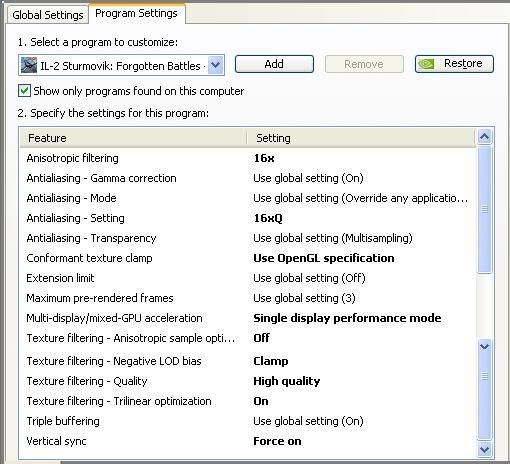
Make sure 'extension limit' in the nVidia Control Panel is set to 'Off' (You may have to switch to the Advanced Settings to see this option under 'Manage 3D Settings')

new sig copy.jpg

Posted August 3, 2009

Thanks, that fixed it.

Question about profiles.

I had it working yesterday, and it looked stunning, but today, no matter the setting, I still have jaggies, and tearing.

I've got it set to 16 AA 8 AF and Vertical sync forced on, but it doesn't seam to take affect.

What you just tld me took affect when I changed in the profile?

ATI profiles worked by clicking an ATI icon to sart the game to ensure it was being used.

It appears

Posted August 3, 2009

Can't help you there, I always only tune the Global Settings, and I leave the rest as they are... but as far as I know, indeed, the NVidia software should recognize you start IL2, and then it applies the settings...

DD-Signature.jpg

Posted August 3, 2009

Yeh, I usually do the same, but now that I'm farting around with another Sim that Global settings are not conducive to use. I thought I'd try the profiles.

I've only been messing with profiles the last couple weeks with the ATI and now the Nvidia

Posted August 3, 2009

TOAD,

nVidia profiles work on the games executable. It should detect all games on your PC and you should see IL-2 listed. Once you've made your settings for IL-2, click APPLY and it should remember those settings forever.

GK

Posted August 3, 2009

Comms anybody?

Posted August 3, 2009
GreyKnight said:

TOAD,

nVidia profiles work on the games executable. It should detect all games on your PC and you should see IL-2 listed. Once you've made your settings for IL-2, click APPLY and it should remember those settings forever.

GK

That's exactly what I did, but as I mentioned something has changed since yesterday.

Posted August 3, 2009

Try putting Vsync on 'Use the 3d application setting', it works better for me with 8800GTX...

large.a_aniahco.GIFbeaufightersig.JPG


Posted August 3, 2009

TOAD,

I had to quit TS too, bed time, let me know how you got on.

GK

Sign in to reply.