Irfanview Batch Conversion

By Blairgowrie, Jul 14, 2010 in Help!!

Posted July 14, 2010

It has been a while since I have done a batch conversion using Irfanview. I have spent most of this evening trying to resize about 100 pictures with no sucess. Do any of you use Irfanview for batch conversion and resizing? I know Rog did but I need someone to hop on TS tomorrow when we run coops and help me with the settings.

beaverchainsawclear.gifindexphp.gif85gg.gifKiev-Ribbon-Bomb.jpgblindmonkey_lg_wht.gif

Posted July 15, 2010 · edited Jul 15, 2010 by gec

It has been a while since I have done a batch conversion using Irfanview. I have spent most of this evening trying to resize about 100 pictures with no sucess. Do any of you use Irfanview for batch conversion and resizing? I know Rog did but I need someone to hop on TS tomorrow when we run coops and help me with the settings.

so:

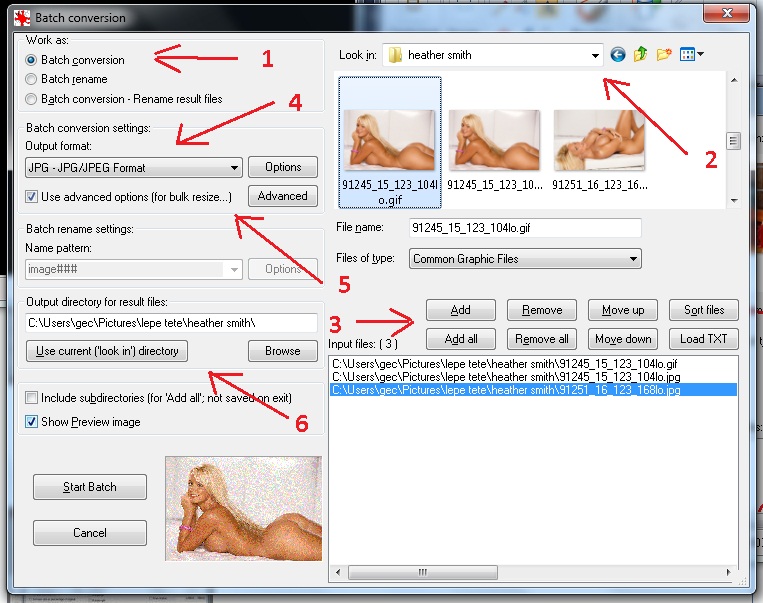
open Irfan and press B

post-476-046593100 1279182727_thumb.jpg

1. select bach conversion

2. select the folder with pictures

3. Add Pictures to the list

4. select format (jpg is ok)

5. check advanced options and click Advanced button

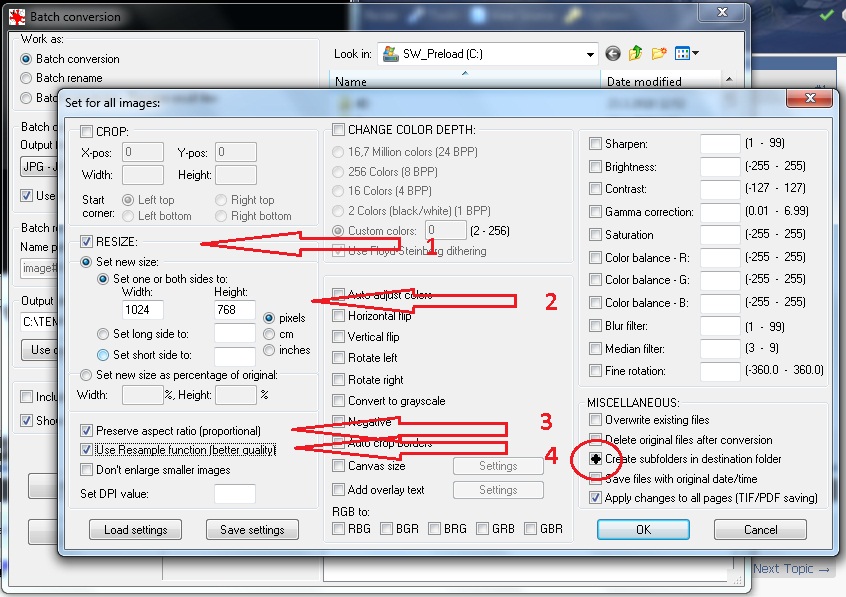
post-476-009320500 1279181707_thumb.jpg

  1. check resize
  2. set the new size
  3. check preserve ratio
  4. check use Resemple
  5. optionally check Create subfolders in destination folder
    (better not)
  6. press OK

6. select output directory (u can press Use current "look In directory" and add 'resized/' at the end

7. press start

gallery_440_79_23940.png

sig.GIF

No matter how good the violin may be, much depends on the violinist.

Posted July 15, 2010

Thanks for that gec I was wondering about it myself :)

image.png

siggy.jpg

Posted July 15, 2010

Thanks Gec. That is pretty much the way I had it set up but when I tried to add files they would not show up on the input screen. After using your exact settings, the problem is still there. I will try deleting the program, do a reinstall and try again.

beaverchainsawclear.gifindexphp.gif85gg.gifKiev-Ribbon-Bomb.jpgblindmonkey_lg_wht.gif

Posted July 15, 2010

what is the picture file extensions u have in the folder? if it is a canon or nicon raw type then irfan probably needs a PlugIn. can u open a picture u want to resize in irfan? if not then that's the problem.

on my Nikon i can save pictures in NEF (which is a nicon's extension for raw files) or compressed in jpg. if i use raw i need to install special plugin on irfan to be able to work with pictures.

gallery_440_79_23940.png

sig.GIF

No matter how good the violin may be, much depends on the violinist.

Posted July 15, 2010 · edited Jul 15, 2010 by Blairgowrie

what is the picture file extensions u have in the folder? if it is a canon or nicon raw type then irfan probably needs a PlugIn. can u open a picture u want to resize in irfan? if not then that's the problem.

on my Nikon i can save pictures in NEF (which is a nicon's extension for raw files) or compressed in jpg. if i use raw i need to install special plugin on irfan to be able to work with pictures.

Thanks Gec but I now have it working. I was trying to add each photo by pressing the "add" button but when I tried "add all", the files appeared.

I will start posting after I upload them to photobucket.

beaverchainsawclear.gifindexphp.gif85gg.gifKiev-Ribbon-Bomb.jpgblindmonkey_lg_wht.gif

Posted July 15, 2010

If you use Imageshack it will let you pick a size to resize them when you upload all of them in a batch.

Posted July 15, 2010

Thanks Snacko. I may give that a try.

beaverchainsawclear.gifindexphp.gif85gg.gifKiev-Ribbon-Bomb.jpgblindmonkey_lg_wht.gif

Posted July 15, 2010

I will start posting after I upload them to photobucket.

:(

I tested a thread with same images from photobucket vs same images from our server.

Amazing difference in speed..

Looking forward to seeing some of your pics BG :)

Sign in to reply.