How To Install Clod Mods

By fruitbat, Apr 10, 2011 in IL-2 Sturmovik: Cliffs of Dover Blitz and Desert Wings: Tobruk

Posted April 10, 2011 · edited Apr 10, 2011 by fruitbat

Hi guys, here is a little walk through, of how to install the mods for clod, which give a significant improvement in fps, and in smoothness.

It really makes a big difference on my system, and across the board from all who try from reading the various forums.

its a little bit complicated, but i shall try to make it as easy as poss with a step by step guide with pics and everything!

first you need to download these 5 things,

/forums/files/file/490-il2cod-sfsmod11zip/

/forums/files/file/489-launcherexeconfig/

/forums/files/file/491-lowtex7z/

/forums/files/file/492-nomipmaps-modzip/

/forums/files/file/493-nossao-modzip/

(thanks rog for uploading to the vault :thumbsu: )

Step 1.

first extract the il2cod-sfsmod11.zip to desktop.

inside will be a 'kegetys.dll' file.

this need s to be copied into here,

C:\Program Files (x86)\Steam\SteamApps\common\il-2 sturmovik cliffs of dover

as shown below,

ScreenHunter_01Apr101633-1.jpg

keep this window open.

Step 2

extract the launcher.exe config that you downloaded.

in the above screenshot, you will see there is already one there, cut that one out, and place somewhere safe, and replace with the one you downloaded, as this has the entries needed already done for you. (thanks to Jedi :thumbsu: )

Step 3

extract the 3 mod folders that you downloaded, 'lowtex', 'nossao' and 'nomipmaps'

copy these into the same place, you can see them in the above screenshot.

Step 4

open steam, click on library, right click on 'il2 sturmovk cliffs of dover' and click properties,

ScreenHunter_02Apr101644.jpg

click 'set launch options',

ScreenHunter_03Apr101644.jpg

and add this text as shown,

-mod=nossao -mod=nomipmap -mod=lowtex

ScreenHunter_04Apr101645.jpg

and thats it, start game :thumbsu:

Some other tips that improve performance,

1) disable windows aero (you can do this by adding the text -disablecomposition in the launch options as shown below, will turn it off when you start the game, and back on when you exit.)

ScreenHunter_01Apr101914.jpg

full text to insert will be,

-disablecomposition -mod=nossao -mod=nomipmap -mod=lowtex

2) disable trees and turn down buildings to low

3) and although this looks pretty, turn off shadows, its a big fps hit.

I can now fly at a much higher res, with better fps and it running much smoother.

Its still nowhere near perfect, but its a massive step forward,

shot_20110410_160809.jpg

hope this helps, FB.

large.DD-Signature.jpg.345348946893195d2fb36046bbc90daa.jpg.0269149e41488d6f21ef7162130cde40.jpg

B-52 Electronic Warfare Officer (EWO) veteran Jack Donovan’s natural response, when he was introduced to the tactics and mission details. His exact reply was: “you want me to fly in the back of a little tiny fighter aircraft with a crazy fighter pilot who thinks he’s invincible, home in on a SAM site in North Vietnam, and shoot it before it shoots me, you gotta be shitting me!

Posted April 10, 2011

Great tutorial FB, many thanks!


People demand freedom of speech as a compensation for the freedom of thought which they never use. - Soren Aabye Kierkegaard


gallery_440_79_23940.png

Posted April 12, 2011 · edited Apr 13, 2011 by Mayhem

Or we could do it even easier and combine 5 downloads into one easy to install zip file.

Just download this CODmods.zip

Go into your Cliffs of Dover install directory (usually C:\Program Files (x86)\Steam\steamapps\common\il-2 sturmovik cliffs of dover)

rename your Launcher.exe.conf to something like xLauncher.exe.conf

extract the CODmods.zip file you just downloaded into the same COD install directory

when prompted select yes to overwrite

Then change your Steam settings as Fruitbat posted starting in step 4.

See easy.

Posted April 13, 2011

Good work chaps. excellent stuff.

Jabo

new sig copy.jpg

Posted April 13, 2011

Now getting 60 over water and 50 over land.

beaverchainsawclear.gifindexphp.gif85gg.gifKiev-Ribbon-Bomb.jpgblindmonkey_lg_wht.gif

Posted April 13, 2011

Or we could do it even easier and combine 5 downloads into one easy to install zip file.

Even easier if someone were to upload that to our own vault so we don't have to use megaupload.

Seems daft paying for web space and bandwidth only to use some add ridden site ;)

When I get home I'll pull it down and upload, my work proxy deems that site dodgy :D

Posted April 13, 2011 · edited Apr 13, 2011 by Mayhem

Or we could do it even easier and combine 5 downloads into one easy to install zip file.

Even easier if someone were to upload that to our own vault so we don't have to use megaupload.

Seems daft paying for web space and bandwidth only to use some add ridden site ;)

When I get home I'll pull it down and upload, my work proxy deems that site dodgy :D

Tried that, wouldn't let me for some reason. Told me there was an error. Possibly permission issue maybe? I tried upload something else earlier and wouldn't let me. Pictures seem to upload fine though. I figured you'd move it to the vault anyway. :thumbsu:

Posted April 13, 2011

Tried that, wouldn't let me for some reason. Told me there was an error. Possibly permission issue maybe? I tried upload something else earlier and wouldn't let me. Pictures seem to upload fine though. I figured you'd move it to the vault anyway. :thumbsu:

Thanks!

I would not have spotted that, been sweating buckets over a weird email server issue and managed to break the web server too.

Got it working again, but file system permissions (well the user dangerdogz.com runs under) got screwed up.

Found and reported a bug, and hopefully got it corrected :)

Posted April 13, 2011 · edited Apr 13, 2011 by Mayhem

Kool, thanks Rog, you do a great job keeping up with all our issues. Uploading to the vault was of course my first choice but it was something like 2 am EST when I uploaded that. Just wanted to get it posted and hit the hay. Not a huge accomplishment by any means but figured it would simplify the process further. By the way thanks to Kev for the legwork and tutorial. Installing the mods seemed to improve my game a bit however that last update for COD gave me that dreaded micro stutter everyone was talking about and seems like it's still with me even after these fixes. If they could get that ironed out I think we'd be in good shape. Well, at least for me and the others who the patch didn't help. Funny thing is I didn't seem to be getting the stutter before the patch but maybe just didn't notice as much with the framerates jumping all over the place like they had been. FPS is much stabler now.

Posted April 13, 2011

ha, i'm all for making it simpler, should of thought of that myself really :icon_study:

nice work mayhem.

large.DD-Signature.jpg.345348946893195d2fb36046bbc90daa.jpg.0269149e41488d6f21ef7162130cde40.jpg

B-52 Electronic Warfare Officer (EWO) veteran Jack Donovan’s natural response, when he was introduced to the tactics and mission details. His exact reply was: “you want me to fly in the back of a little tiny fighter aircraft with a crazy fighter pilot who thinks he’s invincible, home in on a SAM site in North Vietnam, and shoot it before it shoots me, you gotta be shitting me!

Posted April 13, 2011

Happy to report, since my last post, finally nailed the upload problem.

All groovy now I hope..

And uploading the All-In-One now to the vault.

Posted April 13, 2011 · edited Apr 13, 2011 by Mayhem

No no no, thank YOU Fruity! You da man as it were. :thumbsu: Not trying to step on any toes here just trying to contribute what little I can bring to the table. You might want to edit the first part of your tute though and include the new zip download. I tested it on my own install so it should work 100% as long as its unzipped to the install directory correctorly. :sheepsmile: Glad you got it sorted Roger.

Posted April 14, 2011

I just got home last night, and tried this today.

I don't see any noticeable improvement on my end.

But I did notice this.

/forums/gallery/image/1252-pilot-reflection/

/forums/gallery/image/1251-pilot-reflection-close-up/

I also noticed he is not animated, that would impress me, if he was.

Going to go look and see if he changes as you change your uniform.

Posted April 14, 2011

Err..

I like the way you attached those Toad... how did you do that!!

Posted April 14, 2011 · edited Apr 14, 2011 by T_O_A_D

LOL your kidding right?

copy pasted the link is all, the forum did the rest.

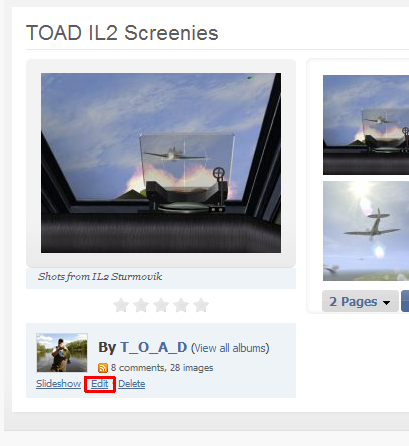
What I'm wanting is to make this album

http://dangerdogz.co...-il2-screenies/

Best I can tell is I have to delete it and re-upload it and make sure it has this one http://dangerdogz.co.../album/35-toad/ as the parent album.

Posted April 14, 2011

LOL your kidding right?

copy pasted the link is all, the forum did the rest.

What I'm wanting is to make this album

http://dangerdogz.co...-il2-screenies/

Best I can tell is I have to delete it and re-upload it and make sure it has this one http://dangerdogz.co.../album/35-toad/ as the parent album.

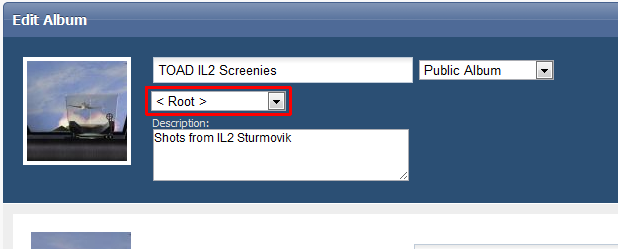
You should be able to create a new sub-album, then move all images into it.

Also (but may be bugged) you should be able to move this album too:

post-284-0-52424700-1302805719_thumb.png

Then:

post-284-0-98697700-1302805637_thumb.png

Should get the drop down there, hopefully it shows your main Album...

Posted April 23, 2011 · edited Apr 23, 2011 by JG1_Luckystrike

Hi there,

i cant download the mod file:

An Error Occurred

Sorry, an error occurred. If you are unsure on how to use a feature, or don't know why you got this error message, try looking through the help files for more information.

[#10869] You do not have access to this section of the site.

Posted April 23, 2011 · edited Apr 23, 2011 by DD_Arthur

Hi there JG1. Although you have registered on our site with us you don't automatically get full access to stuff like our download vault or teamspeak details. I rather feel this CloD mod has now been superceded by the last official patch. If you have the game installed Steam will have updated your game already.

Another official patch will be released by the CloD devs later this week. :goodjob:

Are you interested in flying with us? If so tell us a little about yourself and I'm sure our glorious leader BG will be along soon to welcome you. We don't mind people joining us who are also members of other squads. Several of us are. We seem to be flying just about everything at the moment on just about every night of the week too :laughing7:

If you want an idea of what flying with the Dogz is like then check this thread out;

My link

Good luck!

gallery_440_79_39944.png
Posted April 23, 2011

After the latest patch, I am now getting 70 frames over water and 60 over land. Smooth as silk and no stutters. It updated the latest patch as soon as I signed in on steam.

beaverchainsawclear.gifindexphp.gif85gg.gifKiev-Ribbon-Bomb.jpgblindmonkey_lg_wht.gif

Posted April 23, 2011

Hmm, my Steam isn't updating, I just tried the verify thing and it says its all ok.

But I'm still on the older version.

Going to leave Steam up and go to bed.

Sign in to reply.