Rog, I was trying to help Painless with verifiying his UP3.0 downloads, and he said he was getting 15 errors.
Not believing that all his files were corrupt, I downloaded the first part and ran the MD5summer on my machine and it's giving me the same error (checksum does not match). Has something happened to the UP3.0 files in the Vault?
Actually I've just installed the UP hotfix and voila, there are the 4GB and expert mode options. I didn't see them listed in the release notes so I wasn't sure what you guys meant.
Anyway if people are having trouble with the downloads they might want to get UP from a torrent. Ever since 4.09 I've always gone with torrents for patches and mods, if I try downloading the files normally I usually get corrupt files that cause errors.
Then another dang issue occured. Stuck on loading humans 90%. If it ain't one friggin thing with new mods, it is another.
To be honest I really have had it up to here with this. I will try and address it later when I am done being slighlty upset with all this fuss.
At least there are still some DF servers on HL with 4.10.1 that I do not have issues with. I will calm down by bombing the shit out of something later.
Thanks for letting me rant and I hope to be able to fly with my pack again some day in the future.
Tonar, the 90% loading freeze is a RAM and texture issue. Try setting 'TexCompress=2' under the [Render_OpenGL] section in your conf.ini, it worked for Sweper and Painless, might help you too.
Tonar, the 90% loading freeze is a RAM and texture issue. Try setting 'TexCompress=2' under the [Render_OpenGL] section in your conf.ini, it worked for Sweper and Painless, might help you too.
That worked for me last night First time I've had issues like that.
WTFO!
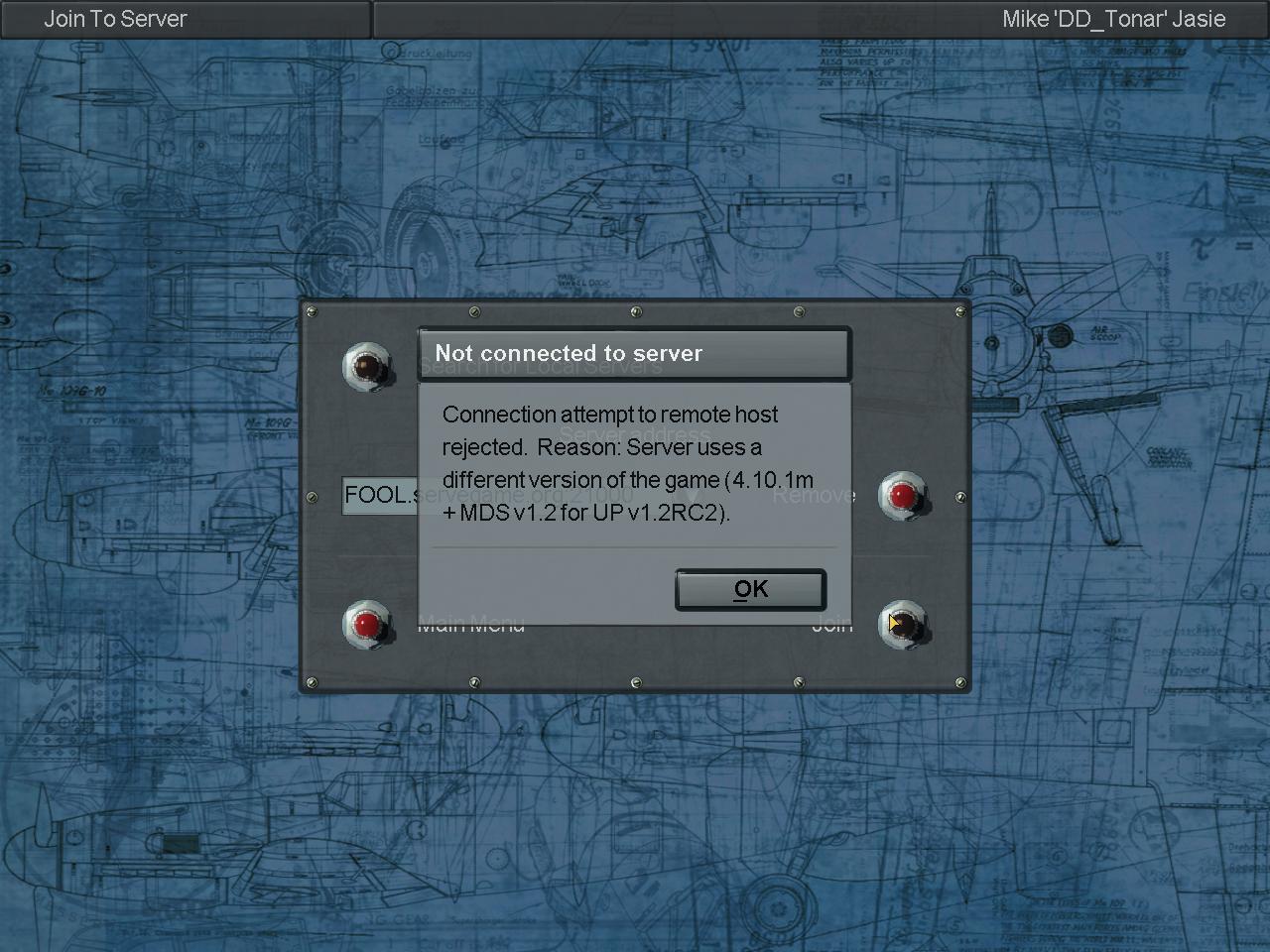
I get this every time I try and Join a UO3.0 server.
Frustrated with Frackin mods cutting into what DD time I have left
I'll be in a UKded server
I get this when trying to log into the Dangerdogz server. Rog, is it something that needs sorting on the server end?
Then another dang issue occured. Stuck on loading humans 90%. If it ain't one friggin thing with new mods, it is another.
To be honest I really have had it up to here with this. I will try and address it later when I am done being slighlty upset with all this fuss.
At least there are still some DF servers on HL with 4.10.1 that I do not have issues with. I will calm down by bombing the shit out of something later.
Thanks for letting me rant and I hope to be able to fly with my pack again some day in the future.
\
~S~ Tonar M8.
I so understand your frustration with loosing flying time whilst fecking around with the fecking mods !
I had all of the same issues you have had and I am glad to say that they are all easily fixed as described above.
Just to make you feel a little better..... I had another issue last week where my computer decided to "restart" in the middle of a fecking mission and later went into a restart "loop" every 20 seconds !Turned out to be a failing power supply and/or Ram.
Thanks to Jabo's diagnosis and my £115 all is well again
Stick with it Mike, the good times outweigh the bad !!
by Skiddly: That worked for me last night First time I've had issues like that.
No worries matey. As I think Jedi pointed out, UP3 uses a whole new set of DLL files for grafix (as i understand it) doing things very differently from the stock and even previously modded versions of the game, I believe in an effort to make the most of some of the eyecandy available - I've noticed lighting and texture changes from between UP3 and even 4.101 ModAct; whilst the UP3 has some excellently smooth frame rates even over stock 4.101, I suspect those DLLs have ramped up the RAM attributed to graphics processes - or something similar - which means you run out of it much quicker, and the big maps, especially now with 'Perfect Map Textures' on as default - I'd prefer that as a selectable in JGSME btw - means we're eating up our RAM allowance quite smartly in UP3.
But bear in mind I have absolutley no qualifications to comment on this! Lol!
I was just discouraged and have been down this road before. (4+ years with the Dogz)
I had tried the textcompression=2 before I left last night and no joy. That is when I hung up my hat for the night. I will sort it out I am sure.
The funny thing is, last night everyone was describing how to fix it. But since I don't fly with the pack as much these days my ear has become de-tuned to the TS accents and I had a hard time picking it up. LOL!
Painless: The Family it good. Grandpa is in town from Mexico city and we just went to a great and exciting MBL Baseball game with a soldout crowd. Toddlers are fun at a major leage Baseball game.
Looks like it will require a bit more time and i hope to be able to fix it in the final release. (Although there are minor chances that this fix may delay further).
The most playsible scenario is that the new RC3 version that will be out this week won't have this "fix".
As we focus on Df server environment this thing went un-noticed. I also recommend to start using a DF server instead of coop hosting sine the MDS 1.2 equalizes these 2 environments and a DF server is much more suited for this. You also have better performance if you run the DF server in the SAME PC along with your IL2 client so people can connect without the need for another PC for DF Server.
Just an update regarding the San's FOV changer issues. I think I found a solution unless anyone else has already posted it. Since the problem seems to be there are 2 il2fb.exe, one created by il2 and one by the executable selector after starting the game you can just alt tab out and start your task manager. Then end the il2fb.exe that has the description of 'executable selector'. Once the game is launched it doesn't appear to need to be running anyways and there you go, only one exe for San's to hook into when the mission starts. Simple huh, don't know why I didn't think of it before. Working every time for me now.
Just an update regarding the San's FOV changer issues. I think I found a solution unless anyone else has already posted it. Since the problem seems to be there are 2 il2fb.exe, one created by il2 and one by the executable selector after starting the game you can just alt tab out and start your task manager. Then end the il2fb.exe that has the description of 'executable selector'. Once the game is launched it doesn't appear to need to be running anyways and there you go, only one exe for San's to hook into when the mission starts. Simple huh, don't know why I didn't think of it before. Working every time for me now.





 \

 First time I've had issues like that.


 Also the host score issue is confirmed as a bug and will be addressed soon





