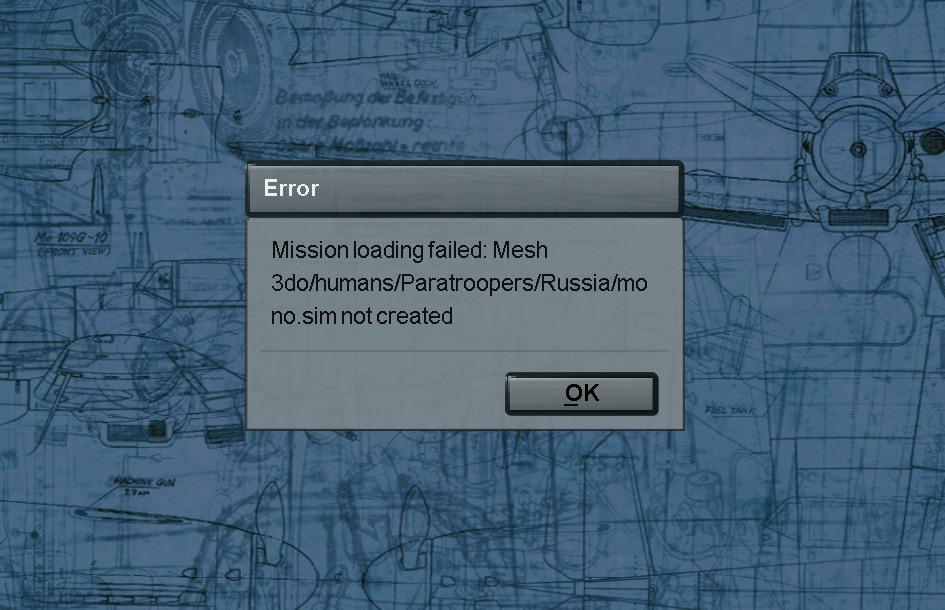
In Quick Mission Bulider I can´t launch Solomons_Okt_43. Get error message below, and also another error I forgot.

Fly High The Swedish Way!


By Gothkrieger, May 26, 2011 in Jim's Place
In Quick Mission Bulider I can´t launch Solomons_Okt_43. Get error message below, and also another error I forgot.
Fly High The Swedish Way!
In Quick Mission Bulider I can´t launch Solomons_Okt_43. Get error message below, and also another error I forgot.
Works fine for me  Increase the memory settings when you first launch UP3. Mine is 786meg or something like that.


In Quick Mission Bulider I can´t launch Solomons_Okt_43. Get error message below, and also another error I forgot.
What Crash said, and this from the bug thread at up's forums: "Solution:
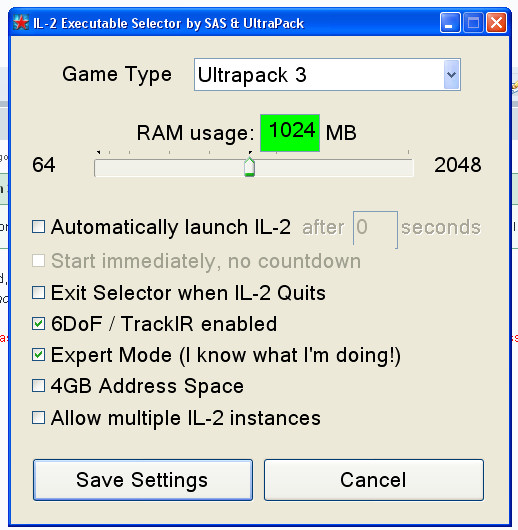
Enable expert mode, 4GB address space and 1200MB of memory in the IL2 selector and try again."
Edit: 1200Mb crashes IL2 on my system, so as you're on XP as well, try 1024, and leave the 4GB address space off.

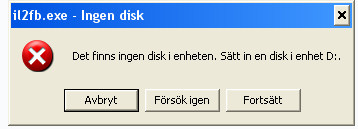
I did try it all, but left 1024 in all settings, otherwise on "red" if go higher. Also tried uncheck Expert Mode. Un-checked 4GB sand tried it checked but same error plus an error that tell me to put a disc in the cd-player.
Fly High The Swedish Way!
Have you tried 786 meg? my 4 gig thing or expert mode (cause I am not) is unticked.
Have you tried 786 meg? my 4 gig thing or expert mode (cause I am not) is unticked.
It worked! Thanks Crash.
FT, where were you on the geoagraphy lessons in school?
Fly High The Swedish Way!
Anyone figured out the updater?
The link they provide just bounces to the main Forum page.

My Track Ir Fix 
In the heat of battle you will not rise to the occasion
You will shrink to the level of your training
bump
the reticle in spit IXs is very small - is this a bug or a feature - I tried using it like a predictor sight but it didnt increase in size
any ideas guys - this is really annoying

Hi Delta, my IX's were the same; I dug out an old British Reticules mod and that fixed it for the LF IXc but it don't work on the IXe - I'll see if it's about to give you the link when i get more time.

I am not surprised, I know how you like your San's FOV changer.
Can't live without it. I've been doing quite a bit of modding to my UP 3.0 already and after making a tiny change to my FOV changer it started working again so I don't know exactly what fixed it. I'll tell you this though, many of the mods were as simple as copying them from the old MODS folder to the new #UP# folder though some do require a little more work. I've gotten about a dozen mods installed right now as well as several cockpit and map repaints. Its looking good now and I am a happy camper.
Well just for the record the issue with the FOV changer seems to be hit or miss. If I start the game and it is working it works fine as long as I don't exit the game. If I start the game and it's not working I have to relaunch the game and then if it works I think it stays working but never had this issue in 4.101 so something is definitively effecting it in UP 3.0. Could be the new executable.
I would like feedback from other San's FOV changer users. Have you experienced any issues since the changeover? Also can someone please confirm if the FOV changer is necessary anymore or is UP 3.0 capable of rendering the 3d in true 16:10 now?
I found this
http://www.sas1946.com/main/index.php/topic,2591.0.html
for old reticles but the link is dead so Ill probably have to wait until they fix this 
I found this
http://www.sas1946.com/main/index.php/topic,2591.0.html
for old reticles but the link is dead so Ill probably have to wait until they fix this
i've got them somewhere, will dig them out for you.
Edit just installed tonight, so far a little tweaking has been required to bring it up to fruitbat standard, lol,

looking good now 

B-52 Electronic Warfare Officer (EWO) veteran Jack Donovan’s natural response, when he was introduced to the tactics and mission details. His exact reply was: “you want me to fly in the back of a little tiny fighter aircraft with a crazy fighter pilot who thinks he’s invincible, home in on a SAM site in North Vietnam, and shoot it before it shoots me, you gotta be shitting me!
installed and was crashing to desktop after about 10 secs even when I touch nothing - FIXED I had only activated UP3.0 in JSME and not in the executable selector box that pops up- click change settings and then ultrapack 3 in game type box
This is what happens to me.
I have not come across an executable selector box poping up. Where is that? or what do I have to do to get it to pop up?

Try and start IL2fb.exe while holding the left shit button down...
Could get messy!
Tonar, have you checked the integrity of your downloads with MD5Summer?
I know it is possible to install UP3 with a corrupt file, and for the message to be missed in the installer (happened to me a couple of times).
The correct MD5 Sums:
6adca1acb3c4bf1d16cb23a4df836f2c *UP_3.0_DFServer.exe
d0f6035fd6e000e57a53567820dd5f50 *UP_3.0RC_Client.part01.exe
8034c8f63e02265de77afc6e02e45c21 *UP_3.0RC_Client.part02.rar
d77d7c7bc8dd29bd25e3d40a0b449aa2 *UP_3.0RC_Client.part03.rar
62cfac096e0e0c5f744b42224a374fbc *UP_3.0RC_Client.part04.rar
4977970dc7f470a6f8a65fe8923938f9 *UP_3.0RC_Client.part05.rar
ce49c25942938d5a37d77ff79034a0d8 *UP_3.0RC_Client.part06.rar
410b49b2806a4401f87c7353b82dca1c *UP_3.0RC_Client.part07.rar
2d54e23051ec7044cc46d02b9feb3598 *UP_3.0RC_Client.part08.rar
b8871b151637a6327bffa559907b6467 *UP_3.0RC_Client.part09.rar
5ccbb3e08069363420a9a8e4207a79ce *UP_3.0RC_Client.part10.rar
0b6388d79eb7bfb41e5bf90b818df7ee *UP_3.0RC_Client.part11.rar
b4a66b12f4a3eb5a92ccac5689d92c63 *UP_3.0RC_Client.part12.rar
39eb9ae5276382ad3cc5430d0ca75afb *UP_3.0RC_Client.part13.rar
be4ba83088cd99d8fb0c8b18ca9d9f77 *UP_3.0RC_Client.part14.rar
thanks guys,
Rog, After I wipe off my hands from FT's suggestion.
What is the easiest way to cross check the MDS sums I created(which were green lighted) from my download with the ones you posted? Besides staring at it 
Attached is MD5 sum for good files.
Place this in same folder as your UP3 download.
Run MD5Summer.
Select your UP3 downloads folder as the 'root folder' by browsing to it.
Select 'Verify sums'
Next window wants to know where you put the attached file, browse to it and select then click 'Open'.
It will then verify your files, all should be green!
Sign in to reply.


