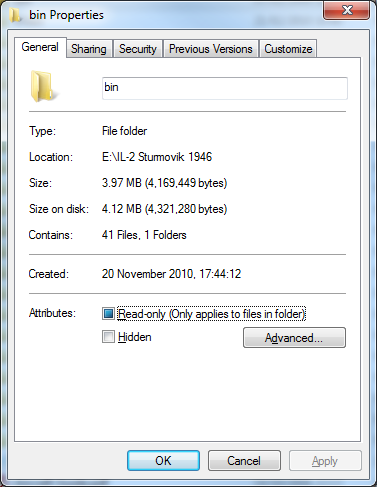
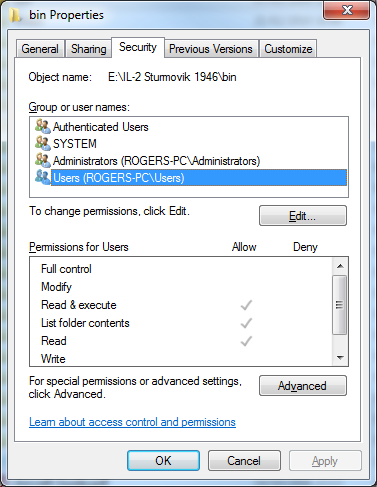
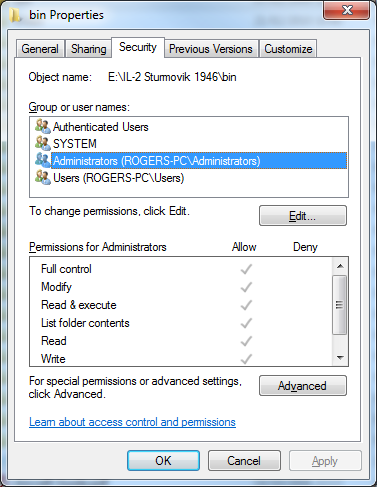
I have had a strange thing happen with Windows 7 64 bit Angus. My mission files are stuck on read only which means I can't change them. I can go into mission proerties and remove the check mark but by the time I get back to altering the mission via QMT or Full Mission Builder, they have changed back to read only. Bloody annoying when you try to host.
I have had a strange thing happen with Windows 7 64 bit Angus. My mission files are stuck on read only which means I can't change them. I can go into mission proerties and remove the check mark but by the time I get back to altering the mission via QMT or Full Mission Builder, they have changed back to read only. Bloody annoying when you try to host.
I am actually thinking of going back to XP..
Rueful LOL...
Too late, I've bought the RAM in anticipation of using the full 8GB and Vista is now a dead duck so it's definitely Win 7 for me now (esp. since it's been bought and paid for now).
Angus
Italy Campaign : 11 airkills, one AAA unit, one Bridge
watch what folders you install programs to or it will nag you to death( think second wife) dont allow them to install into default program files but create new folders e.g. C:/ il246
overall I really like it and I was a XP diehard, I havnt had time to get into the real nuts and bolts of windows7 but it seems stable
Generally I've been hearing good things about Win7 and it doesn't seem to be possible to hold onto XP with new hardware anymore so I'm off to the brave new world soon.
As I recall, CloD wasn't working for you until you did your upgrade from XP, right Dave?
Italy Campaign : 11 airkills, one AAA unit, one Bridge
I have had a strange thing happen with Windows 7 64 bit Angus. My mission files are stuck on read only which means I can't change them. I can go into mission proerties and remove the check mark but by the time I get back to altering the mission via QMT or Full Mission Builder, they have changed back to read only. Bloody annoying when you try to host.
I am actually thinking of going back to XP..
Where are these missions on your hard drive Jim?
Were they restored from a backup, or did they remainn on the drive from a previous windows build?
Reason I ask is that the 'read-only' attribute is a known Windows 'feature' and is usually ignored.
So far I have only encountered one issue that is giving me grief, but it's so obscure that it shouldn't prevent anyone from grabbing what is surely the best job Windows have done for a while.
I'm looking to revive a CH Force (feedback) stick by using the X+Y axis from a Logitech Force with the motors from the CH. It's a known hack which several folk have done - but I'm struggling to get the Logi software running in 64bit Windows But it's more Logitech's bloody-mindedness than the OS. They won't write drivers for an older stick because they want to sell G940s.
Other than that I'm finding the ability to use more RAM very important and learning to work with and around the UAC. The tip about running games from another location than Program Files is worth noting with regard to editing those mission files. It can be done by switching off UAC, then editing and then switching UAC back on - but that's a pain and requires reboots at either end of the Off...........On process.
I'm glad I sidestepped Vista, but I wouldn't want to return to XP.
Up to now I've been using XP but for this build I'm moving to Win 7 64 bit.
Rig:
Asus P8P67 pro
i5 2500k
ATI 6970
2 X 4GB DDR3
Win 7 on 450 GB velociraptor.
Peripherals:
Logitech wireless keyboard + mouse
TIR 3 + Vector
MSFFB2
CH Throttle
CH Pedals
Logitech rumble game pad
I'm not going to be trying to "upgrade" from XP; this is going to be a clean install.
I'm not expecting any problems, but is there anything I might want to watch out for?
Thanks,
Angus
HI, as far as I'm concern, you did the right thing. Win7 64 bits as a bit of issues but will definately the OS you need to make full use of your hardware. It is a lot faster too Hey you will be ablt to use the Eyefinity mode for multiple monitor setup. I have the 6870 and run IL2 and Rise of Flight on a 5040 x 1050 resolution and it works great. I still have problems with San's FOV changer but I don't go insane about it. When it works, wow its amazing. You dont need it for RoF.
watch what folders you install programs to or it will nag you to death( think second wife) dont allow them to install into default program files but create new folders e.g. C:/ il246
overall I really like it and I was a XP diehard, I havnt had time to get into the real nuts and bolts of windows7 but it seems stable
Generally I've been hearing good things about Win7 and it doesn't seem to be possible to hold onto XP with new hardware anymore so I'm off to the brave new world soon.
As I recall, CloD wasn't working for you until you did your upgrade from XP, right Dave?
Yes, this was the only reason I upgraded, Clod would not run on XP ; but having done so Im happy
It took me a while but all my old games, hardware and other programs installed fine
remember to save all your savegame or config files from old games, then when you install them into windows 7 you can copy them in and you wont have to start from scratch
you are probably aware of this but you should also save your my documents folder to an external drive and any other valuable folders such as photographs then you can copy them into your new install
Go for it C_G, I've been using the 64-bit version of 7 since the Release Client waaaay back and I honestly believe it's tbe best thing MS have done in a long time.
Go for it C_G, I've been using the 64-bit version of 7 since the Release Client waaaay back and I honestly believe it's tbe best thing MS have done in a long time.
Jabo
Same here, and I agree wholeheartedly, best M$ product in a long time.
As a user of OS X (work), some of the features of Win7 seemed, hmmm... somehow familiar, but very welcome all the same!
Just waiting on the velociraptor now. I've backed up the main files I want to transfer over onto a portable HDD so I'm pretty much ready to start taking out the "old" components and putting together the new beast.
As I noted, just the GPU upgrade to the old rig has been a huge boost so I have great expectations for this new build.
Angus
Italy Campaign : 11 airkills, one AAA unit, one Bridge
On my machine, Win 7 64-bit benchmarked significantly better than 32-bit XP on the same rig, so you should see a marked improvement. Don't forget that you'll want to use 64-bit drivers wherever possible, but 7 helps you there as well as in most cases, Windows Update will find the appropriate drivers for you. The exception should be the GPU, I always download the one I want directly from the chipset manufacturer (nVidia in my case).

 : 11 airkills, one AAA unit, one Bridge





 But it's more Logitech's bloody-mindedness than the OS. They won't write drivers for an older stick because they want to sell G940s.

 Hey you will be ablt to use the Eyefinity mode for multiple monitor setup. I have the 6870 and run IL2 and Rise of Flight on a 5040 x 1050 resolution and it works great. I still have problems with San's FOV changer but I don't go insane about it. When it works, wow its amazing. You dont need it for RoF.



