Help An Old Guy Dept.

By Oldtimer, Aug 26, 2011 in Help!!

Posted August 26, 2011

I've noticed that when you whizzy guys post links to things, you say get it "here" - here being the link. This looks really snazzy, much better than the www.... link that I have to put up with.

Would one of you kind gents explain how you do this please......

gallery_440_79_39944.png

A6MZeroOT.jpg

Posted August 26, 2011

I've noticed that when you whizzy guys post links to things, you say get it "here" - here being the link. This looks really snazzy, much better than the www.... link that I have to put up with.

Would one of you kind gents explain how you do this please......

Hi.

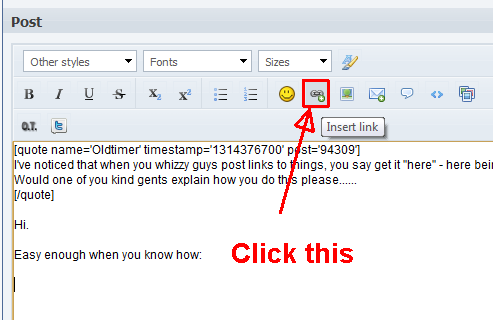
Easy enough when you know how:

Click on the link icon:

post-284-0-65519200-1314378129_thumb.png

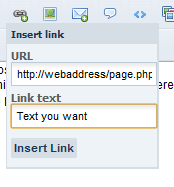
Fill in the web adress bit at the top, and the text you want to appear as a link:

post-284-0-05242100-1314378130_thumb.png

Voila!:

Text you want

Posted August 26, 2011 · edited Aug 26, 2011 by PropNut

Here

Use any word that you have typed, highlight it (select it using the mouse) and then click on the icon to the right of the smiley in the menu above. You can paste in a link from any website and it will display the word that you have highlighted.

Hope this helps.

Edit: Rog got there first! lol


People demand freedom of speech as a compensation for the freedom of thought which they never use. - Soren Aabye Kierkegaard


gallery_440_79_23940.png

Posted August 26, 2011 · edited Aug 26, 2011 by FoolTrottel

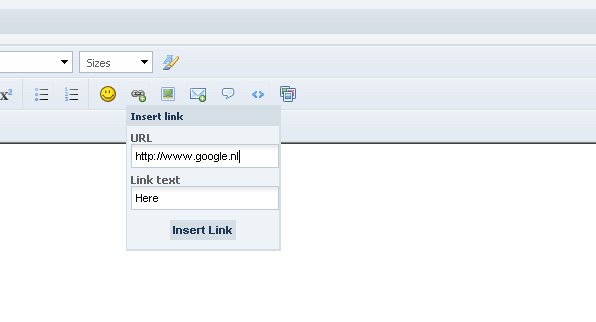
Here's a different way ...

Press the 'Insert Link' icon above the edit window.

Paste your link into the box titeld URL, that states 'http://"

Type your text in the box name 'Link Text' below it.

Like this:

post-465-0-31863300-1314378241_thumb.jpg

Press Insert Link, and there ya go!

(Note that these icons do not appear in the quick reply window, you need to use the 'Full Editor')

DD-Signature.jpg

Posted August 26, 2011 · edited Aug 26, 2011 by B16Enk

Ahh.. but you also showed the alternate way mate!

And FT did a more comprehensive reply than me too..

Full posting form!

Posted August 26, 2011

Oww... carp... I'm sooo sloooww tooodaaayy..... :hot:<_<:rolleyes:

Even too slow for my instant reply to my own post to have it join it into that previous reply... someone's already replied ! :(:notfair:

Hey, I'm getting back up to speed her... second fast reply ... will it be joint to the other two?

Yeah!!

DD-Signature.jpg

Posted August 26, 2011 · edited Aug 26, 2011 by Oldtimer

Ahhhh! I see! Thank you gents. I did google it but the sort of thing I came up with wasn't very helpful, especially Here !!

gallery_440_79_39944.png

A6MZeroOT.jpg

Posted August 26, 2011

It is really my only complaint about this system, that it does not have a built-in help system.

You can try the docs over At the IPB Document Repository

What I really need to do is spend a bit of time putting together a tutorial!

Posted August 26, 2011

It is really my only complaint about this system, that it does not have a built-in help system.

You can try the docs over At the IPB Document Repository

What I really need to do is spend a bit of time putting together a tutorial!

Ummmm...... I see you noticed my (failed) efforts to upload a sig then Rog....

gallery_440_79_39944.png

A6MZeroOT.jpg

Posted August 26, 2011

It is really my only complaint about this system, that it does not have a built-in help system.

You can try the docs over At the IPB Document Repository

What I really need to do is spend a bit of time putting together a tutorial!

Ummmm...... I see you noticed my (failed) efforts to upload a sig then Rog....

Looks fine to me Adrian ;)

Sign in to reply.