Mouse Lag Problem! Help!

By BluBear, Sep 22, 2011 in Help!!

Posted September 22, 2011

Hi guys, wonder if you can help me out here?

For the past week or so, i've been noticing that my mouse and sometimes keyboard have become very laggy when running certain programs,

notably in Firefox and Steam.

The mouse pointer looks and feels like it's in mollases whilst the page is loading, or a youtube video is playing for example.

It's really starting to get on ones tits and I think it's also affecting IL2, because i'm getting stuttering more often than not now.

My mouse and keyboard are MS wireless.

And I'm running Windows 7 (fully updated), on 3Gb RAM.

MSE scans show no evidence of malware.

Any ideas mates?

5118544329_d4a72201d9_z.jpg

gallery_440_79_23940.png

Posted September 22, 2011

Batteries?

Then Video drivers?

Posted September 23, 2011

I have had a similar problem and all it took was pressing the "Reset" button found at the bottom of the mouse!! If that does not work, then I agree with TOAD!

Hope you get it fixed!

gallery_440_79_37157.png

"TEN OF MY RULES FOR AIR FIGHTING" by Sailor Malan

  • Wait until you see the whites of his eyes. Fire short bursts of 1 to 2 seconds and only when your sights are definitely 'ON'.
  • Whilst shooting think of nothing else, brace the whole of the body, have both hands on the stick, concentrate on your ring sight.
  • Always keep a sharp lookout. "Keep your finger out!"
  • Height gives You the initiative.
  • Always turn and face the attack.
  • Make your decisions promptly. It is better to act quickly even though your tactics are not the best.
  • Never fly straight and level for more than 30 seconds in the combat area.
  • When diving to attack always leave a proportion of your formation above to act as top guard.
  • INITIATIVE, AGGRESSION, AIR DISCIPLINE, and TEAM WORK are the words that MEAN something in Air Fighting.
  • Go in quickly - Punch hard - Get out!

Speed is life. Altitude is life insurance.

Posted September 23, 2011

Batteries?

Then Video drivers?

Replaced the batteries after a low bat warning message about 3 days ago.

Funny thing is last night, I got another warning... weird.

Video drivers up to date, i think. never can be too sure with ATI!

I have had a similar problem and all it took was pressing the "Reset" button found at the bottom of the mouse!! If that does not work, then I agree with TOAD!

Hope you get it fixed!

Hmmm, not tried reconnecting the mouse, it's been 'bound' since day one and not had to reset it before. Will try it though.

Strangely TOAD, after playing IL2 with you Swep and a few of the others last night, I relaunched Firefox and the lag had disappeared.

I have that sometimes, it comes and goes. Argh!

5118544329_d4a72201d9_z.jpg

gallery_440_79_23940.png

Posted September 23, 2011

Also make sure that the receiver is not buried behind items on your desk. I have MS wireless too and it's usually fine unless my desk is cluttered up....


gallery_440_79_39944.png


2iraw8-4.png


Posted September 27, 2011

Well, I've not had this issue now for the last few days. Frankly I'm baffled!

Dodgy solenoid?? lol

5118544329_d4a72201d9_z.jpg

gallery_440_79_23940.png

Posted September 27, 2011 · edited Sep 27, 2011 by T_O_A_D

Get a screen shot of your processes when all is well.

Then the next time it acts up, take another screen shot of all your processes, and compare.

If its nothing of the above, there must be something grabbing too much attention on the CPU or something, during your times of complaint.

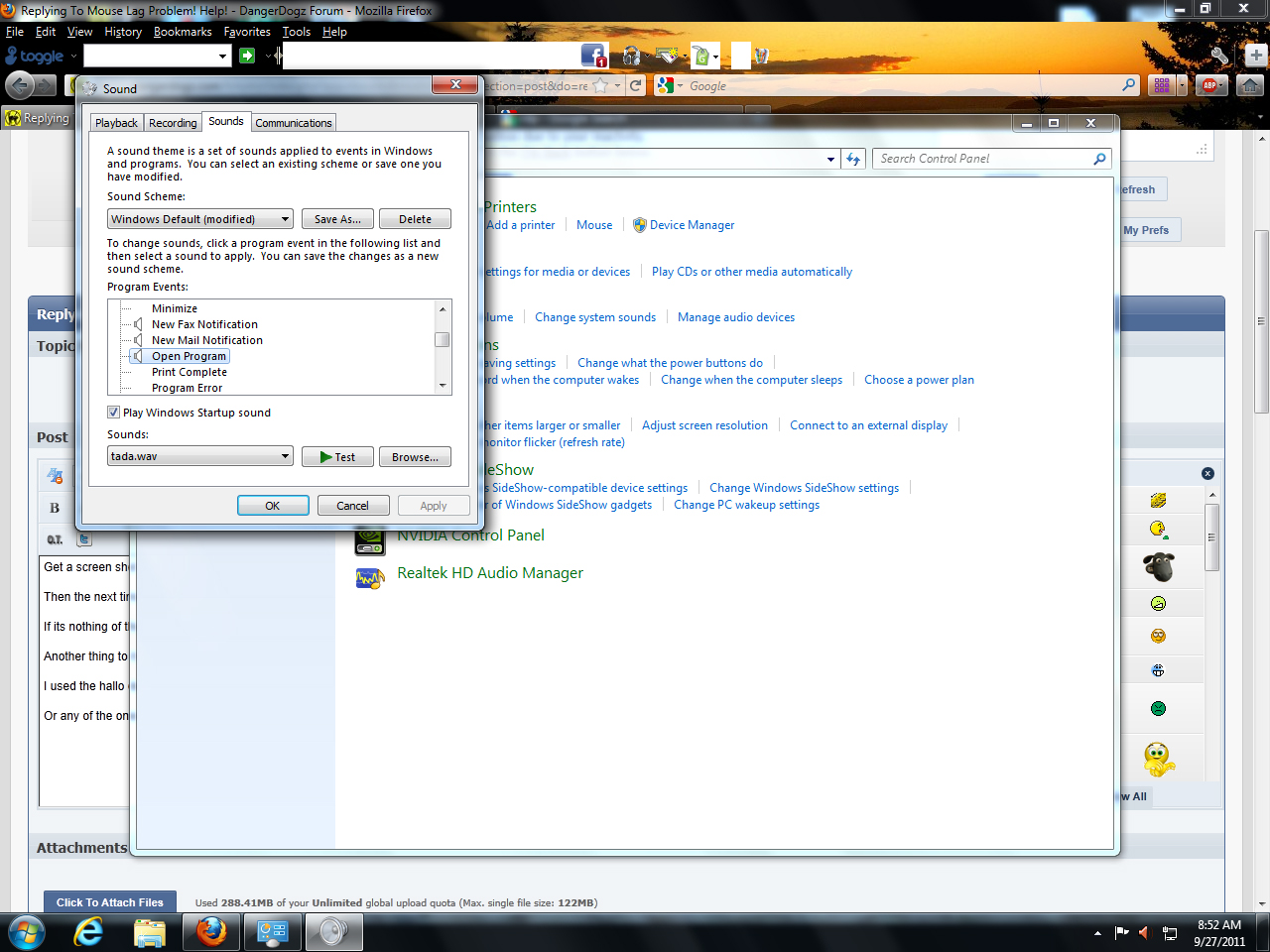
Another thing to try for a spell, is to change your "open program" to use a sound bite.

I used the hallo deck door from Star trek once. to catch an offender.

Or any of the ones already provided with windows, like tada.wav

So if you hear it, while in game and you know dam well you didn't start something, you can jump out and look at processes and try and catch the offender.

post-468-0-57604500-1317131694_thumb.jpg

Posted September 27, 2011

It may not be as bad as it once was, but I found MSE to be the culprit for me. Specifically it was defender that was a pos and was pulling my system down. File operations in particular as well as browsing as it fought for io time....

Sent from my Galaxy using TapaTalk

Posted September 28, 2011

Thanks for the advice guys, I really appreciate it.

I had a strange occurrence last night during my D/F with Zooly, which may or may not be related...

After we passed each other in combat, I suddenly lost all sound (inc TS) and my frames dropped from a steady 35 down to about 3. Trying to manually quit IL2 took some time as the mouse was yet again lagging all over the place.

Once back to desktop, I checked and my CPU was flat out, so i closed TeamSpeak (audio still gone at this point) and after that everything went back to normal.

Really frickin weird! Never had that happen before either.

It was then fine all night for co-ops... :huh:

5118544329_d4a72201d9_z.jpg

gallery_440_79_23940.png

Posted September 28, 2011

What joystick do you use, and profiler?

I used to have a problem with an older version of Saitek profile drivers, grabbing all the attention, doing the same thing.

keep an eye on TS it could be it, or a conflict with it and other sound programs/drivers.

I am assuming you reboot everyday, and keep de-fragged weekly correct?

Posted October 3, 2011

What joystick do you use, and profiler?

MS FFB2, no profiler.

...

keep an eye on TS it could be it, or a conflict with it and other sound programs/drivers.

Ok will do.

I am assuming you reboot everyday, and keep de-fragged weekly correct?

The PC is only on when I use it in the evenings.

I hadn't defragged for a while, so I did this yesterday along will more windows updates.

It was fine last night after all this. But then it was intermittent anyway, I'll see how it goes!

Thanks for your help mate

5118544329_d4a72201d9_z.jpg

gallery_440_79_23940.png

Sign in to reply.