HI,
I have just noticed looking at my system information that win7 sais that I have 2 Cores and 4 logical processors. Can someone tell me if it is correct ? I always thought that the i7 920 had 4 Cores.
Thank you!
MT



By MadTrooper, Oct 27, 2011 in Hardware Hell
HI,
I have just noticed looking at my system information that win7 sais that I have 2 Cores and 4 logical processors. Can someone tell me if it is correct ? I always thought that the i7 920 had 4 Cores.
Thank you!
MT
Hey MT,
I too have the Core i7 920, and mine is showing four physical and four logic for a total of eight. Where exactly is it showing that you only have two? Here is a screenshot of what I am looking at:
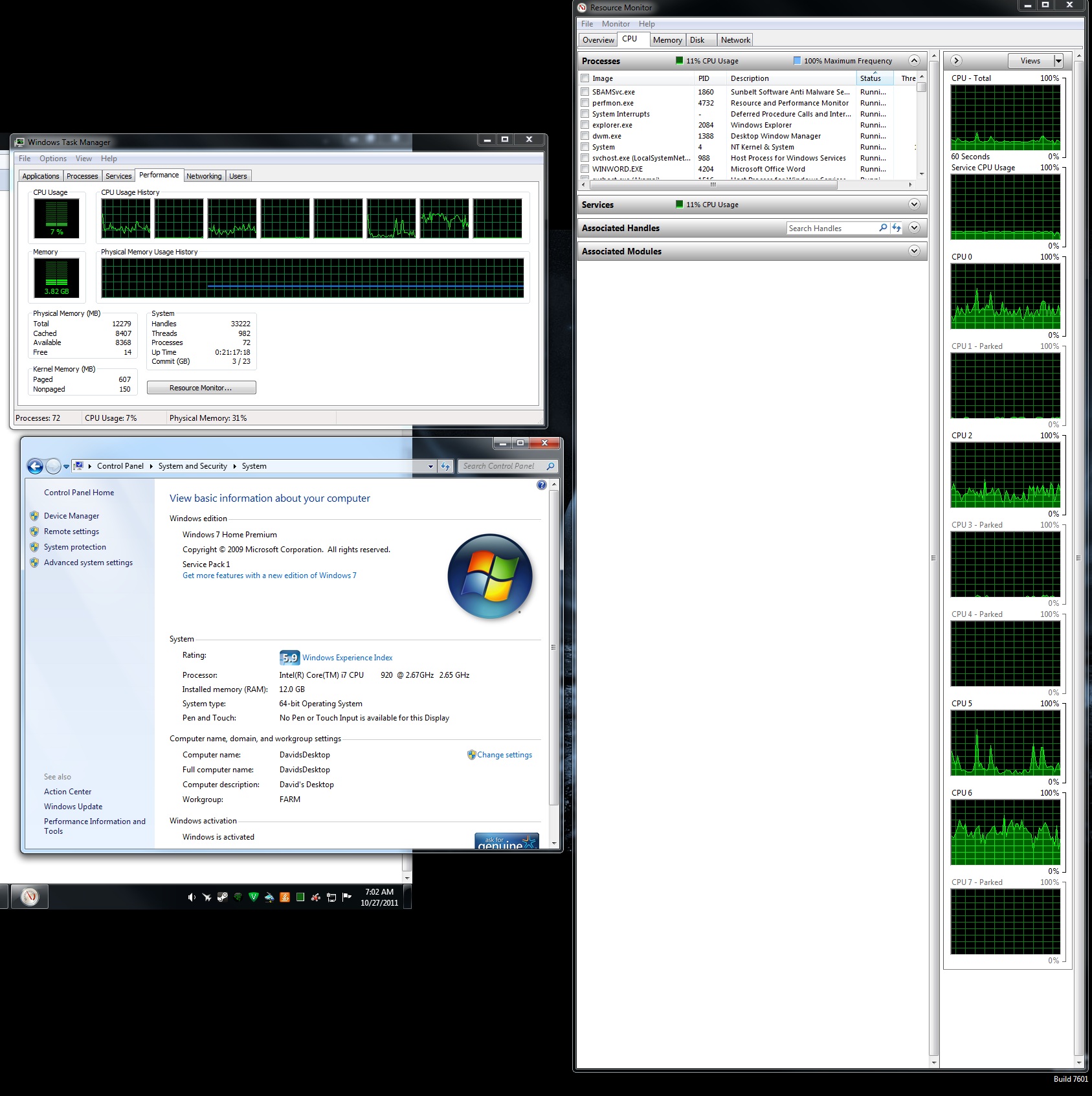
People demand freedom of speech as a compensation for the freedom of thought which they never use. - Soren Aabye Kierkegaard
Disable hyperthreading and you should get 4 cores. HT doesn't do anything for gaming anyway.
Known by some as Jedipedia
Et dulcissimum pro patria bibere.
Veni, Vidi, volo in domum redire.
 BoB
 85th Dogfight
Kiev SEOW

it should be 4 cores with hyperthreading disabled and 8 with it enabled. Something else is the matter, check your bios that all four cores are enabled, as they can be individually disabled in bios.
i7-920 defiantly has 4 cores.
@propnut, i'd (and i have) disable hyperthreading. Jedis right, it does nothing for games, in fact from my testing it can actually cause a few micro stutters. Turn off in Bios.

B-52 Electronic Warfare Officer (EWO) veteran Jack Donovan’s natural response, when he was introduced to the tactics and mission details. His exact reply was: “you want me to fly in the back of a little tiny fighter aircraft with a crazy fighter pilot who thinks he’s invincible, home in on a SAM site in North Vietnam, and shoot it before it shoots me, you gotta be shitting me!
HI Guys, thanks for the replies.
David, this is what I get on my system

I'll try the Bios and see...
How I fond out, I went and cliked on Start / All Programs / Accessories / System Tools and then System Information. Leaving the curser on System Summary, look on the info on the Processor on the right.
Thanks again.
MT
I'm a i7-920 operator also, just shut down the hyperthreading cause Jedi said so. Thanks


HI,
I went into the BIOS and diseabled Hyperthreading. Now I get this:

Its says that I have now 4 cores, 4 logical Processors but the Ressource manager shows me only 3 cores but I guess it is because it count CPU 0 as one so 0,1,2 and 3 would be 4 cores. Why can't I see the 8 x cores like Fruitbat and Propnut ?
In the BIOS I did not see anything about turning ON Cores individually.
Thanks Guys !
MT
as you surmise, 0=1, 1=2 etc.....
with hyperthreading off you should only see 4 cores, 0,1,2,3.
to be honest, your better looking at something like OCCT than the windows crud to look at this stuff.
B-52 Electronic Warfare Officer (EWO) veteran Jack Donovan’s natural response, when he was introduced to the tactics and mission details. His exact reply was: “you want me to fly in the back of a little tiny fighter aircraft with a crazy fighter pilot who thinks he’s invincible, home in on a SAM site in North Vietnam, and shoot it before it shoots me, you gotta be shitting me!
as you surmise, 0=1, 1=2 etc.....
with hyperthreading off you should only see 4 cores, 0,1,2,3.
to be honest, your better looking at something like OCCT than the windows crud to look at this stuff.
Yes but I had it ON and windows was showing me that I had only 2 cores :/
I'll try what you said (the OCCT).
Thank You very much Fruitbat.
MT
Sign in to reply.