someone posted a good setup for nvidea , can anyone help me find this please as I have lost all my settings on last driver update and playing around
ty


someone posted a good setup for nvidea , can anyone help me find this please as I have lost all my settings on last driver update and playing around
ty
Guessing the OpenGL part of conf.ini for IL2?
Or would you be needing the Nvidia control panel settings?
Or both?
[Render_OpenGL]
TexQual=3
TexMipFilter=3
TexCompress=2
TexFlags.UseDither=1
TexFlags.UseAlpha=0
TexFlags.UseIndex=0
TexFlags.PolygonStipple=0
TexFlags.UseClampedSprites=0
TexFlags.DrawLandByTriangles=0
TexFlags.UseVertexArrays=1
TexFlags.DisableAPIExtensions=0
TexFlags.ARBMultitextureExt=1
TexFlags.TexEnvCombineExt=1
TexFlags.SecondaryColorExt=1
TexFlags.VertexArrayExt=1
TexFlags.ClipHintExt=0
TexFlags.UsePaletteExt=0
TexFlags.TexAnisotropicExt=1
TexFlags.TexCompressARBExt=1

TexFlags.TexEnvCombine4NV=1
TexFlags.TexEnvCombineDot3=1
TexFlags.DepthClampNV=1
TexFlags.SeparateSpecular=1
TexFlags.TextureShaderNV=1

HardwareShaders=1

Shadows=2
Specular=2
SpecularLight=2
DiffuseLight=2
DynamicalLights=1
MeshDetail=2
VisibilityDistance=3

Sky=2
Forest=2
LandShading=3
LandDetails=2

LandGeom=3
;LandGeom=2
TexLarge=1
TexLandQual=3
TexLandLarge=1

VideoSetupId=17
Water=4
Effects=1
ForceShaders1x=0

PolygonOffsetFactor=-0.15
PolygonOffsetUnits=-3.0
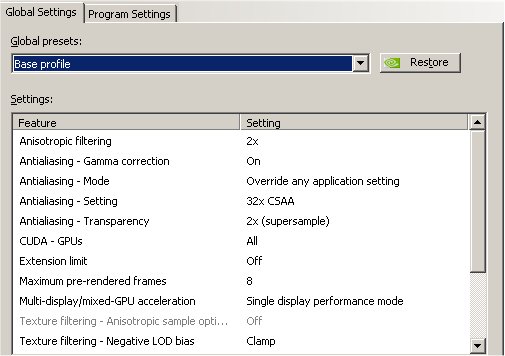
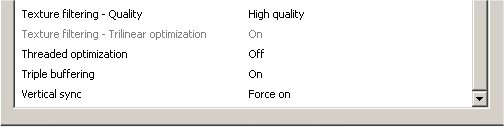
All this for 580GTX.
Remarks:
Trees=2
Forest=2 - Prevents them weird trees growing out of runways, roads and rivers.
2x AF and 2x Supersample prevent Low FPS over water=4

Hi FT,
Do you mean Forest=2 or is Trees=2 a different setting.
Coz' I just looked through my conf.ini and I only have the forest setting?
regards
Friar

Thats 'cause you've got a shit graphics card Friar. FT's 580 gives him a choice of trees, forest, bushes, walls, carpet and lino.
Keep up mate. 

What Arthur said, I'm wondering whether I should ask Kevin to do some maintenance on that 580...
No, sorry, my bad, it's Forest=2
(Edited the original post)
2x AF and 2x Supersample prevent Low FPS over water=4
Actually, setting AF to application controlled (which is 4X by default i believe when TexMipFilter=3 in conf.ini) avoids the low fps over water=4 regardless of supersampling settings from my findings, its forcing AF in the nvidia control panel that seems to cause it I think.
Also decided personally that i prefer 16q*aa rather then 32*aa, but its actually hard to see the difference...... I was running supersampling =8, but 4 seems to do the job, and when i tried to rip some footage with fraps, 8 was a setting to far, despite being ok in game.
TexCompress=0 also means you have nicer uncompressed textures as well, with a 580, why not.......... Especially if you patch your il2fb.exe with a 4 gig patcher thats been around for a while, for lower systems texcompress will be of help though, but i can really notice the difference in the mid to far distance when looking at maps.
I use this with my 580,

and
TexQual=3
TexMipFilter=3
TexCompress=0
TexFlags.UseDither=1
TexFlags.UseAlpha=0
TexFlags.UseIndex=0
TexFlags.PolygonStipple=0
TexFlags.UseClampedSprites=0
TexFlags.DrawLandByTriangles=0
TexFlags.UseVertexArrays=1
TexFlags.DisableAPIExtensions=0
TexFlags.ARBMultitextureExt=1
TexFlags.TexEnvCombineExt=1
TexFlags.SecondaryColorExt=1
TexFlags.VertexArrayExt=1
TexFlags.ClipHintExt=0
TexFlags.UsePaletteExt=0
TexFlags.TexAnisotropicExt=1
TexFlags.TexCompressARBExt=1
TexFlags.TexEnvCombine4NV=1
TexFlags.TexEnvCombineDot3=1
TexFlags.DepthClampNV=1
TexFlags.SeparateSpecular=1
TexFlags.TextureShaderNV=1
HardwareShaders=1
Shadows=2
Specular=2
SpecularLight=2
DiffuseLight=2
DynamicalLights=1
MeshDetail=2
VisibilityDistance=3
Sky=2
Forest=2
LandShading=3
LandDetails=2
LandGeom=3
TexLarge=1
TexLandQual=3
TexLandLarge=1
VideoSetupId=17
Water=4
Effects=1
ForceShaders1x=0
PolygonOffsetFactor=-0.15
PolygonOffsetUnits=-3.0

B-52 Electronic Warfare Officer (EWO) veteran Jack Donovan’s natural response, when he was introduced to the tactics and mission details. His exact reply was: “you want me to fly in the back of a little tiny fighter aircraft with a crazy fighter pilot who thinks he’s invincible, home in on a SAM site in North Vietnam, and shoot it before it shoots me, you gotta be shitting me!
Thanks Kevin, tried the 'application controlled' for AF, AAx4 and indeed, FPS when low over water=4 stay up...
thanks guys - my card was overheating slightly so I cleaned it out and installed new drivers and had to have a play with predictable results- all sorted now
Sign in to reply.