Pc Net Connection Issues - Help!

By BluBear, Feb 26, 2012 in Help!!

Posted February 26, 2012

Ok chaps, here's one for you. I'm pulling my hair out!

My broadband is supplied by BT and I get a consistent connection speed of about 6Mbps.

Recently i've noticed my PC seems to struggle on this connection, but all other devices on the network seem to be fine, (2x iPhones, iPad, Mac and MacBook - which are all wireless)

I hardwired my PC to the router many months ago after constant headaches connecting over wifi. A Gigabit Netgear Powerline system did the job.

Now this is the issue:

I can ping (command through cmd) any website and get a nice, constant speedy return of around 50ms, no bother.

But, I'm finding browsing the web painfully slow, and you can almost forget about streaming video, YouTube just fails to buffer a lot of the time. Tried using both Chrome and Firefox, both equally slow.

Now tonight, for the first time in a while I connected to TS anticipating a fun night flying the North Africa campaign, but Teamspeak just went FUBAR. I'd initially connect with a ping of about 50ms, but this would rapidly increase to 500+ also with a stated +-500ms variation. WTF?

The netgear utility confirms the connection to the router is running at about 385Mbps, so it's not the Poweline.

I've not installed any new programs, it's virus free and to be honest it's probably only been turned on a couple of times since I flew last about a fortnight ago when all was well.

I'm stumped.

5118544329_d4a72201d9_z.jpg

gallery_440_79_23940.png

Posted February 26, 2012

Ok, I just tried something. I have a Mac and the PC next to each other, so I opened a browser on each and downloaded an 18Mb file from download.com on each machine, one after the other.

The Mac gave a steady D/L rate of 450KBps throughout the download and the PC, although starting at a similar value, quickly declined to about 50Kbps.

ARGHHHHH!!!

5118544329_d4a72201d9_z.jpg

gallery_440_79_23940.png

Posted February 26, 2012

Create an account over at thinkbroadband.com.

The create a monitor (left menu under tools - look for Broadband Quality / Ping Monitor).

You will need to enable ping response on your router for this to work.

You will then get (eventually) a graph like this:

dde6334029c88e0015699ecf34fcab2e-26-02-2012.png

It will show if you are suffering contention issues

Posted February 26, 2012

This may be a stupid post but have you tried a different cable.

I had an issue once on site where it was the cable preventing a proper connection.

Just a thought.

Friar

My Hanger 2026.png

Posted February 26, 2012

@Rog, i'll certainly give this a try, but I don't think it's a problem with the broadband because it's only the PC that seems to be suffering.

@Col, The cable is only a couple of months old, but it's certainly worth a try.

Thanks guys.

5118544329_d4a72201d9_z.jpg

gallery_440_79_23940.png

Posted February 27, 2012

Is the memory usage high? might be other things going on.

image.png

siggy.jpg

Posted February 27, 2012

I wonder whether there is any bandwidth limitation enabled in the router settings; QoS, something like that?


gallery_440_79_39944.png


2iraw8-4.png


Posted February 27, 2012

Could the Net Over Power be the trouble Chris? If you wanna isolate it or just remove it as a variable then feel free to borrow the 15m Cat6 of mine.

Sorry you're havin trouble chum. :(

Sig.jpg

Posted February 27, 2012

You could always turn the wireless off on the Mac book and plug the ethernet cable into it Should be able to see if its the cable side of things or not.

Like 1

image.png

siggy.jpg

Posted February 27, 2012

Thanks for your help/suggestions guys!

I just don't quite understand what has caused this issue, when as far as I can see, nothing has changed physically or virtually.

I've not installed any new software, or hardware...

I'll have another look tonight, grrrrr

5118544329_d4a72201d9_z.jpg

gallery_440_79_23940.png

Posted February 27, 2012

Gremlins!!!

Thanks for your help/suggestions guys!

I just don't quite understand what has caused this issue, when as far as I can see, nothing has changed physically or virtually.

I've not installed any new software, or hardware...

I'll have another look tonight, grrrrr

gallery_440_79_37157.png

"TEN OF MY RULES FOR AIR FIGHTING" by Sailor Malan

  • Wait until you see the whites of his eyes. Fire short bursts of 1 to 2 seconds and only when your sights are definitely 'ON'.
  • Whilst shooting think of nothing else, brace the whole of the body, have both hands on the stick, concentrate on your ring sight.
  • Always keep a sharp lookout. "Keep your finger out!"
  • Height gives You the initiative.
  • Always turn and face the attack.
  • Make your decisions promptly. It is better to act quickly even though your tactics are not the best.
  • Never fly straight and level for more than 30 seconds in the combat area.
  • When diving to attack always leave a proportion of your formation above to act as top guard.
  • INITIATIVE, AGGRESSION, AIR DISCIPLINE, and TEAM WORK are the words that MEAN something in Air Fighting.
  • Go in quickly - Punch hard - Get out!

Speed is life. Altitude is life insurance.

Posted February 28, 2012

Getting anywhere Chris?

image.png

siggy.jpg

Posted February 28, 2012

Not really Crash.

All i've tried so far tonight is swapping ethernet ports on the router.

Going to grab a long cable from work tomorrow and try a direct connection rather than through PowerLine.

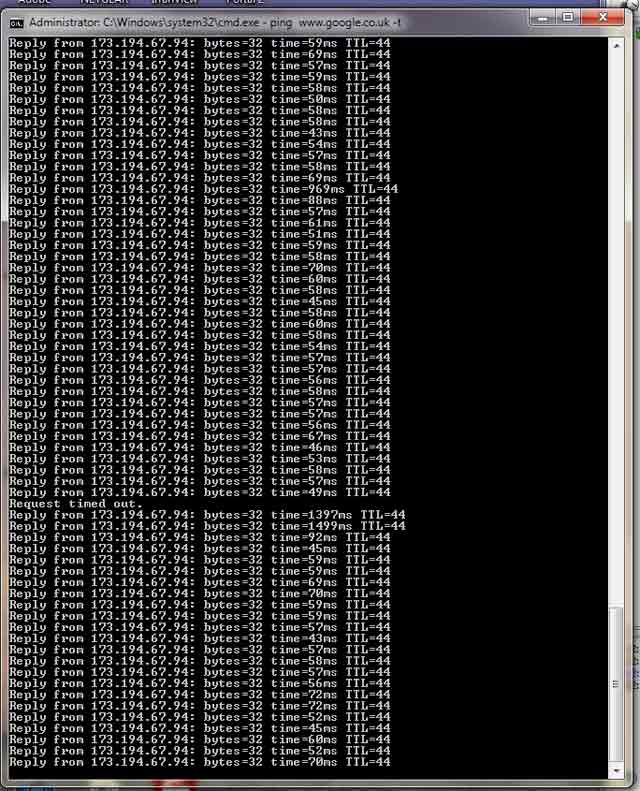
I've attached an image showing a typical minute or so pinging google.

As you can see, there is frequent packet loss or lag.

post-671-0-28549800-1330470051_thumb.jpg

5118544329_d4a72201d9_z.jpg

gallery_440_79_23940.png

Posted February 28, 2012

Sounds like a sensible option Chris, it could well be one of the powerline devices going faulty.

new sig copy.jpg

Posted March 1, 2012

Ok, well I have some news.

I tried the long ethernet cable and guess what... It was perfect :huh:

So it seems that one or both of my Netgear Powerline AV500 units is faulty. :(

I bought them at Maplin less than 6 months ago, but not sure if i still have the receipt. The box says Netgear offer a 2 year warranty.

Do you chaps have any suggestions where I go from here? I don't really want to spend another £80/90 :mellow:

5118544329_d4a72201d9_z.jpg

gallery_440_79_23940.png

Posted March 1, 2012

You do have both adapters in a wall socket?

Manual states: "You can plug a power strip into the filtered outlet, but do not plug your Powerline adapter into a power strip."

DD-Signature.jpg

Posted March 1, 2012

The one next to the router is, but the one for my PC is in a multi plug block - not a cabled extension, just one of those blocks that turns a single socket into three.

Thing is, it's been like that since I started using them and this problem has only been occurring the last few weeks :huh:

5118544329_d4a72201d9_z.jpg

gallery_440_79_23940.png

Posted March 1, 2012

Still, try it like they state it should be plugged.

It's for a reason they want the plugs to be as close together, with as little 'interference' as possible in betweeen them...

Maybe something changed there? You plugged in a different device somewhere since the last few weeks?

DD-Signature.jpg

Posted March 1, 2012

I will certainly try it FT. Process of elimination etc

Thanks for your suggestions old chap.

5118544329_d4a72201d9_z.jpg

gallery_440_79_23940.png

Sign in to reply.