Think The Colors In Rof Are A Bit Bleak N' Pale?

By Kimosabi, Jan 8, 2011 in Rise of Flight-NOT BEEN USED SINCE 2020 - TO BE DELETED

Posted January 8, 2011 · edited Jan 8, 2011 by Kimosabi

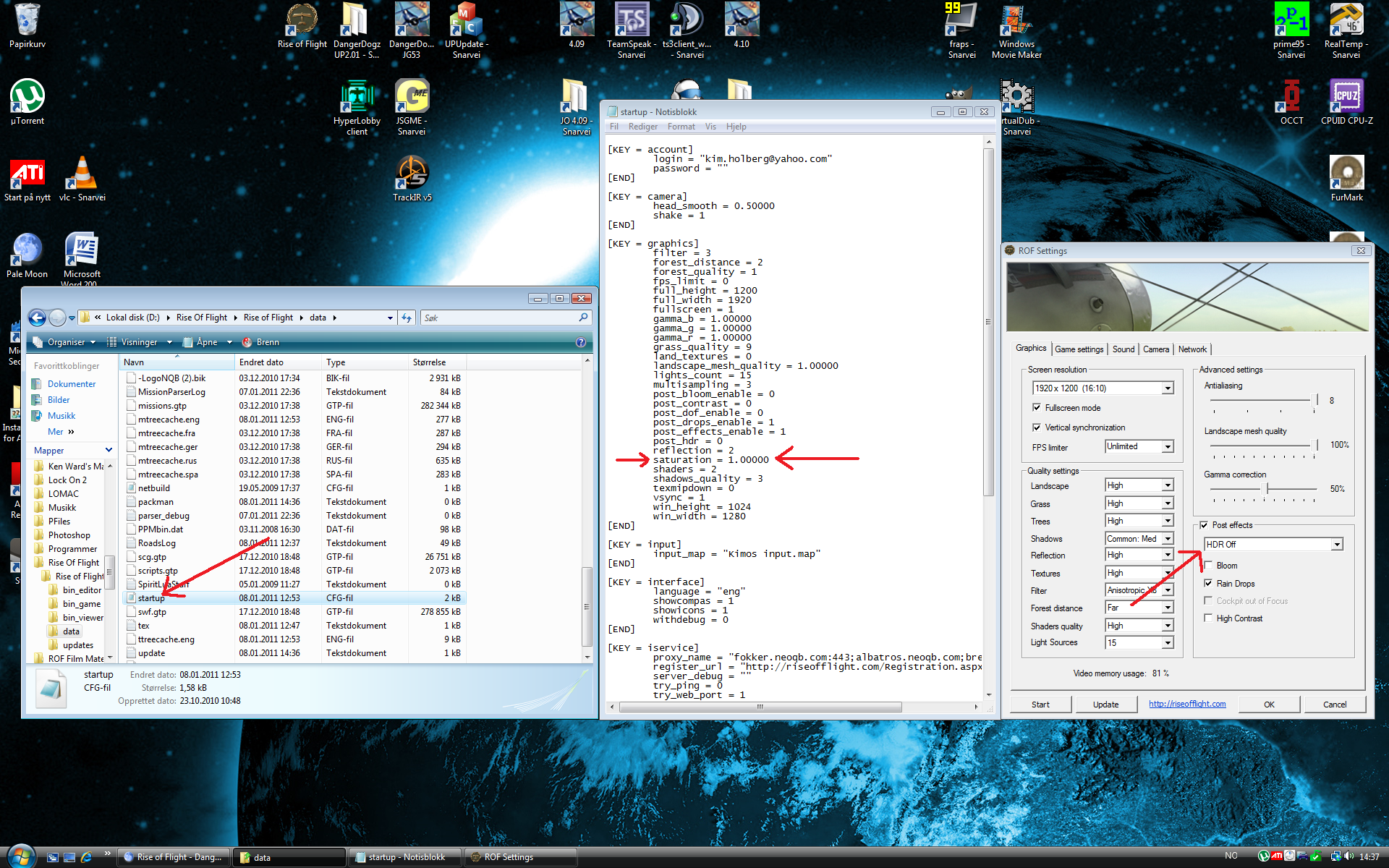
Hey here's a quick fix for fixing some of those bleak colors a bit more than turning off HDR.

You can turn post effects OFF(HDR) and that will help you out a little bit but the game's Saturation can still be changed to give your terrain an even more authentic look.

1. Turn HDR OFF in your Post Effects menu.

2. Enter your Rise Of Flight\data folder and scroll down until you see the startup file, open it with notepad.

3. Take a look at the [KEY = graphics] section and you'll see a "saturation=0.75000" line. Try setting it to 1.00000, save, and see how you like it. :)

Cheers!

post-597-0-57972000-1294494737_thumb.png

Three rules for any forced landing:

1. Don't stall.

2. Don't ever stall

3. Don't never ever stall.

Posted January 8, 2011

HI Kimosabi,

My colors look great and I have HDR Off. I'll give this a try and let you know if I see a difference.

Thanks for the info Kimo.

Mt

P47sig2.pngMTROF2.png

gallery_440_79_39944-1.png

Posted January 13, 2011

I tried this the other day Kimo and it looked ok. I wanted to take screenshots to compare to the normal settings, but they all came out totally black.

Posted January 13, 2011

Hey here's a quick fix for fixing some of those bleak colors a bit more than turning off HDR.

You can turn post effects OFF(HDR) and that will help you out a little bit but the game's Saturation can still be changed to give your terrain an even more authentic look.

1. Turn HDR OFF in your Post Effects menu.

2. Enter your Rise Of Flight\data folder and scroll down until you see the startup file, open it with notepad.

3. Take a look at the [KEY = graphics] section and you'll see a "saturation=0.75000" line. Try setting it to 1.00000, save, and see how you like it. :)

Cheers!

HI Kimosabi, I don't have a saturation line in my startup file. Perhaps it is becausae I don't use post effects and HDR is off. But my colors are great !

P47sig2.pngMTROF2.png

gallery_440_79_39944-1.png

Sign in to reply.