All I can find so far but at least we can get a disc.
http://www.amazon.ca/dp/B004L5SJ4Y/?creative=395285&creativeASIN=B004L5SJ4Y&linkCode=asn



By Blairgowrie, Mar 28, 2011 in Jim's Place
All I can find so far but at least we can get a disc.
http://www.amazon.ca/dp/B004L5SJ4Y/?creative=395285&creativeASIN=B004L5SJ4Y&linkCode=asn
I just posted that it may be possible to purchase here on behalf of Canada/US guys, depending on how DRM is done it may also be possible to create/copy the DVD electronically and use the activation code.
Of course we would need a disk in hand first 
I've got one on pre-order Jim, if you require a disc I can put in for another and get it to you as soon as it arrives here. (Meet you in Detroit)
GoGamers


Where do I find it Nick?
Have you created an account on Steam yet? If so, just search for jabo_dd and add me to your friends list. When that gets to me, I'll be able to see your ID and send you an invite to the group straight back.
If not, you'll need to install Steam first. Go here and click on the Install Steam button (it's in the top right-hand corner). You'll be taken through the account creation process as part of the install. Then add me as a friend and I'll do the rest.
Jabo

No. DD_Jabo is the account the UK version will be installed with, Jabo_DD is the temporary one for the Russian version and the one for controlling the group.
Jabo
If we buy the DVD, does it still need a steam account?
When you install the game it will take you to steam to create your account or use yours if you have one already. Then it will download and install the latest version of the game so you up and ready for multiplayer 


I have downloaded steam and opened an account. I have gone to the page add a friend but can't get it to work. Why can't things be easy? I am getting too old for this farting around.
My account name is DD_Blairgowrie
Don't worry Jim, I've added you into my friends list and sent you the invite to the group too. You'll find two invites waiting for you when you next log into Steam, one for joining my friends list, and another for joining the DDz group.
Jabo
I never did get your original invite Nick.
I added DD_Jabo to my friends list yesterday, didn't know about the Jabo_DD thingy... But I am trying to add that right now and can't find where to add a friend now..
I'm with BG... stupid computers... Why can't they make it easy.... I am even on my Friends page. It says that I have no friends. (that makes me sad) But it has no options to Add a Friend? Wouldn't you think that might be a good place to put the Add a Friend button?? Argg..
Use the friends drop down menu (top left-hand corner). The Add Friend option is in there Snacko. I'll have another crack at adding you in when I get home tonight (while installing a version of CloD I can understand with any luck).
jabo_dd (case-senstive) is the account I'm using to administer the DDz group, so that's the one to add if you want access to the group. dd_jabo on the other hand is my primary account and the one the international version of CloD will be installed under.
Jabo
I think Snack has found the Add Friends option but like me, can't get it to do anything. I am wondering if it will only work if I have some games using steam.
Also I didn't get any invites to join a group. It also shows I have no friends.
Ok BG, I have sent an invitation to you.
Underneath the taskba, you have the two arrows, and then
Store- Library- News -Community, click community, and you should get a profile page thing, there you have a number of options, Home - Profile- Groups - Invites -Games. Click on invites and you should see a bunch of friend requests and the group invitation. When you have added friends, in the bottom right of any steam screen you should have the option to "view friends". Right-click on a name and press Send message and you should be able to communicate via Steam, if you would like.
Known by some as Jedipedia
Et dulcissimum pro patria bibere.
Veni, Vidi, volo in domum redire.
 BoB
85th Dogfight
Kiev SEOW

Thanks Jedi but there is no way I can get this dog to hunt. I don't see the invites option nor have I received any messages.
Hi Jim, this may help
Once you've logged into Steam, click the community link (it's highlighted) as below. This will take you to your community home page - yours will probably look different to mine, but no matter.
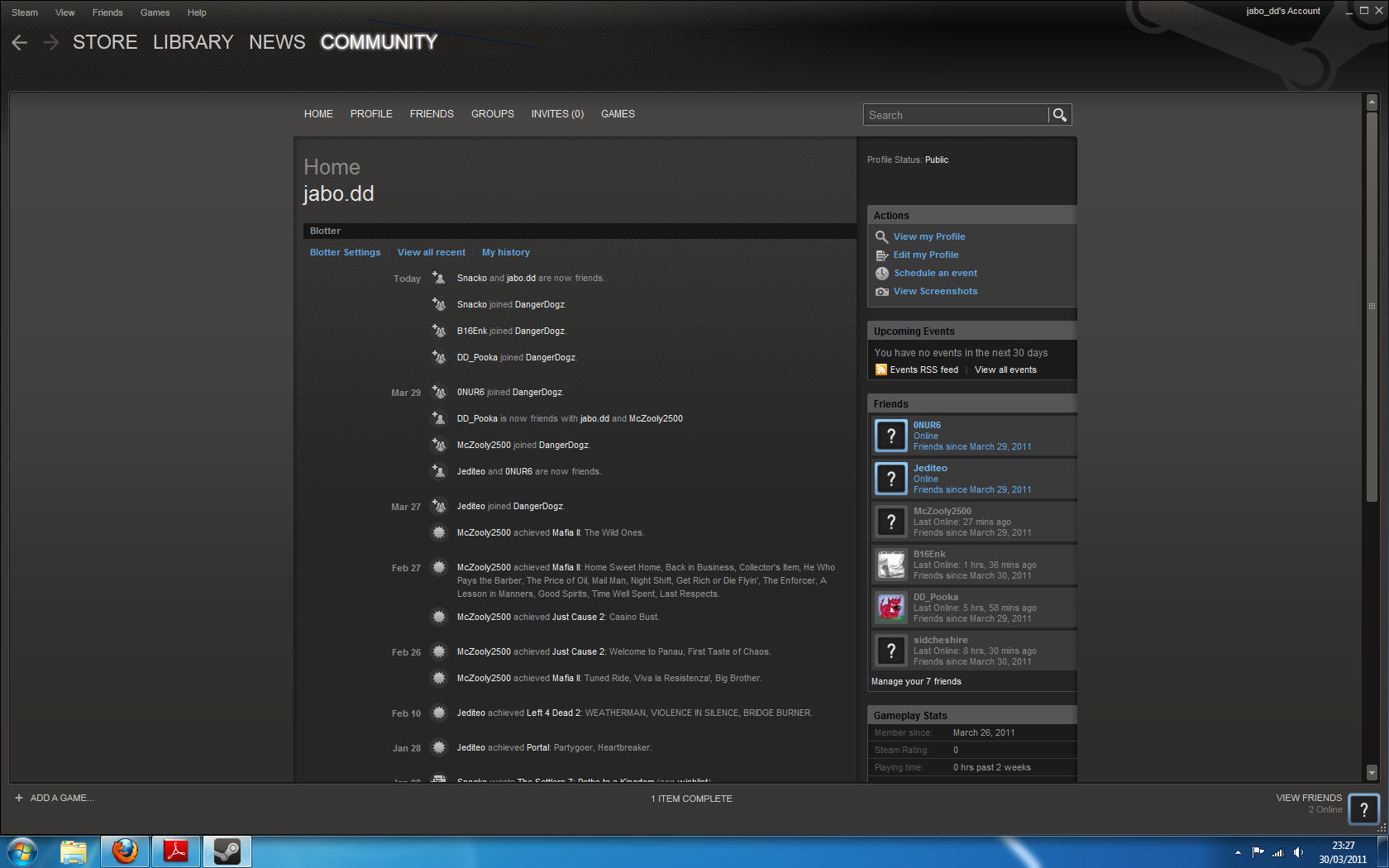
Immediately below the community link, there are a number of other tabs, Home, Profile, Friends, Groups, Invites, Games. Click on the Invites link and you should see a number of invites awaiting your attention.
Jabo
Sign in to reply.



