
I read somewhere that turning down your resolution to help spot planes easier. So what are you guys running at?
Useful Set Up Stuff For Clod
By fruitbat, Oct 11, 2014 in IL-2 Sturmovik: Cliffs of Dover Blitz and Desert Wings: Tobruk
I know people running the game at mobile phone resolution (800x600) but, for me, that's just step away from cheating.
i'm running it @ 1920x1080


No matter how good the violin may be, much depends on the violinist.
I read somewhere that turning down your resolution to help spot planes easier. So what are you guys running at?
You don't need to do that anymore Hill. Team Fusion sorted this out a while back. Just set your screen for native res and enjoy the eye candy.


I was using a SweetFX I got a year or so ago but came across this one which seems to have been tweaked to help spot planes a bit better. Testing it with a mission someone posted that puts planes out at various distances shows it does help a little. It looks good on my 39". Easy to try and easy to get rid of so worth a shot. Not for Windows 8 from what I have read.
http://theairtacticalassaultgroup.com/forum/showthread.php?t=13303&highlight=markie
I saw a blurb on switching the german voices with english ones. My de folder has Actor 1-4 but the gb one only has Actor 1-2. The instructions given would eliminate 3-4 and would that cause a problem?
I don't think I will be learning German anytime soon.. lol
Last time I used VAC was with IL2 about 8 years ago!
Great tool, I'd use it again but most of my flying is online.



What is the purpose of that pic you can put in the cockpit with the other aircraft wingspans?
If you are setting your gunsight convergence by feet, how do you use this pick?
To adjust the size of the ring your gunsight so you can judge when you're at the correct distance for maximum hitting power
Sent from my iPhone using Tapatalk

Heads up for those installing CloD in Windows 10:
- Do not try and run the stock game, it won't.
- It looks like it will not created the folder My Documents\1C Softclub\IL2 Sturmovik cliffs of dover
- Apply TF patch 3.0, run Launcher as administrator.
Then patch up further and further, between the patches, run Launcher.exe as administrator.
See this video:

This all worked for Sweper, he had the F2 (external view) but could not get back in cockpit. Then he got kicked from the server.
Just re-applying the patches was not good enough, one hás to start the game in between.



Maybe not in Sweper's case FT but it was fine for me. I suspect though that there may be a difference between win 10 home and win 10 pro
Sent from my iPhone using Tapatalk
Maybe not in Sweper's case FT but it was fine for me. I suspect though that there may be a difference between win 10 home and win 10 pro
Sent from my iPhone using Tapatalk
Could it be you had already restored your data / My Documents folder befóre you started steam and installed CloD and TF Patches?
Here's the culprit of the F2 issue:
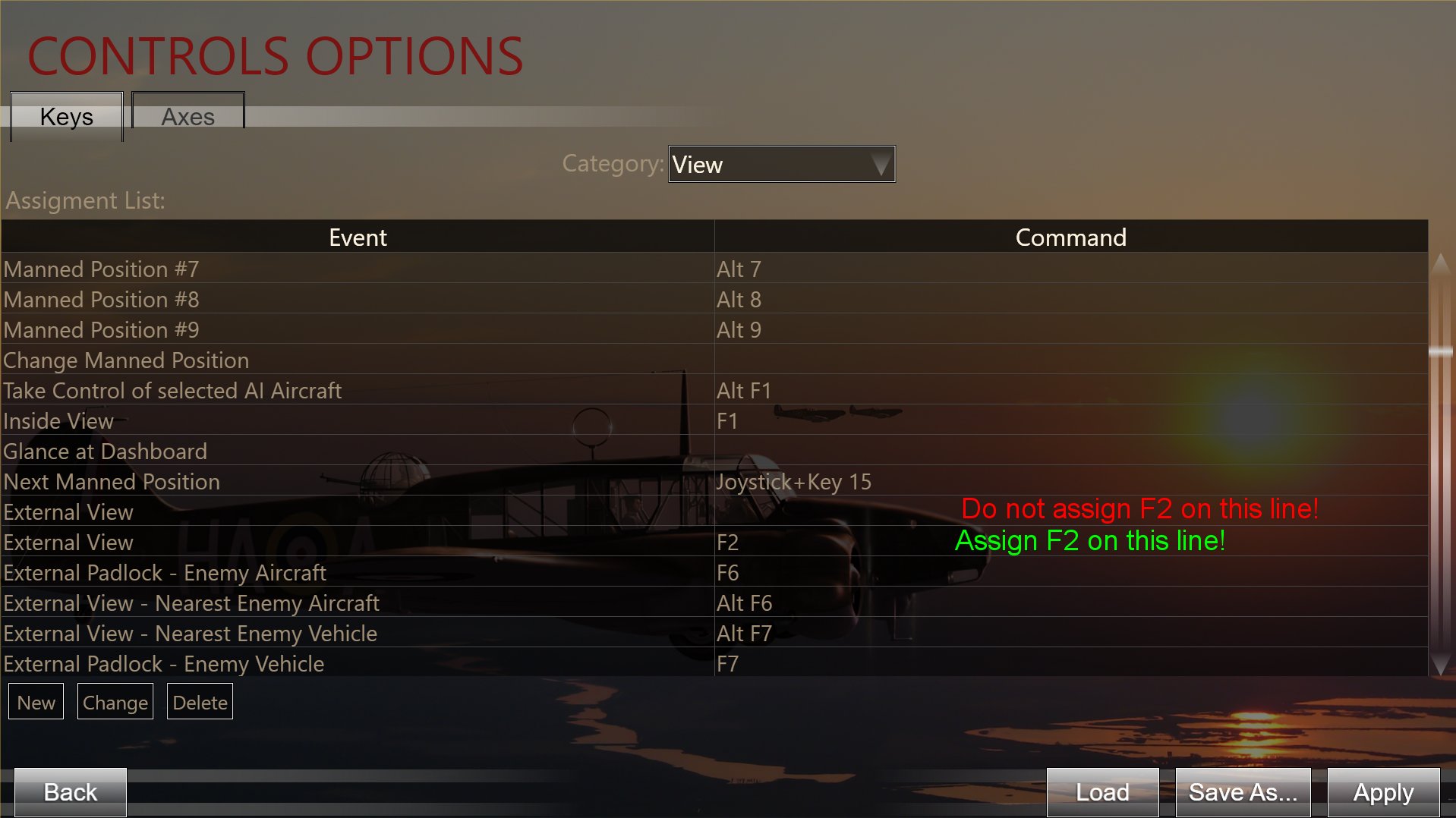
As it appears, there's a duplicate definition of this External View line.
Now, that's a bug, as you cannot delete the secondary line.
Should you assign F2 to the first line, then the issue will occur that you cannot switch to in cockpit view, and your aircraft will be removed from the session/mission.
Good work FT.

B-52 Electronic Warfare Officer (EWO) veteran Jack Donovan’s natural response, when he was introduced to the tactics and mission details. His exact reply was: “you want me to fly in the back of a little tiny fighter aircraft with a crazy fighter pilot who thinks he’s invincible, home in on a SAM site in North Vietnam, and shoot it before it shoots me, you gotta be shitting me!
Sign in to reply.