Spotted this the other day, but as my F2 was working fine, it didn't occur to me mention it.
Oh well. Joys of CloD


By fruitbat, Oct 11, 2014 in IL-2 Sturmovik: Cliffs of Dover Blitz and Desert Wings: Tobruk
Spotted this the other day, but as my F2 was working fine, it didn't occur to me mention it.
Oh well. Joys of CloD
As I was having the old launcher blues last night I tried this and it worked  http://theairtacticalassaultgroup.com/forum/Downloads.php?do=file&fileid=207


Blenhiem Bombing guide
Probably old is it still current ?
https://dl.dropboxusercontent.com/u/20586543/High-Altitude%20Bombing%20Guide.pdf
Thanks Alpha, really useful guide - had a try offline and it works well. If there was a version on a white background I'd print it out for reference. Don't suppose you know if there is one?
This is a very useful thread. I could see 12 of them, and now 14, not sure if I can do any better with 1080p 27" monitor and GTX 660 Ti
http://theairtacticalassaultgroup.com/forum/showthread.php?t=13915&highlight=pixel+view
------------------------------------------------------------------------------------------------------------------------------------------------------------------------
Hi fellow pilots,
Did you ever wonder if you really can see contacts in TFCliffs worse than other pilots? Here is a small single player mission that might help you to find out.
Of course, besides from supporting with monitor calibration (brightness, contrast, gamma) the mission also helps to quickly check if/how SweetFX and other software-based adjustments influence the contact visibility.
Instructions:
1. Download this zip-archive,
2. extract the three files to your missions-directory in "...\Documents\1C SoftClub\il-2 sturmovik cliffs of dover - MOD\missions\Single",
3. start up TFCliffs and choose in "Single Player/Single Mission" the mission "Contact Spotting" *.
4. Directly after you have spawned in the plane (109) pause the game (default: "p") and
5. choose the pre-defined 30° zoom-view (default: "Delete").
6. Now count the contacts that you somehow can see in the area left to your plane's gunsight - as tiny and bright the pixels may be.
In total there are up to 16 contacts (Spitfires) that are positioned in 1 km steps from a distance of 1 km to 16 km.
On my screen I somehow can see 14 of the 16 contacts (see attached image):
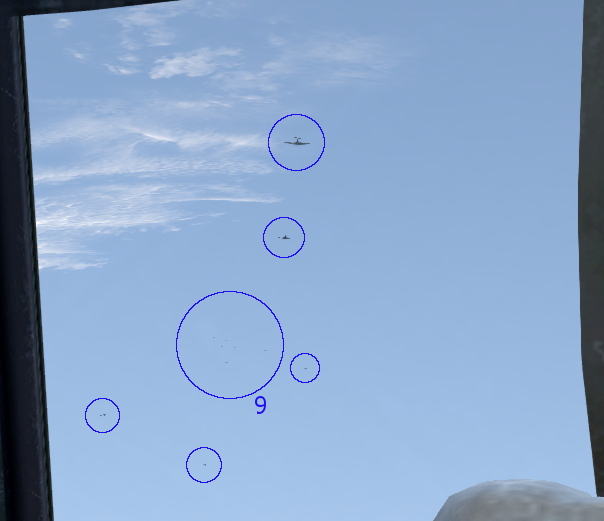
In a real flight situation I probably "only" would have some realistic chance to see 11 contacts (meaning contacts up to a distance of 11 km against this bright-blue sky).
So, someone more/less? 
* Note - thanks to ATAG_Lewis: The 109 that you spawn in should be standing on the ground. If you spawn in an already airborne plane you have to adapt your "realism settings":
Before starting the mission go into 'Custom'..then 'Realism Options'....and check All the 'Visual aides' and check 'Mission Take-Off and Landing'...

My Track Ir Fix 
In the heat of battle you will not rise to the occasion
You will shrink to the level of your training
Map Tools Video thanks AP

My Track Ir Fix
In the heat of battle you will not rise to the occasion
You will shrink to the level of your training
Here is his forum link
http://stormofwar.org/phpBB3/viewtopic.php?f=15&t=502

Here is what I tweaked it too.
Just take all the files and drop them into your game folder loceted in Steam folder In C:drive
C:\Program Files (x86)\Steam\steamapps\common\il-2 sturmovik cliffs of dover
Or elsewhere if you have moved it like I have.
K:\Steam\steamapps\common\il-2 sturmovik cliffs of dover
inject fx - philstyle settings.zip
Example Picture below
Then once installed the {ause Break key flips it on and off. with it off you can see better in low light if your monitor britness is turned up. But with it on the jaggys go away and the colors look more natural.
My Track Ir Fix
In the heat of battle you will not rise to the occasion
You will shrink to the level of your training
So chaps I re-installed CLOD Blitz Edition - thought I may as well give it a bash if I get some time as it has been a long time. Is the stuff in this thread still accurate do you think, or will it all change due to Tobruk which I am contemplating picking up at some point?
5 hours ago, Reggie said:So chaps I re-installed CLOD Blitz Edition - thought I may as well give it a bash if I get some time as it has been a long time. Is the stuff in this thread still accurate do you think, or will it all change due to Tobruk which I am contemplating picking up at some point?
Most of it of p1 and p2 are valid...I'd stay away from Sweetfx / injtfx, it doesn't need it, IMO. And for sure, do not use the TF patches ... lol
Spotting-post and settings is probably not relevant, as Antialiassing in game has changed.
And to add, stop contemplating, and just get it! 
 1

Sorry to resurrect such an old thread...I have had a look, and tried to use the ammo settings and config.ini settings as outlined on the first page. I did not actually have a MOD folder in this location :
\Users\Username\Documents\1C SoftClub\il-2 sturmovik cliffs of dover - MOD
From memory I seem to remember that was created by the TF patches. I created one manually and added the files, but the loadout for example are not appearing in game, and it looks like the info windows aren't updated either.
Should I dump them in the main \Users\Username\Documents\1C SoftClub\il-2 sturmovik cliffs of dover folder instead - and ignore the "MOD" part? That seems to be where the existing files are.
Yeah, the MOD part is no longer valid, you should just use the normal standard path \Documents\1C SoftClub\il-2 sturmovik cliffs of dover
1
Sign in to reply.


